*IF EQUIPPED
STEERING WHEEL CONTROLS
22
CRUISE
CANCEL
RES
OK
SET
SMART CRUISE
CONTROL WITH
STOP & GO VIDEO
To view a video on your
mobile device, snap
this QR Code or visit the
listed website. Refer
to page 2 for more
information.
A
B
C
F
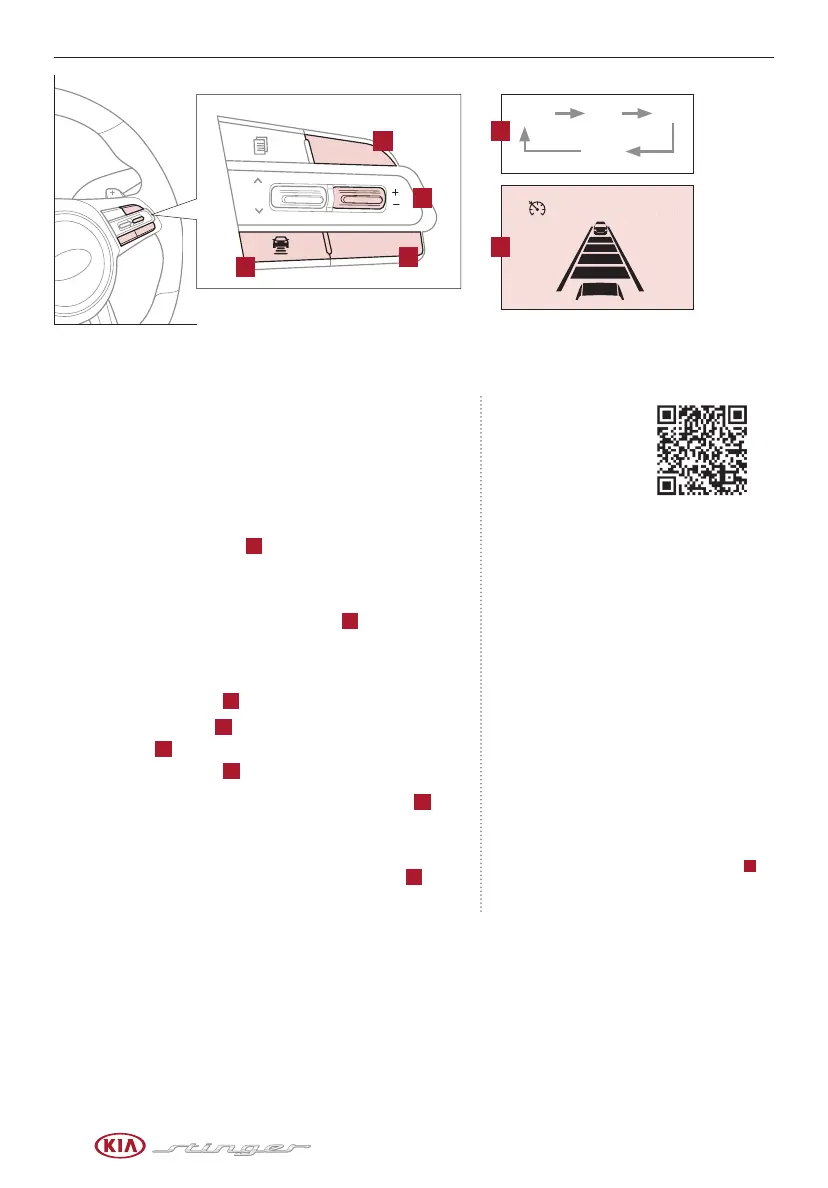
Smart Cruise Control (SCC) with Stop & Go*
Quick Tips
The speed setting for the SCC can be adjusted under
the following conditions:
- With no vehicle in front, you must be travelling at
a minimum speed of 20 mph
- When following a vehicle, there is no minimum
speed requirement
When following a vehicle, the system will
automatically adjust your cruise speed based on
the vehicle in front. It will even bring the vehicle to
a complete stop if necessary. If the vehicle remains
at a standstill for more than 3 seconds, you must
depress the accelerator pedal or press the
RES+/SET- button up/down to start the vehicle.
To change the cruise control mode from SCC to
standard cruise control, press and hold button
C
.
Repeat to switch back to SCC mode. (The SCC
system must not be activated to change modes).
REMINDERS:
- CRUISE indicator must be ON in order to operate SCC
- The cruise control system will not activate until the brake
pedal has been depressed at least once after ignition is ON
or engine starting
- For the SCC System to operate, you must be traveling at a
minimum speed of 20 mph, when no vehicle is in front.
- The SCC system remains ON when ignition is cycled. The
speed setting will need to be reset when ignition is cycled
- The distance settings are approximations and may vary
depending on factory settings at the time. See owner’s manual
for more information
- The SCC is also canceled when the driver’s door is opened, gear
shift is changed out of D (Drive), EPB is activated and various
other conditions.See owner’s manual for other conditions.
- In standard Cruise Control, the driver needs to manually assess
the distance from other vehicles as the system will not apply
brakes to slow down automatically
www.youtube.com/KiaFeatureVideos
The Smart Cruise Control (SCC) with Stop & Go* system
allows you to set the vehicle to maintain a speed so long
as it is not limited by traffic. When traffic is encountered,
the vehicle will be slowed to maintain a set distance behind
traffic without depressing the accelerator or brake pedal.
To set/adjust the SCC speed:
§ Press the CRUISE button
A
to turn system ON. The
CRUISE indicator will illuminate on the instrument cluster
§ Accelerate/decelerate to the desired speed
§ Press the RES+ / SET- button up/down
B
to set or
adjust speed
To set the vehicle-to-vehicle distance:
§ Press the SCC button
C
on the steering wheel.
§ Each time you press
C
the vehicle-to-vehicle distance
will change
D
, indicated by the number of bars that
appear on the display
E
To cancel SCC operation: Press the CANCEL button
F
.
The LCD screen will display a message that the SCC
operation is cancelled.
To turn SCC system OFF: Press the CRUISE button
A
.
The CRUISE indicator on the instrument cluster will turn OFF.
CRUISE 60MPH
(Distances are
approximate and
vary depending on
vehicle speed)
(Display on
LCD screen)
172ft 130ft
82ft
106ft
D
E



 To Next Page