EasyManua.ls Logo

Kimo MP 200 P - Navigating and Operating the Manometer; Device Power-up and Navigation; Probe Connection and Display; Measurement Display Modes

Kimo MP 200 P
16 pages
Print Icon
To Next Page IconTo Next Page
To Previous Page IconTo Previous Page
Loading...
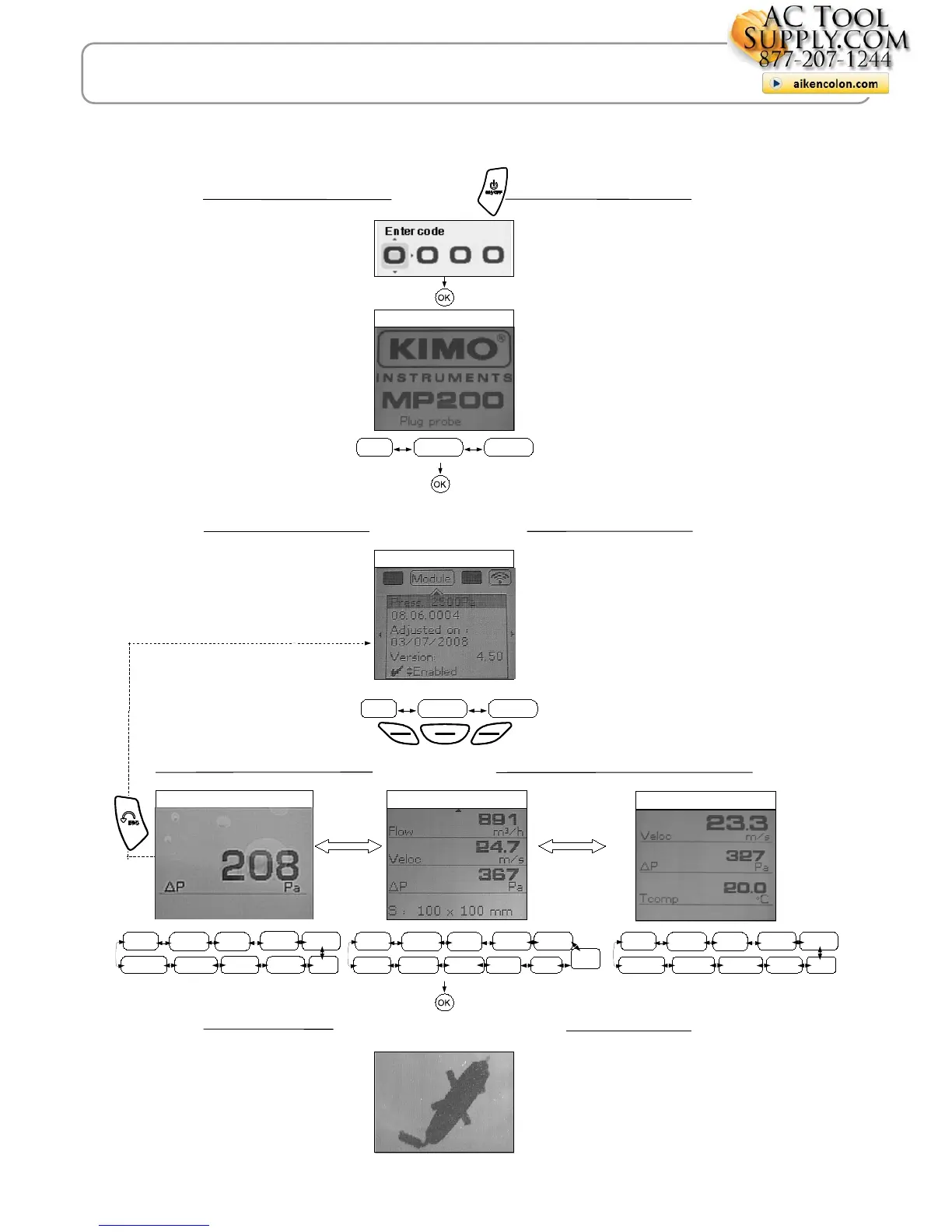
Power-up
!5!
#! 4)
  !e
Homepage display
Probe display
AIRFLOW display
Infos
Probe
Params

Probe connection
!!!5 !
1!!!!"445 
Infos
Measure Params
-"-!!5
55 
Measurement
Communication interrupted
1"!!!
-"!-5
55 
-"-!!
5
55
 
7
,-!
4-!
III – Browsing
AIR VELOCITY display
Rec.
Config
Params
Veloci.
AutoZ
Airflow
PRESSURE Display
Hold
Probe
Avg.
Alarms
Rec.
Config
Params
Area
AutoZ
Press
Hold
Probe
Avg.
Alarms
Veloci.
Rec.
Config
Params
PressAirflow
Hold
Probe
Alarms
AutoZ
Avg.

actoolsupply.com
actoolsupply.com

Related product manuals