1
1a
1b
2
3
4 5 6 7 8
1
2. Device description
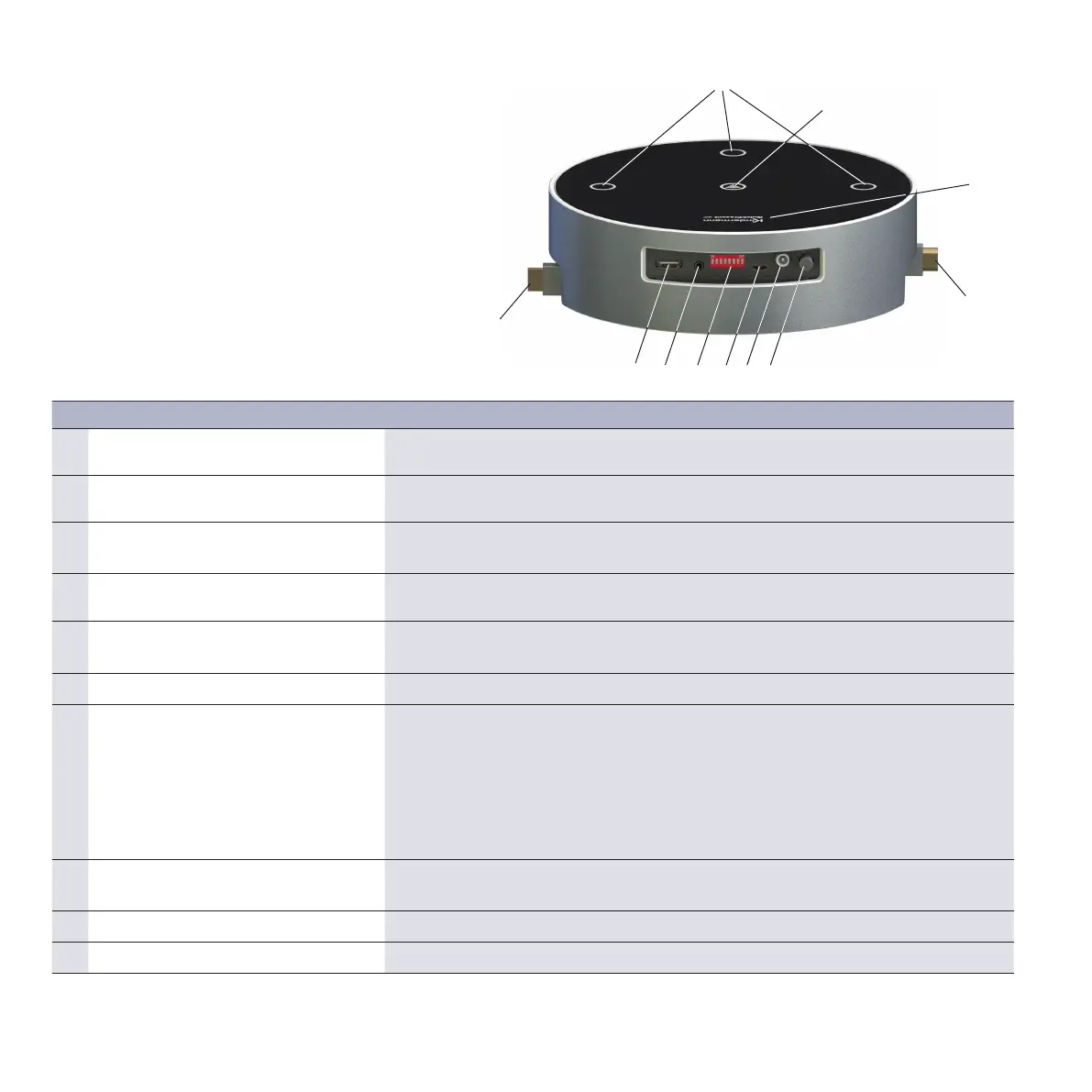
2.1 QuickPresent air / Lite (transmitter): ports and buttons
6
No. Article Description
1 HDMI port Cable retractor system, cables can be pulled out to a length of 90cm and are
locked in 4 locking positions
1a Touch-sensitive button for HDMI input Manual switching of the 3 HDMI inputs, active input has a blue backlight; it flashes if
the source is not active.
1b Touch-sensitive button for mobile
device
Manual switching to WLAN input.
2 Touch-sensitive button and LOGO
backlight, battery status display
Red battery status display; LED flashes if the remaining power is approximately
10% or less*
3 Local HDMI output Allows for the connection of a playback device via HDMI cable in parallel / as an
alternative to the 60GHz transmission path.
4 Local audio output Allows for playback via external AUDIO amplifiers or headsets.
5 8-way DIP switch Possible settings
EDID
Automatic/manual input selection
WLAN On/O
60 GHz On/O
Standby timer
6 Micro-USB For the firmware update of QuickPresent air and for charging
external devices such as mobile phones
7 DC 12V/3A power pack port Voltage supply and charging the battery*.
8 Push-button switch Device ON/OFF
* The scope of supply for QuickPresent Air Lite does not include batteries



 To Next Page