Code Reader Controls
DISPLAY FUNCTIONS
DISPLAY FUNCTIONS
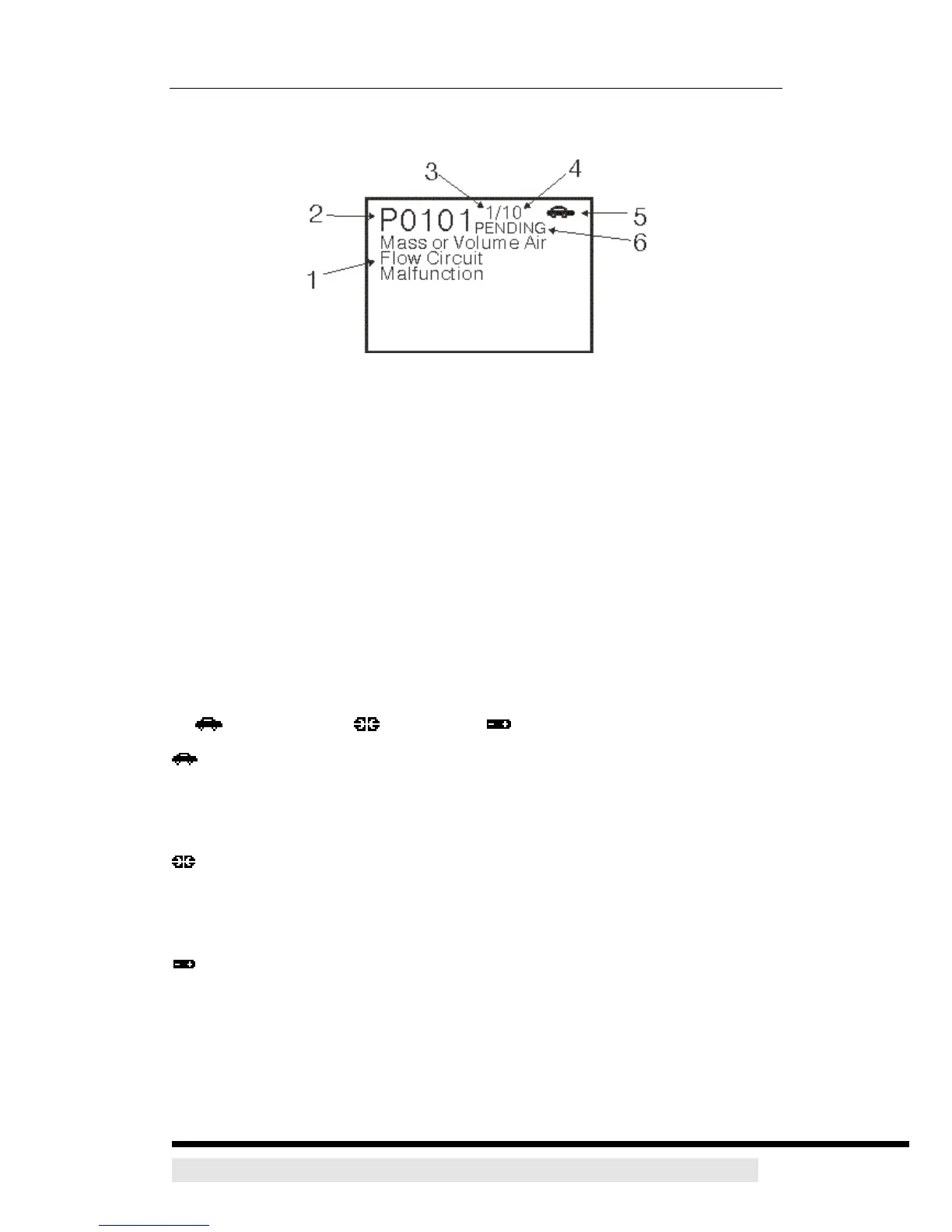
Figure 2. Display Functions
See Figure 2 for the locations of items 1 through 6, below.
1. Test Data Display Area - Displays DTC definitions, and other pertinent test
information messages.
2. DTC Display Area - Displays the Diagnostic Trouble Code (DTC) number.
Each fault is assigned a code number that is specific to that fault.
3. Code Number Sequence - The CanScan assigns a sequence number to
each DTC that is present in the computer’s memory, starting with “1.” This
number indicates which code is currently displayed. Code number “1” is
always the highest priority code.
4. Code Enumerator - Indicates the total number of codes retrieved from the
vehicle’s computer.
5. Vehicle icon / Link icon / Internal Battery icon
Vehicle icon - Indicates whether or not the CanScan is being properly
powered through the vehicle’s Data Link Connector (DLC). A visible icon
indicates that the CanScan is being powered through the vehicle’s DLC
connector.
Link icon - Indicates whether or not the CanScan is communicating
(linked) with the vehicle’s on-board computer. When visible, the CanScan is
communicating with the computer. If the Link icon is not visible, the CanScan is
not communicating with the computer.
CanScan Internal Battery icon - When visible, indicates the CanScan
batteries are “low” and should be replaced.
6. PENDING icon - Indicates the currently displayed DTC is a “Pending” code.
D900 CanScan 11


 To Next Page