About the Code Reader
VEHICLES COVERED / BATTERY REPLACEMENT
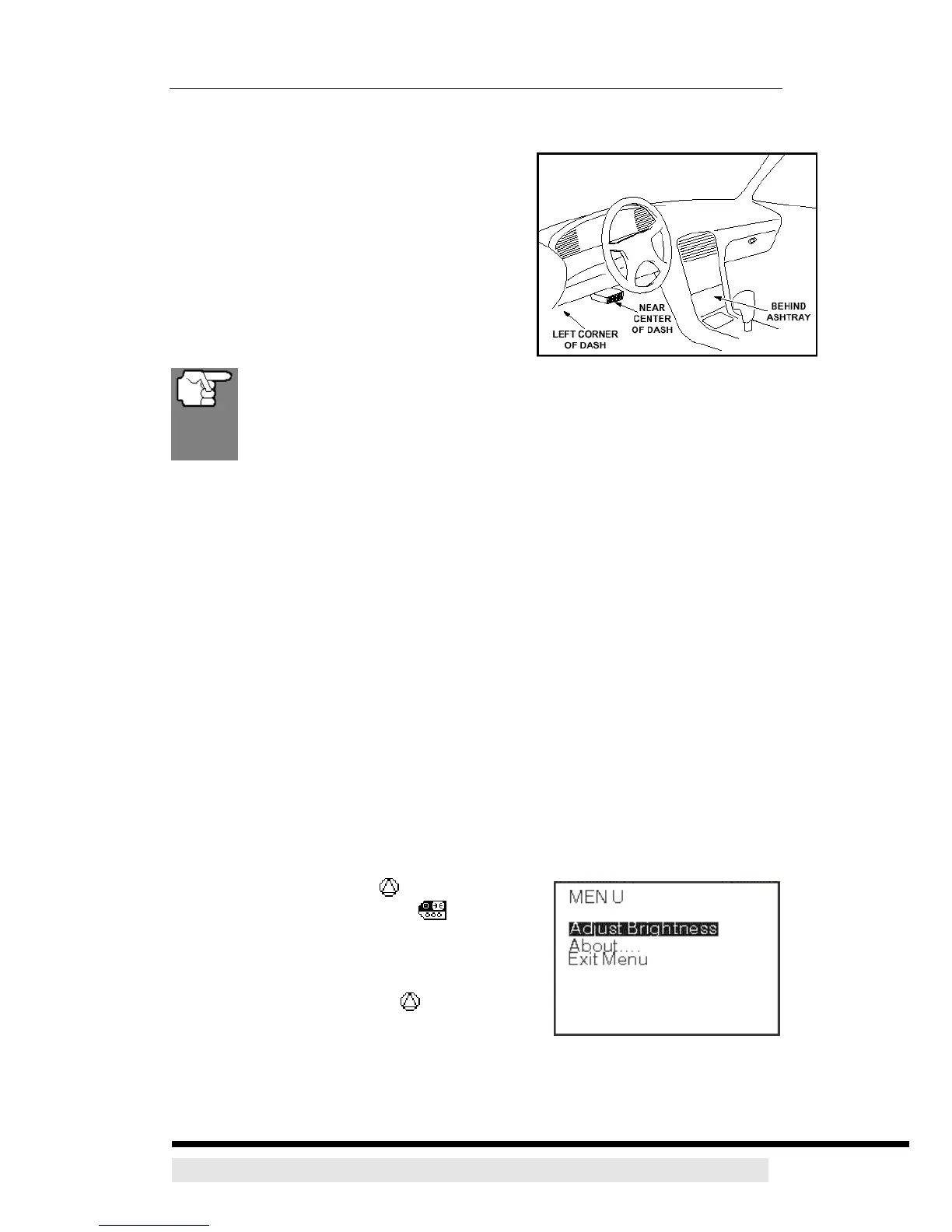
Data Link Connector (DLC) Location
The 16-pin DLC is usually located under the
instrument panel (dash), within 12 inches
(300 mm) of center of the panel, on the
driver’s side of most vehicles. It should be
easily accessible and visible from a kneeling
position outside the vehicle with the door
open.
On some Asian and European vehicles the DLC is located behind
the “ashtray” (the ashtray must be removed to access it) or on the
far left corner of the dash. If the DLC cannot be located, consult the
vehicle’s service manual for the location.
BATTERY REPLACEMENT
1. Locate the battery cover on the back of the CanScan.
2. Slide the battery cover off (use your fingers).
3. Replace batteries with three AA-size batteries (for longer life, use
Alkaline-type batteries).
4. Reinstall the battery cover on the back of the CanScan.
ADJUSTMENTS AND SETTINGS
To enter the MENU Mode:
1. Press and hold the UP button, then press
and release the POWER/LINK button.
¾ The adjustments and setting MENU
displays.
2. DO NOT release the UP button until the
adjustments and settings MENU is visible on
the display.
3. Make adjustments and settings as described in the following paragraphs.
D900 CanScan 7


 To Next Page