Using the Code Reader
CODE RETRIEVAL PROCEDURE
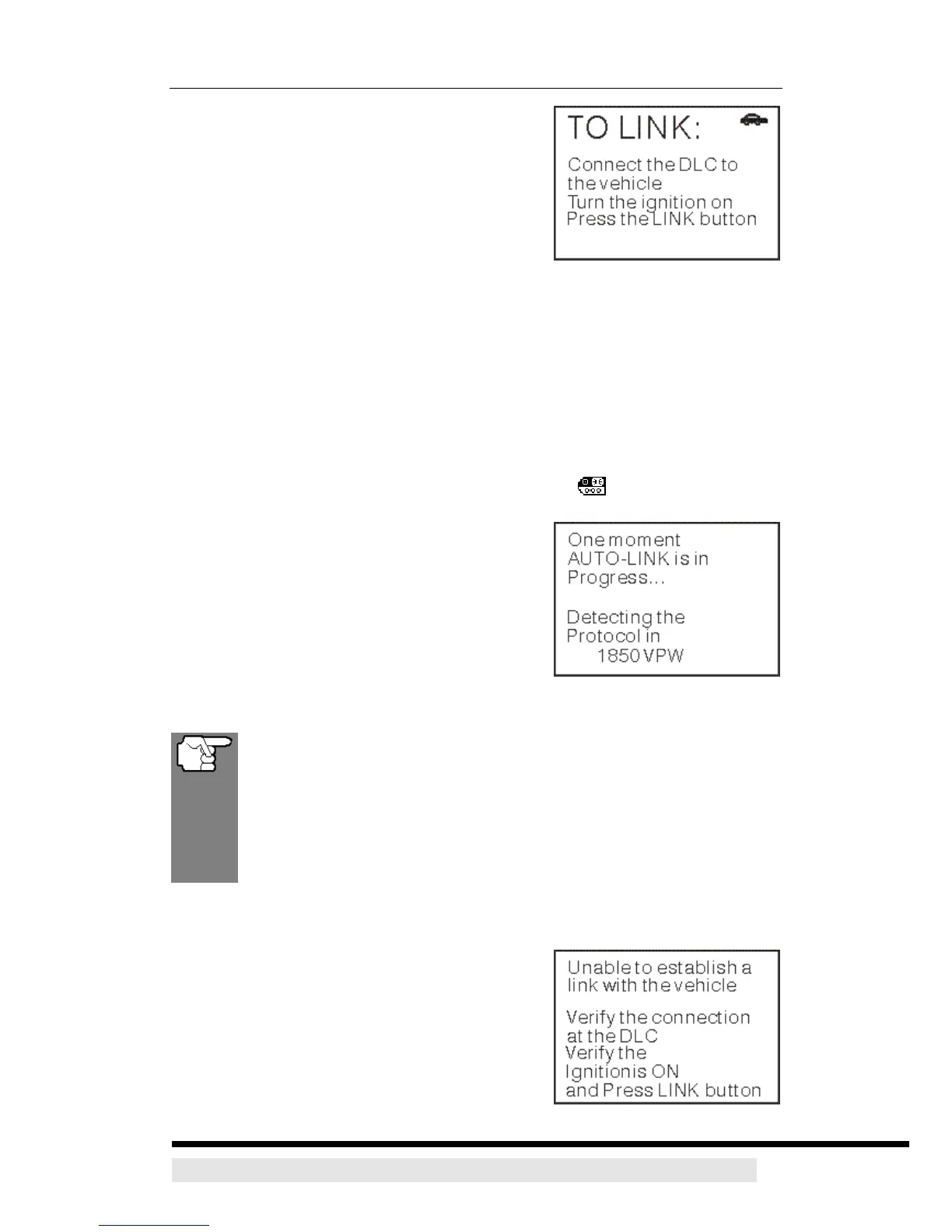
4. When the CanScan’s cable connector is
properly connected to the vehicle’s DLC, the
unit automatically turns ON, and the LCD
display shows instructions for linking to the
vehicle’s on-board computer.
¾ If the unit does not power on automatically
when connected to the vehicle’s DLC connector, it usually indicates there
is no power present at the vehicle’s DLC connector. Check your fuse panel
and replace any burned-out fuses.
¾ If replacing the fuse(s) does not correct the problem, consult your vehicle’s
repair manual to identify the proper computer (PCM) fuse/ circuit, and
perform any necessary repairs before proceeding.
5. Turn the ignition on. DO NOT start the engine.
6. Press and release the CanScan’s POWER/LINK
button.
¾ The CanScan will automatically start a
check of the vehicle’s computer to
determine which type of communication
protocol it is using. When the CanScan
identifies the computer’s communication
protocol, a communication link is
established. The protocol type used by the
vehicle’s computer is shown on the LCD
display.
A PROTOCOL is a set of rules and procedures for regulating data
transmission between computers, and between testing equipment
and computers. As of this writing, five different types of protocols
(ISO 914, Keyword 2000, J1850 PWM, 1850 VPW and CAN) are in
use by vehicle manufacturers. The CanScan automatically identifies
the protocol type and establishes a communication link with the
vehicle’s computer.
7. After approximately 4~5 seconds, the CanScan will retrieve and display
any Diagnostic Trouble Codes retrieved from the vehicle’s computer memory.
¾ If the CanScan fails to link to the vehicle’s
computer a “Linking Failed” message
shows on the CanScan’s LCD display.
- Verify the connection at the DLC: and
verify the ignition is ON.
- Turn the ignition OFF, wait 5 seconds,
D900 CanScan 22


 To Next Page