Page 6
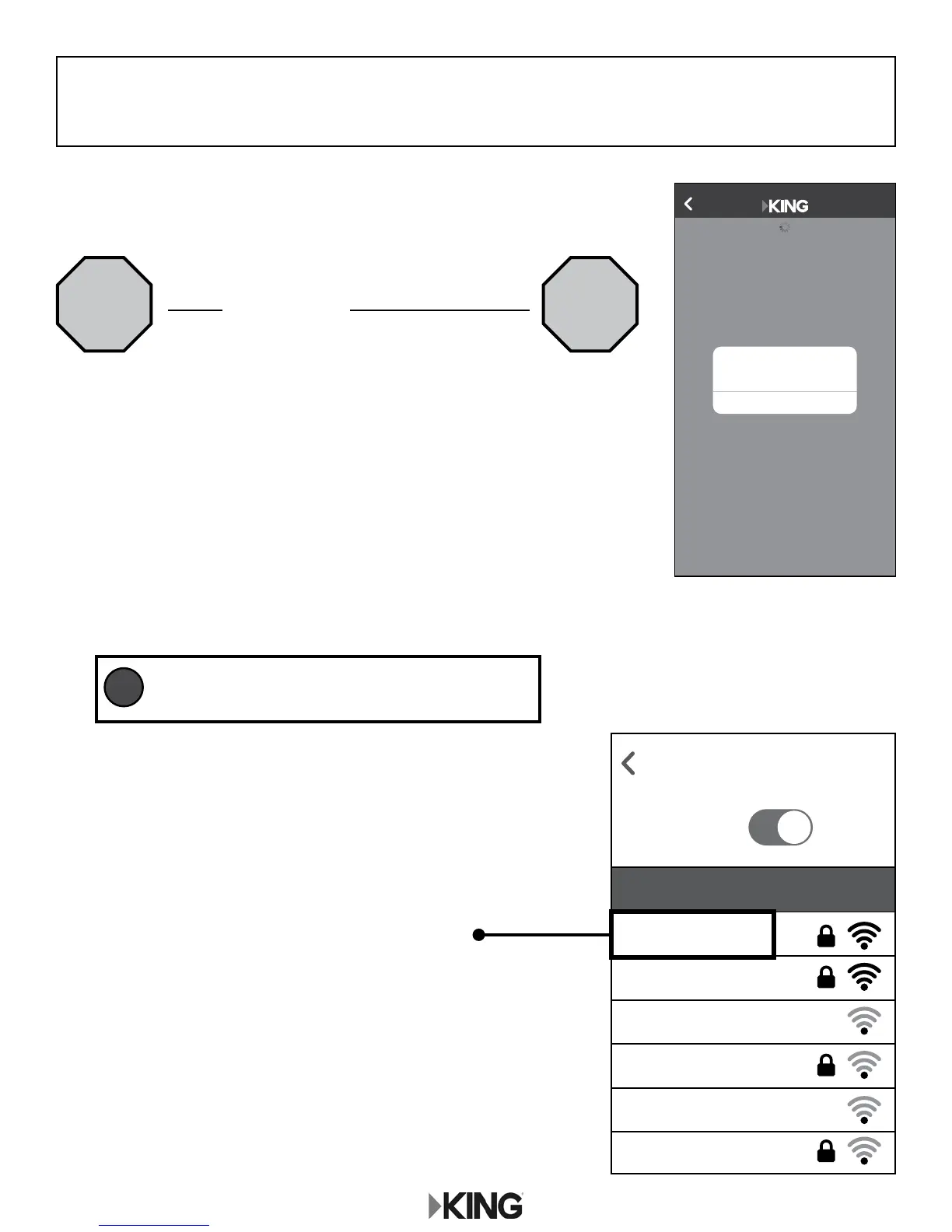
2. Go to your smart phone or tablet’s Wi-Fi settings page
and connect to the Wi-Fi Network with your personalized
network name.
If your device cannot connect to your 5GHz network,
connect to your other network.
Example:
“MyWiFiName_5G”
This will be the name you
created in step 7, page 5.
Back to Settings
WiFi
KC1075
ON
MyWiFiName_5G
MyWiFiName
Fun Lake Campground
Dad’s Campground
Chat Cafe
Campit Here
Choose a Network...
Please connect this device
to your WiFiMax network.
OK
Back
KC1121
2. CONNECT TO THE KING WIFIMAX WITH YOUR
PERSONALIZED NETWORK NAME
1. Once you have congured your KING WiFiMax network names
in the previous step, this pop up will appear.
Do not click on “OK.” Instead, exit the app.
For best performance, choose the 5GHz
network whenever possible.
TIP
STOP STOP





 To Next Page