14 | USING THE FOOD CHOPPER
USING THE FOOD CHOPPER
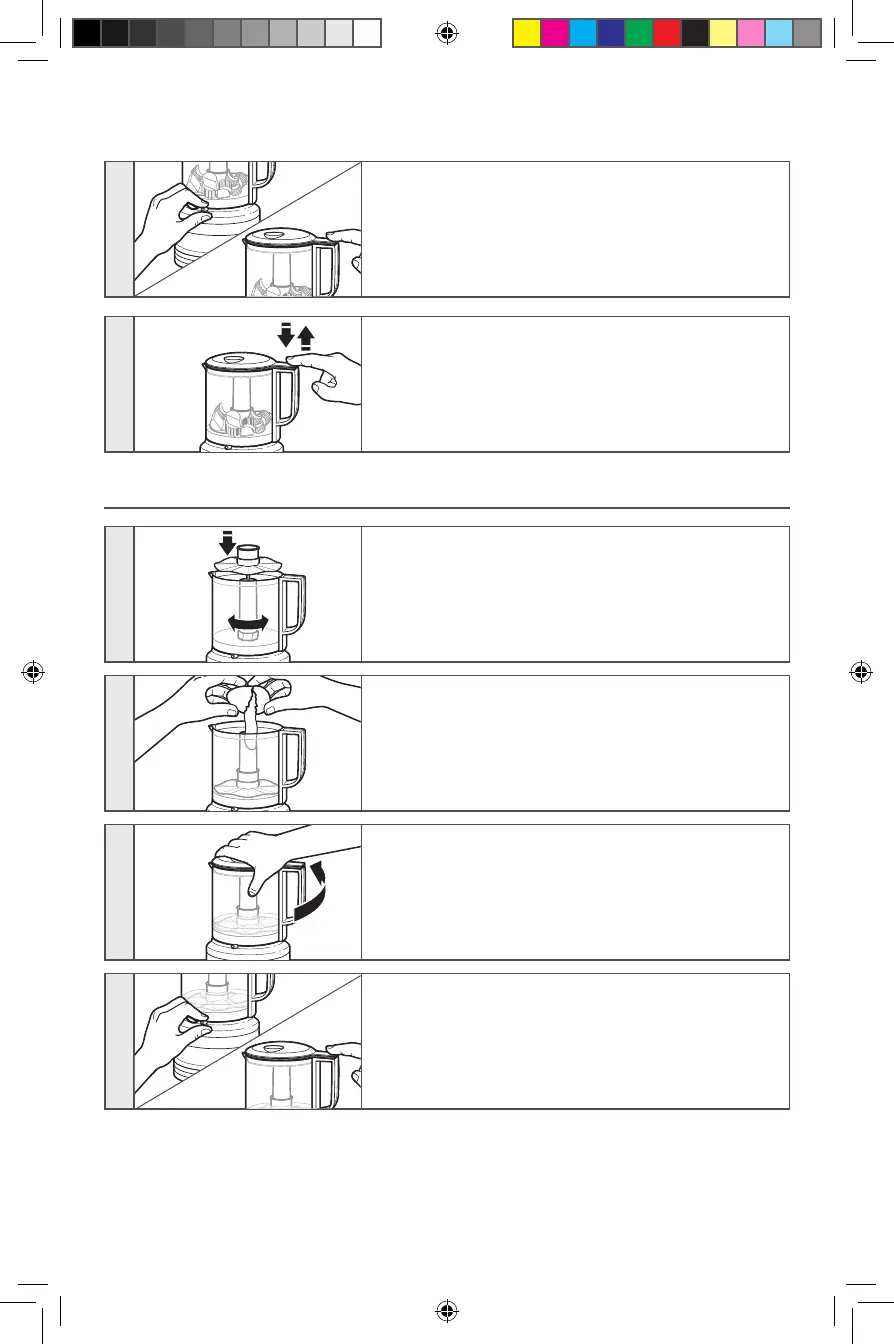
USING THE WHISKING ACCESSORY
1
Fit the whisking accessory over the drive adapter,
then rotate and press down until it rests at the
bottom of the work bowl.
2
Place ingredients to be processed inside the work
bowl.
3
Place the lid on the work bowl with the lid handle
facing front. Rotate the lid handle counterclockwise
until it locks into place. The lid will click when
properly locked into place.
4
Slide the Speed selection lever to your desired
setting. Press and hold the PULSE/ON button to
start the
Food Chopper.
6
Slide the Speed selection lever to your desired
setting. Press down on the PULSE/ON button to start
the Food Chopper.
7
For a coarse chop, use a pulsing motion to rapidly
press and release the PULSE/ON button until your
desired results are achieved.
W11250099A.indb 14 6/14/2018 2:07:10 PM


 To Next Page
 Loading...