24
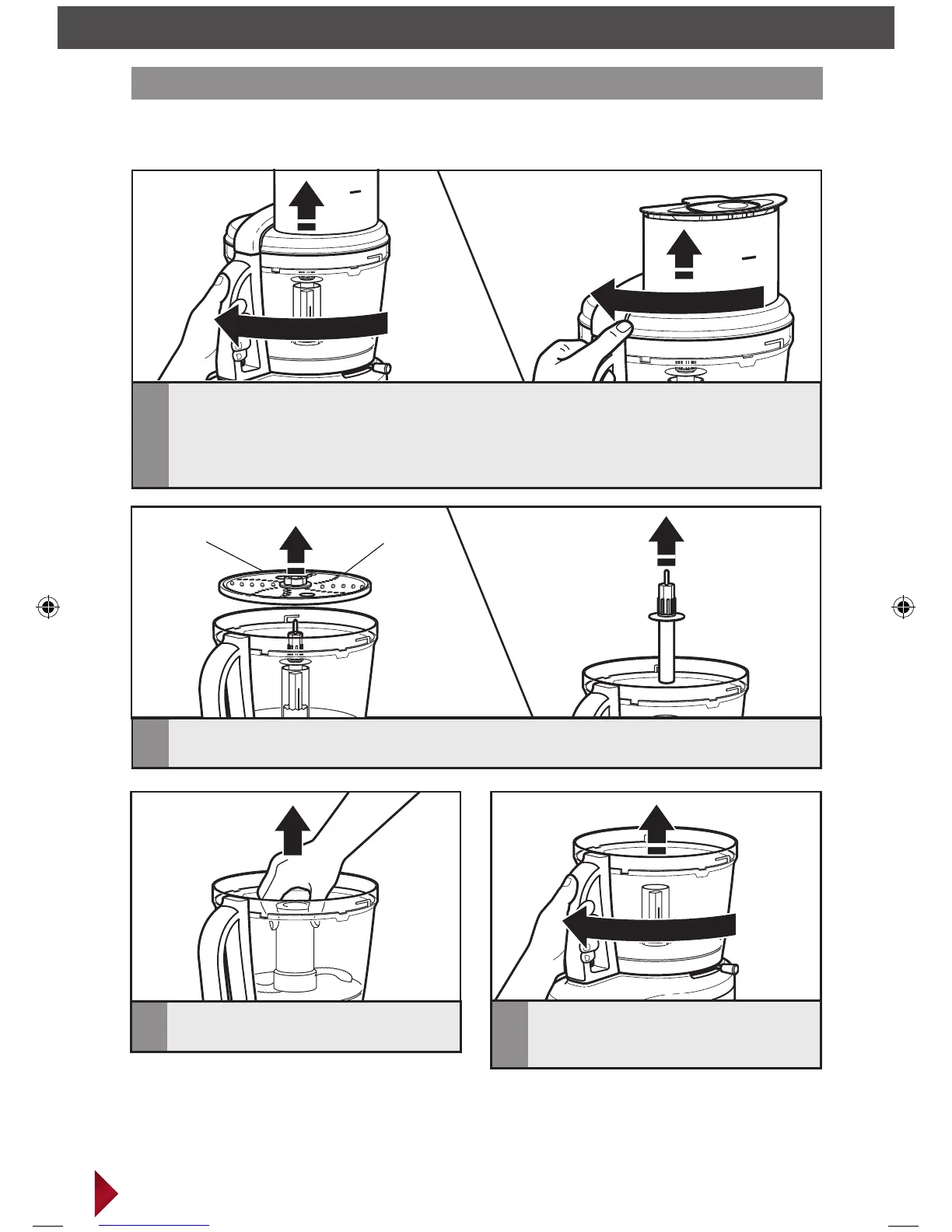
Removing accessories and work bowl
USING YOUR ACCESSORIES
Finger grip
hole
Finger grip
hole
4
If work bowl is still attached to
Food Processor: Turn the work bowl
and lift to remove.
3
To remove blade accessories: Grasp
blade and pull straight up.
1
To remove work bowl from Food Processor before removing accessories: Turn the
work bowl and lift to remove, and then turn and lift the lid.
To remove accessories before removing work bowl from Food Processor: Turn the
work bowl cover to unlock, as shown, and lift the lid to remove, continuing next steps with
bowl still attached to Food Processor.
2
To remove disc accessories: Hold the disc by the 2 finger grips; lift it straight up. Then
remove the adapter.
IMPORTANT: Be sure the Food Processor is off and unplugged before disassembling.



 To Next Page