WARNING DISPLAY
1. Ifthedisplayshows“HHH”afteryouhavepressedSTART/STOPbutton,thetemperatureinside
is still too high. Then the program has to be stopped. Open the lid and let the machine cool down
for 10 to 20 minutes.
2. Ifthedisplayshows“EE0”or“EE1”afteryouhavepressedSTART/STOPbutton,thetemperature
sensor is malfunction please check the sensor carefully by Authorized expert.
BEFORE THE FIRST USE
Theappliancemayemitalittlesmokeandacharacteristicsmellwhenyouturnitonforthersttime.
Thisisnormalandwillsoonstop.Makesuretheappliancehassucientventilation.
1. Please check whether all parts and accessories are complete and free of damage.
2. Cleanallthepartsaccordingtothesection“CLEANINGANDMAINTENANCE”.
3. SetthebreadmakeronBAKEmodeandbakeemptyforabout10minutes.Thenletitcooldown
and clean all the detached parts again.
4. Dry all parts thoroughly and assemble them, the appliance is ready for using.
HOW TO MAKE BREAD
1. Place the bread pan in position, then turning it in clockwise until they click in correct position. Fix
the kneading blade onto the drive shaft. It is recommended to ll hole with heat-resisting
margarine prior to place the kneading blade to avoid the dough sticking the kneading blade, also
this would make the kneading blade be removed from bread easily.
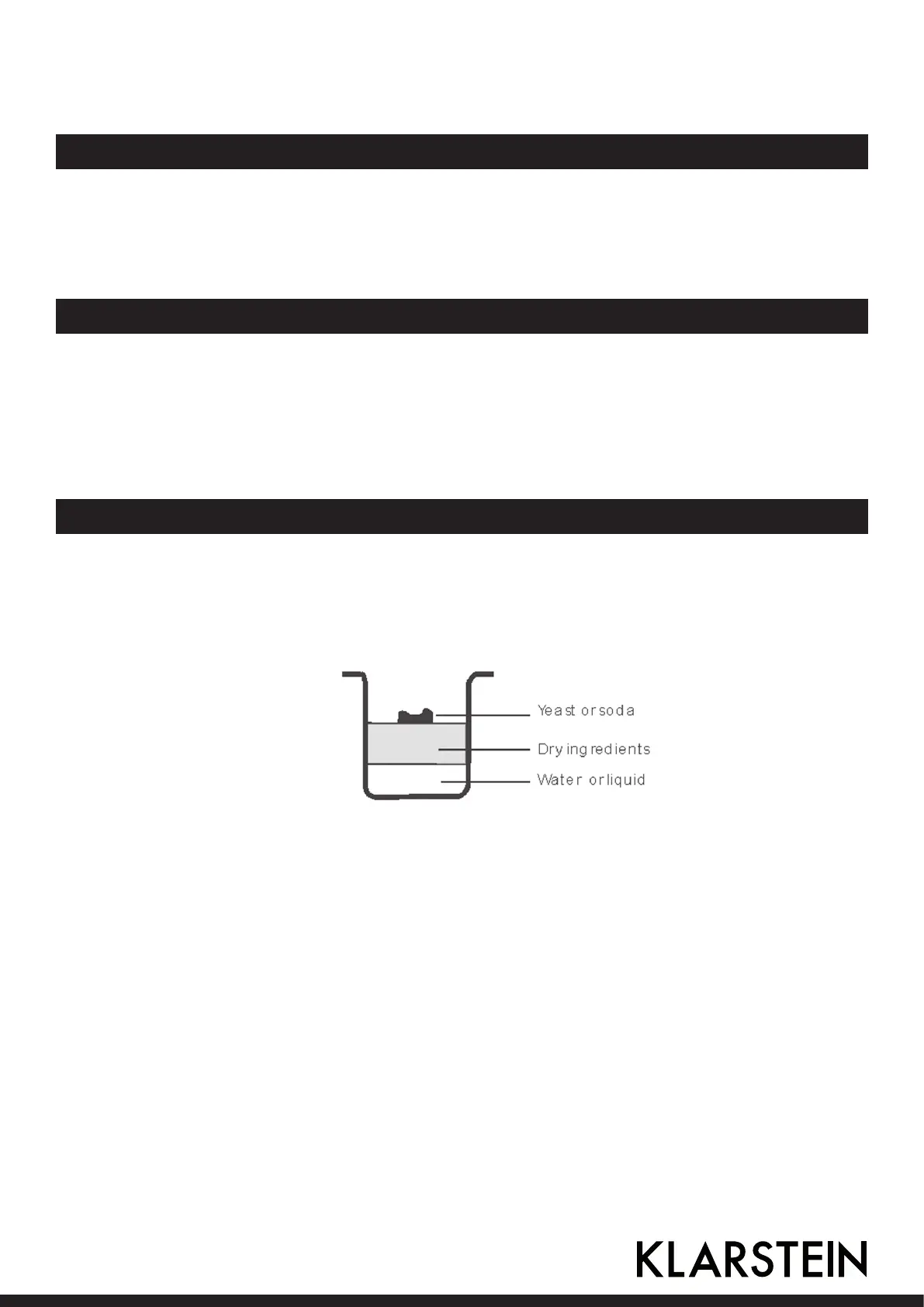
2. Placeingredientsintothebreadpan.Usuallythewaterorliquidsubstanceshouldbeputrstly,
thenaddsugar,saltandour,alwaysaddyeastorbakingpowderasthelastingredient.
3. Makeasmallindentationonthetopofourwithnger,addyeastintotheindentation,andmake
sureitdoesnotcomeintocontactwiththeliquidorsalt.
4. Closethelidgentlyandplugthepowercordintoawalloutlet.
5. PresstheMenubuttonuntilyourdesiredprogramisselected.
6. Press the COLOR button to select the desired crust color.
7. Press the LOAF button to select the desired size. (700g or 1000g)
8. Set the delay time by pressing Time button. This step may be skipped if you want the bread
maker to start working immediately.
9. Press the START/STOP button for approx. 1.5 seconds to start working.
10. For the program of BASIC, WHOLE WHEAT, FRENCH, QUICK, SWEET, CAKE, ULTRA-FAST and
HOME-MADE beeps sound will be heard during operation. This is to prompt you to add
ingredients. Open the Lid and put in some ingredients. It is possible that steam will escape
through the vent in the lid during baking. This is normal.
11.Oncetheprocesshasbeencompleted,10beepswillbeheard.YoucanpressSTART/STOP button
for approx. 1.5 seconds to stop the process and take out the bread. Open the Lid and while using
oven mitts, turn the bread pan in anti-clockwise and take out the bread pan.
19


 To Next Page