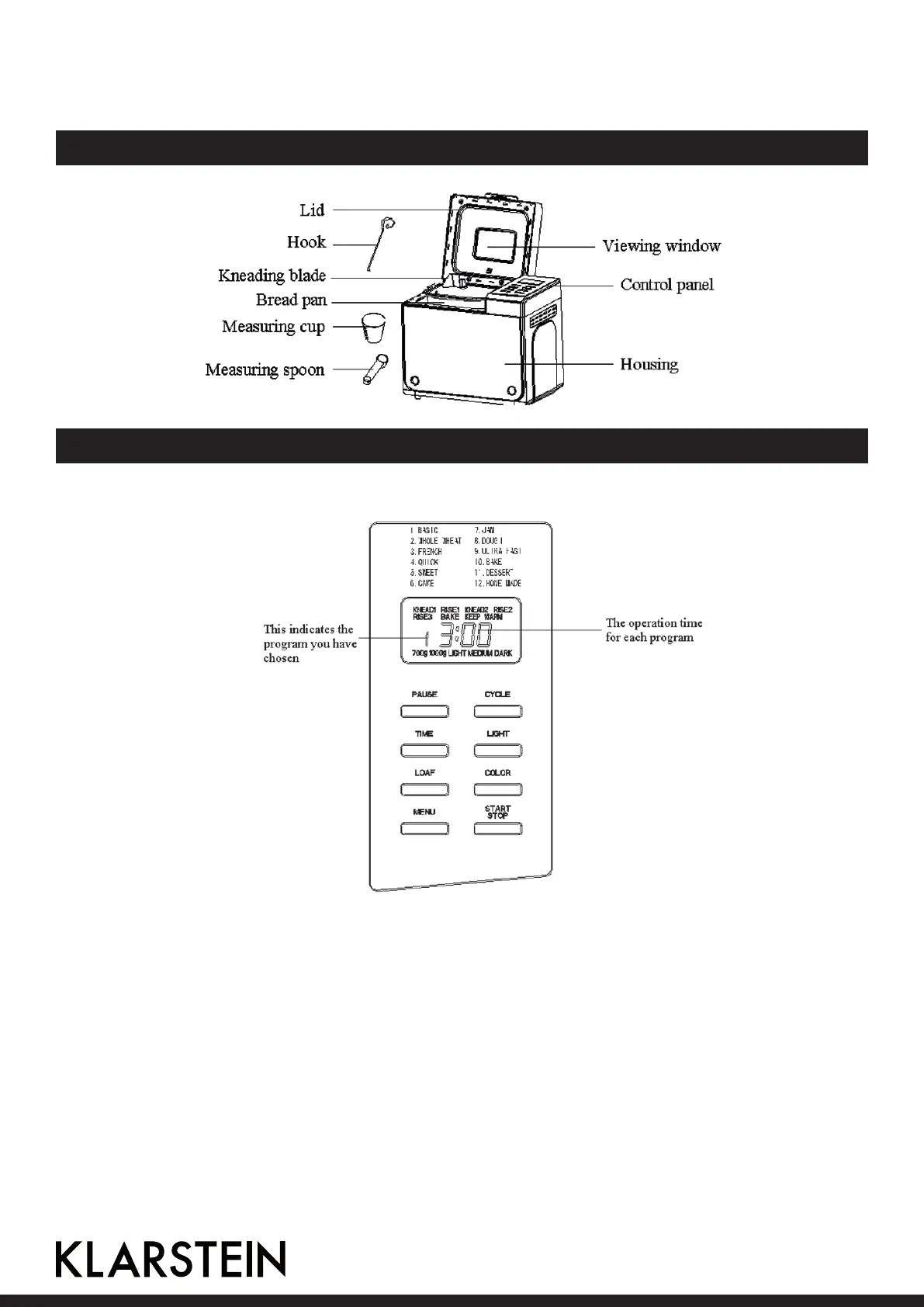
KNOW YOUR BREAD MAKER
INTRODUCTION OF CONTROL PANEL
(The silkscreen is subject to change without prior notice.)
After power-up
Assoonasthebreadmakerispluggedthepowersupply,abeepwillbeheardand“13:00”appears
inthedisplay.Butthetwodotsbetweenthe“3”and“00”don’tashconstantly.The“1”isthedefault
program.1000gandMEDIUMwillappearonLCD.Theyaredefaultsetting.
Start/stop
For starting and stopping the selected baking program
Tostartaprogram,pressthe“START/STOP”buttonforapprox.1.5seconds.Ashortbeepwillbeheard
andthetwodotsinthetimedisplaybegintoashandtheprogramstarts.Anyotherbuttonisinactivated
excepttheSTART/STOP,LIGHT,andPAUSEbuttonsafteraprogramhasbegun.
Tostoptheprogram,pressthe“START/STOP”buttonforapprox.1.5seconds,thenabeepwillbeheard,
itmeansthattheprogramhasbeenswitchedo.
16


 To Next Page