66
EN
QUICK START
1 After plugging the indoor air conditioner power plug into the wall outlet, press the
POWER button on the remote control to turn on the indoor air conditioner.
2 Press the MODE button to set the desired mode: AUTO, COOL, DRY, FAN, HEAT.
3 Press the ARROW KEYS to set the desired temperature (the temperature cannot be
adjusted in automatic mode).
4 Press the FAN key to set the fan speed:
auto > low > low-medium > medium > medium-high > high.
5 Press the SWING buttons to set the air discharge angle.
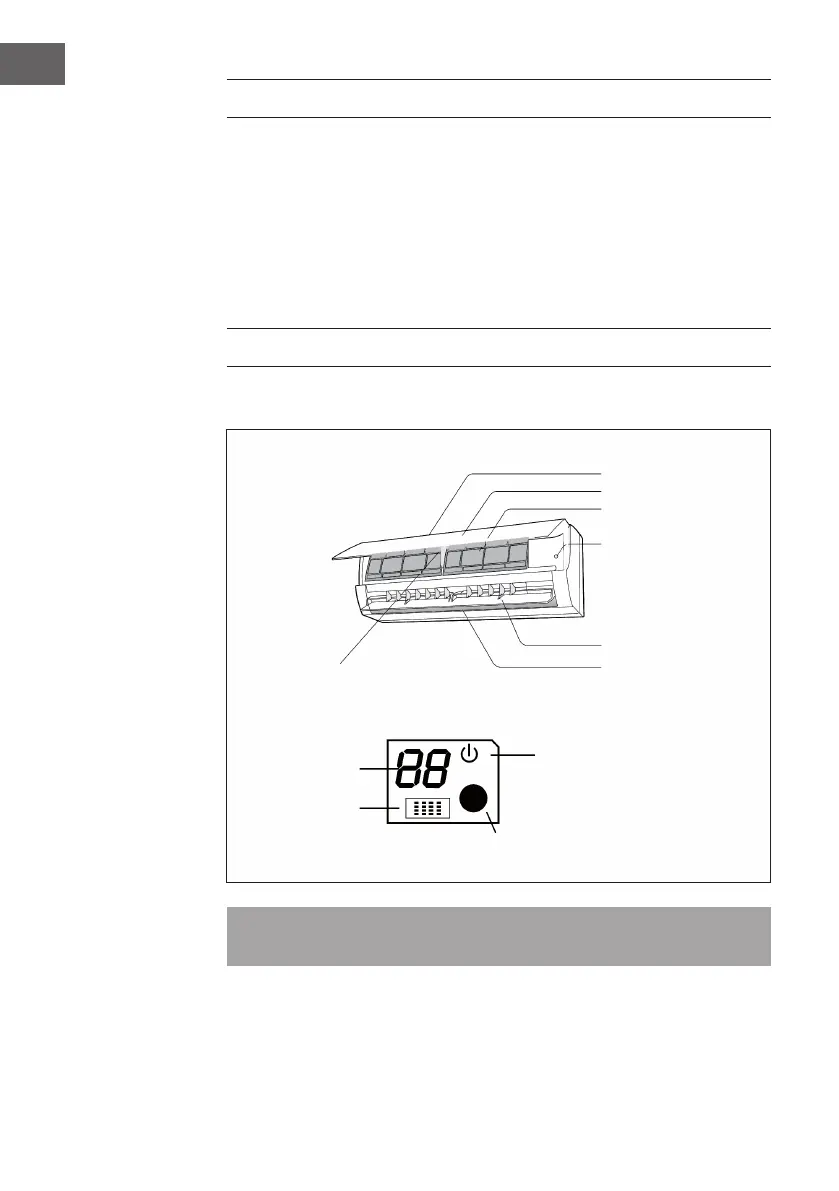
DEVICE OVERVIEW
Indoor Unit
Note: Actual product may be different from above graphics, please refer to actual
products.
Air inlet
Panel
Filter
Emergency button
Horizontal
louver
Air outlet
Temp. indicator
Receiver
window
Power indicator
Display
Display




 To Next Page