68
EN
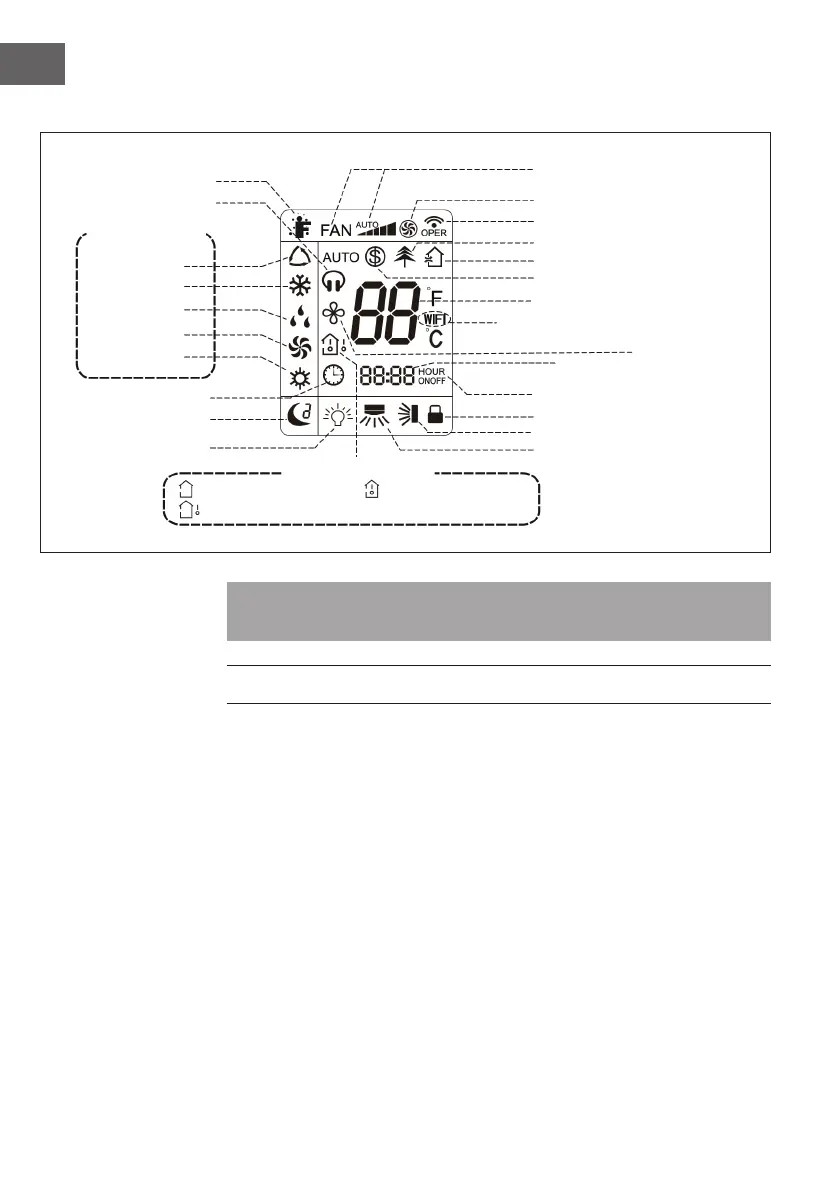
Display Indicators and Symbols
Note: This is a general representation of the unit. Some models have this feature while
others do not. Refer to your actual model.
START-UP AND OPERATON
Important Notes on Operation
• It is a general remote control that can be used for air conditioners of all models. If
you press a button on the remote control whose function your air conditioner does
not have, the air conditioner continues to operate in the currently set mode.
• After the air conditioner is switched on, a signal sounds. The power indicator lights
up (red, colour may vary between models). After switching on, you can operate the
air conditioner with the remote control.
• If you press a button on the remote control when it is switched on, the WLAN
symbol on the remote control screen ashes briey once and the air conditioner
emits a „di“ sound, meaning that the signal from the remote control has been
received.
Set fan speed
Turbo mode
Send signal
Healthy mode
Scavenging functions
8 °C heating function
Set Temperature
WIFI
X-FAN function
I feel
Quiet
Clock
Sleep mode
Light
Auto mode
Cool mode
Dry mode
Fan mode
Heat mode
Set temp
Outdoor temp.
Indoor temp.
Set time
Timer on/off
Child lock
Up & down swing
Left & right swing
Operation
Modes
Temp. Display




 To Next Page