12
ENGLISH
OPERATING INSTRUCTIONS
AC/DC CURRENT
NOTE: The meter defaults to AC measurement. To measure DC, press
the "SEL" button
11
to toggle between AC and DC modes. The AC
DC
icon on the LCD indicates which mode is selected.
1. Attach test leads to the appropriate jacks and rotate function
selector switch
2
to the appropriate setting as follows:
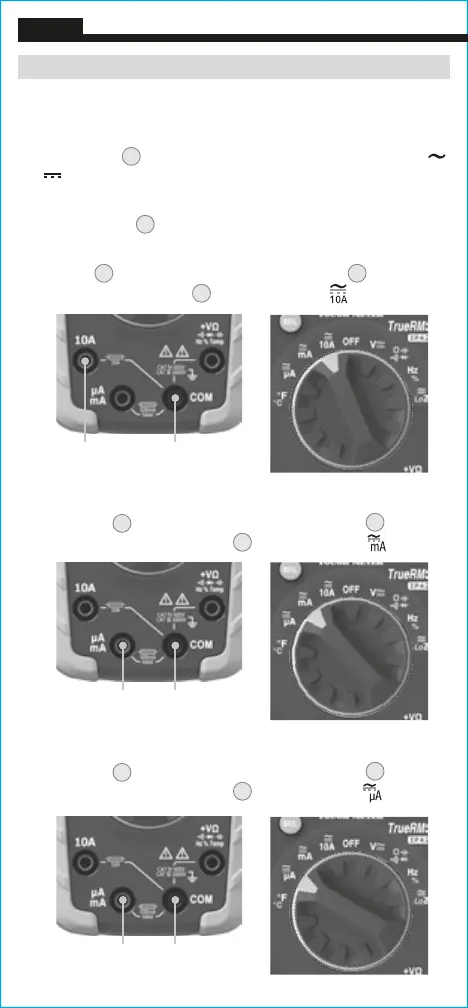
• For AC/DC currents >400mA and <10A: Insert RED test lead into
10A jack
3
, and BLACK test lead into COM jack
4
, and rotate
function selector switch
2
to the 10A AC/DC setting.
• For mA AC/DC currents <400mA: Insert RED test lead into
mA/µA jack
6
, and BLACK test lead into COM jack
4
, and
rotate function selector switch
2
to the mA AC/DC setting.
• For µA DC currents <400µA: Insert RED test lead into
μA/mA jack
6
, and BLACK test lead into COM jack
4
, and
rotate function selector switch
2
to the µA AC/DC setting.
Red lead Black lead
Black leadRed lead
Black leadRed lead







 To Next Page