EasyManua.ls Logo

Ko Propo EX-2 - Startup and Initial Screens; Screen Displays and Information

Ko Propo EX-2
57 pages
Print Icon
To Next Page IconTo Next Page
To Previous Page IconTo Previous Page
Loading...
18
Startup Screen and Initial Screen


󰴤
󰴤
󰴩
󰴫
󰴪
󰴬
󰴥
󰴦
󰴧
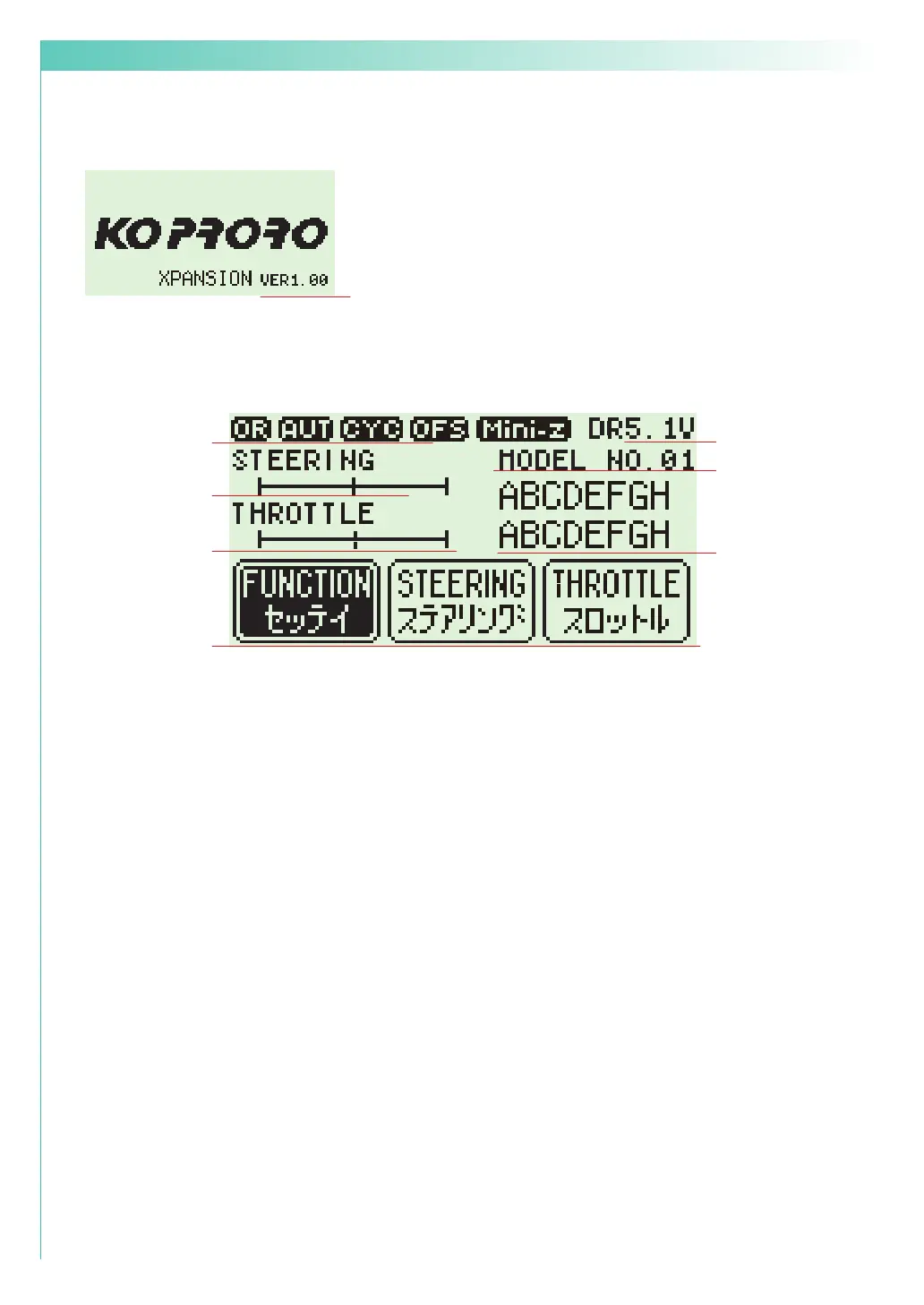
Function Monitor: Functions that are active will be lit up.
Steering Trim Monitor: Displays the position of the steering trim.
Throttle Trim Monitor: Displays the position of the throttle trim.
Top menu: Display three kinds of setting items



Mini-Z MODE: Functions that are in Mini-Z will be lit up.
Power Source Type: Displays the type of battery being used.
Voltage: Displays the current power source voltage.
Model Number: Displays the currently selected model number.
Model Name: Displays the name of the currently selected model number.
󰴨
Version Information :




【 Startup Screen 】
【 Initial Screen 】
LP:
LF:
DR:
NI:



󱐯


Table of Contents

Related product manuals