EasyManua.ls Logo

KOCOM KLPD410 - User Manual

KOCOM KLPD410
6 pages
Print Icon
To Next Page IconTo Next Page
Loading...
KIP-603 Users Manual for Operation and Installation
Connection up to 2 units of monitors and inter phones, respectively
Lobby chime switch function
Lobby door open/close after communication with lobby phone
Inner line (video phone and interphone) call and communication
Call to and communication with guardroom (KIP-603)
Interphone
for Apartment Unit
PRODUCT
MODEL
DATE PURCHASED
WARRANTY PERIOD
AGENCY ADDRESS
KOCOM Warranties the original purchaser of this product
as follows.
1) This product is produced under strict quality control and inspection procedures.
2) If this product breaks down during proper use as a result of product defect, KOCOM
will repair it within one year from date of purchase free of charge.
3) The following cases will be subject to charge, even during warranty period:
a. Breakdown during transport, or through careless treatment, by consumer.
b. Breakdown cause by unauthorized repair, or system modification.
c. Breakdown caused by natural disaster or power disorder.
Warranty
Warranty Card
KIP-603 04.04
To receive after-Sale service, have the following ready
when you contact our branches
1. Name of the product
2. Model number of the product
3. The area of problem
4. Phone number and address at
which you can be contacted.
This manual is based on the date as shown in the right and specifications
are subject to change without notice for quality improvement.

Question and Answer IconNeed help?

Do you have a question about the KOCOM KLPD410 and is the answer not in the manual?

Overview

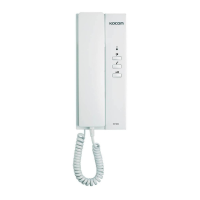
The KIP-603 is an interphone designed for apartment units, offering a range of communication and access control features. It is manufactured by KOCOM CO.,LTD.

Function Description

The KIP-603 serves as a central communication hub within an apartment unit, facilitating various types of calls and interactions:

  • Lobby Communication: It allows for communication with the lobby phone. After a chime tone rings, users can communicate with the lobby for up to 3 minutes. During this communication, pressing the door open button will activate the opener for the common lobby door.
  • Guardroom Communication: Users can initiate calls to and communicate with the guardroom by pressing the guard button on the interphone. If the guardroom responds, communication is maintained for 3 minutes. When the guardroom calls the house, a tone sound rings in the handset for 30 seconds, and the guard/lobby LED flickers. Picking up the handset initiates communication for 3 minutes.
  • Inner Line Communication: The device supports inner line calls and communication between up to 2 units of monitors and interphones. When an inner line call is made to a newly installed house, a chime tone rings, and communication can be maintained for 3 minutes. If the house receives an inner line call, a tone sound rings in the handset for 30 seconds, and the inner line LED flickers. Picking up the handset initiates communication for 3 minutes.
  • Door Opening Function: After communicating with the lobby, the door open button can be pressed to open the lobby door, provided an opener is installed.
  • Chime Switch Function: It includes a lobby chime switch function, where pressing the chime switch causes a chime tone to ring. This function only detects the call state and does not support communication.
  • Password Change: A password change function is available during a call with the house. Users can input a new password by pressing "# # 00 #" during the call and then pressing "#".
  • Door Open using Lobby Phone with Password: The lobby phone can be used to open the door by entering the house number, followed by "#", the password, and then "#" again.

Important Technical Specifications

  • Power: DC 17V(±1V)
  • Common Power Input: DC 12.8V±1V
  • Consuming Electricity: Max 1W (standby mode) / Max 2.5W (operation mode)
  • Guaranteed Operation Temperature: 0 ~ +50°C
  • Communication Mechanism: Balance Circuit, DUPLEX HANDSET CONVERSION
  • Melody: Supports melody for front door, inner lines, guardroom, and lobby calls.
  • Wiring:
    • 5-line polar wiring (VCC/GND/Voice 1/Voice 2/DATA) for the main line of the apartment unit.
    • 6-line polar wiring between KVM-520 (monitor) and interphone.
    • 2-line non-polar wiring for connection with the chime switch at the front door.
    • 6-line polar wiring when installing more devices.
    • (OPTION: Chime SW 2Line(signal / GND))
  • Wiring Distance:
    • Power(+/GND) 1.2 Ø: 300M within.
    • (OPTION: ChimeSW 0.5 SINGLE CABLE / within 30m).
  • Dimensions: W 92 mm X H 210 mm X D 57 mm

Usage Features

  • Volume Control: Features a 3-level volume switch for adjusting audio output.
  • LED Indicators: Includes a Power Lamp (Green), Guard/Lobby LED (Green), and Inner Lines LED (Yellow) to indicate status and call activity.
  • Handset Operation: Communication is typically initiated or ended by picking up or hanging up the handset.
  • DIP Switch Setting: The device uses DIP switches for setting the house number.
    • Numbers are set by summing the values assigned to each switch when moved to the ON direction.
    • For basement floors, DIP switches No. 11 and 12 are generally set to ON, and the program uses "8" (similar to "B" for Basement) to indicate basement floors, with values like 8102 or b102.
    • After setting DIP switches, the device power must be reset.
    • For direct dialing type lobby phones, up to 12 houses can be set.
    • If the interphone or video phone is to be used as a sub-phone, all DIP switches should be in the OFF state.

Maintenance Features

  • Quality Control: The product is produced under strict quality control and inspection procedures.
  • Warranty: KOCOM provides a one-year warranty from the date of purchase for product defects under proper use.
  • Repair Policy:
    • Repairs due to product defects within the warranty period are free of charge.
    • Repairs will be subject to charge for breakdowns caused by transport, careless treatment, unauthorized repair, system modification, natural disaster, or power disorder.
  • Cleaning:
    • Avoid using wet hands, volatile benzene, or paint thinner.
    • Use soft cloths dipped in neutral detergent to clean the device, then dry it with dry clothes.
    • Clean the exterior with soft cloths periodically to maintain cleanliness.
  • Handling Precautions:
    • Do not attempt to disassemble the device as it contains electronic precision components.
    • Avoid dropping the device or subjecting it to strong impact.
    • Keep away from humidifiers and stoves to prevent issues caused by high temperature and humidity.
  • Wiring Precautions:
    • Incorrect wiring can lead to non-operation or poor communication quality; careful wiring is essential.
    • When connecting a wiring chord, loosen the screw, insert the chord end into the bottom part of the screw, and then tighten it.
    • Use staples to fix wiring chords carefully to avoid damage.
    • When using existing wiring, be cautious to prevent disconnection and short-circuits.
    • Excessive impact on DIP switches during setting may cause abnormal or erroneous device operation.

KOCOM KLPD410 Specifications

General IconGeneral
BrandKOCOM
ModelKLPD410
CategoryIntercom System
LanguageEnglish

Related product manuals