14
PROJECTION
LAMP
REPLACEMENT
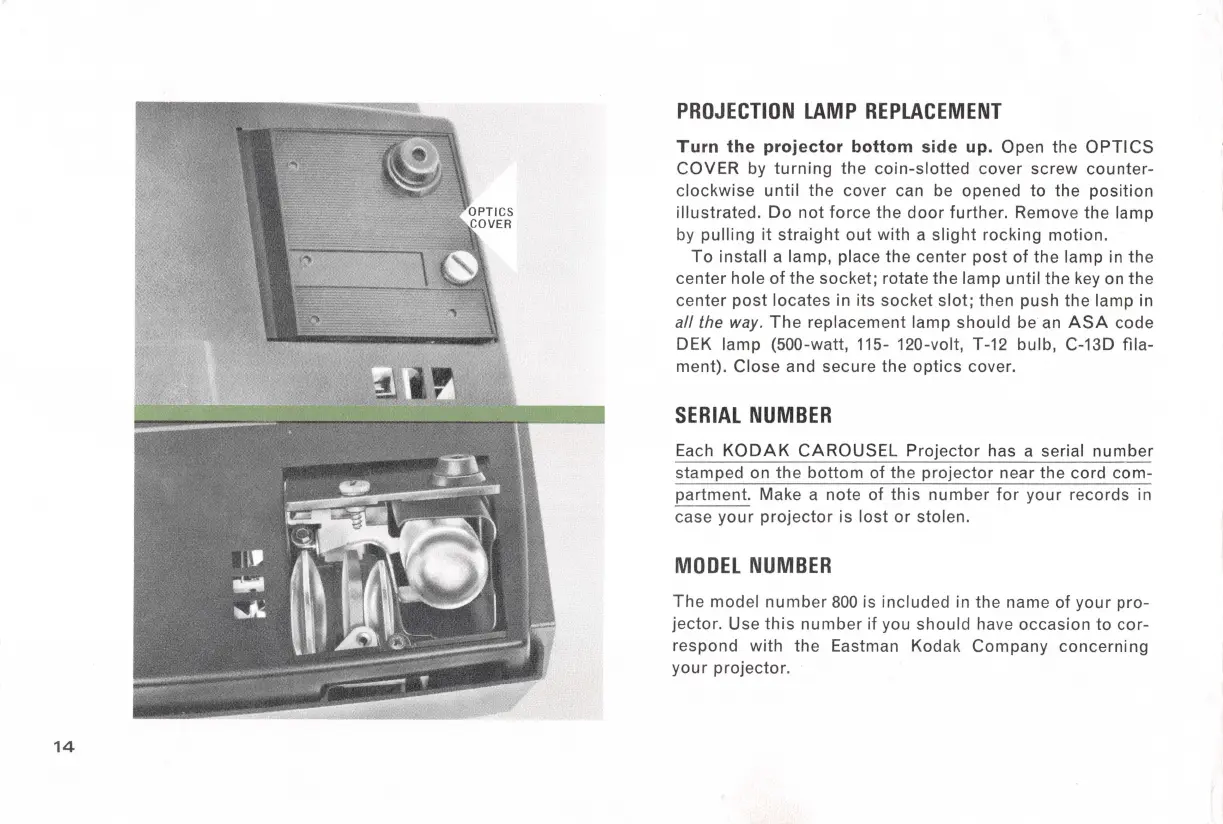
Turn
the
projector
bottom side up. Open the
OPTICS
COVER
by
turning
the
coin-slotted
cover screw
counter-
clockwise
until
the
cover can be opened
to
the
position
illustrated
.
Do
not
force the
door
further. Remove the lamp
by
pulling
it
straight
out
with a
slight
rocking motion.
To
install a lamp, place
the
center
post
of
the lamp in
the
center
hole
of
the socket; rotate the lamp until the
key
on
the
center
post
locates in its socket
slot;
then push the lamp in
all the way.
The
replacement lamp should be an
ASA
code
DEK lamp (500-watt, 115- 120-volt, T-
12
bulb, C-13D fila-
ment).
Close
and secure the
optics
cover.
SERIAL
NUMBER
Each
KODAK
CAROUSEL
Projector
has a serial
number
stamped on
the
bottom
of the
projector
near the cord
com-
partment. Make a note of
this
number
for
your records in
case
your
projector
is
lost
or
stolen.
MODEL
NUMBER
The
model
number
800
is included in the name of
your
pro-
jector.
Use
this
number
if you should have occasion
to
cor-
respond with the Eastman Kodak
Company
concerning
your
projector.



 To Next Page