EasyManua.ls Logo

Kodak CAROUSEL 800 - Page 7

Kodak CAROUSEL 800
20 pages
Print Icon
To Next Page IconTo Next Page
To Previous Page IconTo Previous Page
Loading...
Long
Dimension
of
Projec
ted
Pictu
re
40
"
50
"
60
"
70"
84"
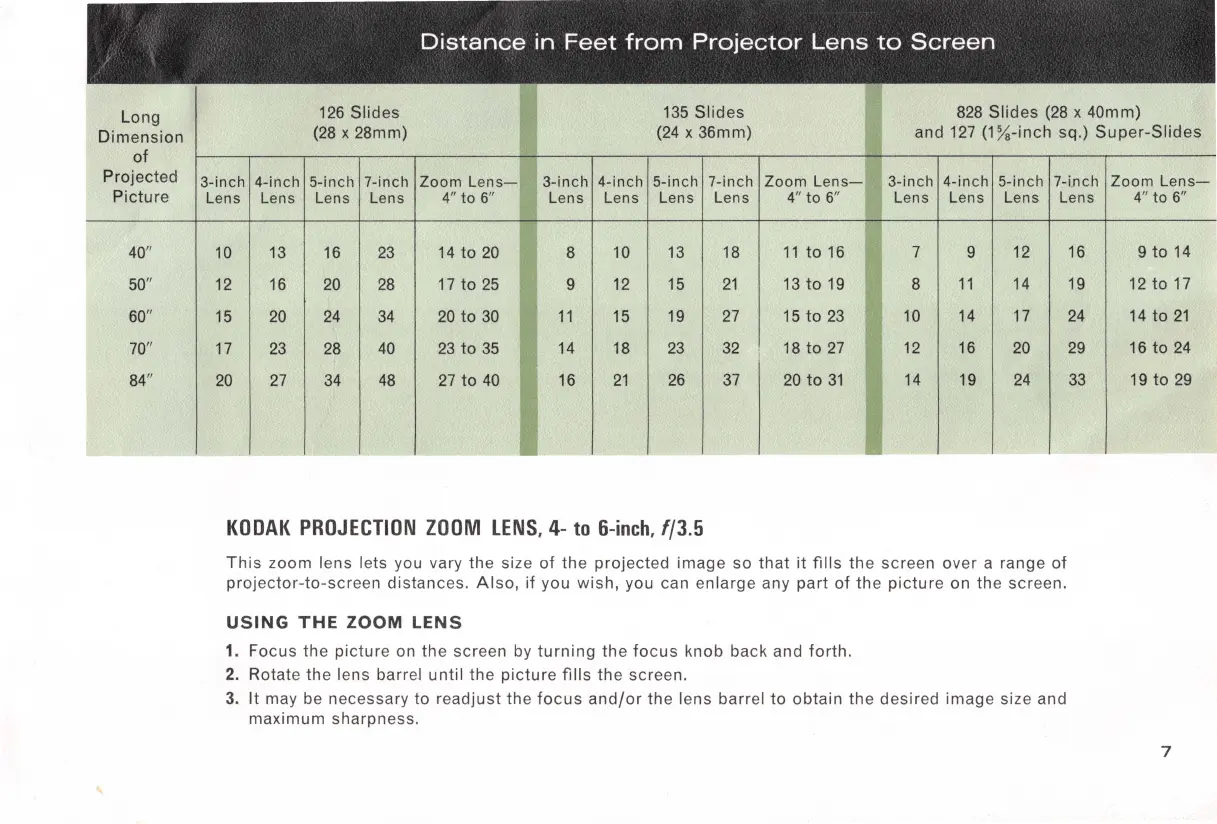
Distance
in
Feet
from
Projector
Lens
to
Screen
126
Slides
135
Slides
828
Slides
(28 x 40mm)
(28
x 28mm)
(24
x 36mm) and
127
(1½-inch
sq.)
Super-Slides
3-inch 4-inch
5-inch 7-inch Zoom
Lens-
3-inch 4-inch 5-inch
7-inch
Zoom
Lens-
3-inch 4-inch
5-i
nch
7-i
.nch
Lens Lens Lens Lens
4"
to 6" Lens Lens
Lens Lens
4" to 6"
Lens Lens Lens Lens
10
13
16
23
14
to
20
8
10
13
18
11
to
16
7
9
12
12
16
20
28
17
to
25
9
12
15
21
13
to
19
8
11
14
15
20
24
34
20
to
30
11
15
19
27
15
to
23
10
14
17
17
23
28
40
23
to
35
14
18
23
32
18
to
27
12
16
20
20
27
34
48
27
to
40
16
21
26
37
20
to
31
14
19
24
KODAK
PROJECTION
ZOOM
LENS,
4-
to
6-inch,
f/3.5
This
zoom
lens
lets you vary
the
size
of
the
projected
image
so
that
it
fills
the
screen over a range
of
projector-to-screen
distances.
Also
,
if
you
wish,
you can
enlarge
any
part
of
the
picture
on
the
screen.
USING
THE
ZOOM
LENS
1. Focus the
picture
on
the
screen by
turning
the
focus
knob back and
forth.
2. Rotate the lens barre.I
until
the
picture
fills
the
screen.
3.
It
may be necessary to
readjust
the
focus
and/or
the
lens barrel
to
obtain
the
desired
image
size and
maximum
sharpness.
16
19
24
29
33
Zoom
Lens-
4" to
6"
9
to
14
12
to
17
14
to
21
16
to
24
19
to
29
7

Related product manuals