EasyManua.ls Logo

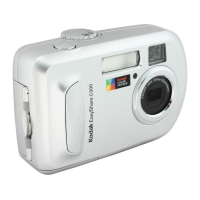
Kodak EasyShare C340 - User Manual

Kodak EasyShare C340
74 pages
Print Icon
To Next Page IconTo Next Page
Loading...
Kodak EasyShare C340
zoom digital camera
User’s guide
www.kodak.com
For interactive tutorials, www.kodak.com/go/howto
For help with your camera, www.kodak.com/go/c340support

Table of Contents

Questions and Answers

  • H
    Haley WhiteAug 19, 2025
    How to connect Kodak Digital Camera to computer?
    • A
      Alan WardAug 19, 2025
      To connect your Kodak Digital Camera to your computer, first insert a charged battery and turn on the camera. Then, make sure the USB cable is securely connected to both the camera and the computer port. Finally, verify that the EasyShare software is installed on your computer.
  • M
    Mark YoungAug 21, 2025
    What to do if storage is full on Kodak EasyShare C340?
    • J
      Jennifer ShannonAug 21, 2025
      If the storage on your Kodak Digital Camera is almost or entirely full, transfer your pictures to your computer. Alternatively, you can delete pictures from the card or insert a new one. You may also change the image storage location to internal memory.
  • T
    Toni KingAug 25, 2025
    Why is the battery life so short on my Kodak Digital Camera?
    • A
      Andrew NelsonAug 25, 2025
      A short battery life on your Kodak Digital Camera may be due to incorrect battery type, dirty contacts, or a depleted battery. Ensure you're using the correct battery type. Try wiping the contacts with a clean, dry cloth before inserting the battery. Also, try inserting a new or charged battery.
  • N
    Natalie SmithAug 26, 2025
    How to make pictures clearer with Kodak Digital Camera?
    • B
      Brandon PittmanAug 26, 2025
      To get clearer pictures with your Kodak Digital Camera, automatically set exposure and focus by pressing the Shutter button halfway, and then fully press it when the Ready light glows green. Clean the lens. Ensure the camera is not in Close-up mode if you're more than 27.6 inches from your subject. For high-zoom or low-light conditions, place the camera on a flat, steady surface or use a tripod.
  • A
    Austin LaneAug 27, 2025
    How to fix dark pictures on Kodak Digital Camera?
    • M
      mary44Aug 27, 2025
      To fix dark or underexposed pictures on your Kodak Digital Camera, reposition the camera for more available light. Use Fill flash or change your position so light is not behind the subject. Move so that the distance between you and the subject is within the effective flash range. To automatically set exposure and focus, press the Shutter button halfway, and then press the Shutter button completely down to take the picture. Adjust the exposure compensation.
  • M
    mfosterAug 29, 2025
    How to fix overexposed picture on Kodak EasyShare C340?
    • B
      Benjamin DavisAug 29, 2025
      To correct an overexposed or too light picture on your Kodak Digital Camera, reposition the camera to reduce the amount of available light. Try turning the flash off. Move so that the distance between you and the subject is within the effective flash range. To automatically set exposure and focus, press the Shutter button halfway, and then press the Shutter button completely down to take the picture. Use Auto, Landscape, or Close-up to adjust the exposure compensation.
  • J
    Joseph SmithAug 31, 2025
    Why can't I take a picture with my Kodak EasyShare C340?
    • D
      Deborah HuynhSep 1, 2025
      If you cannot take a picture with your Kodak Digital Camera, try turning the camera off and then on again. Ensure that the camera is not in Favorites mode. Depress the shutter button completely. Insert a new or charged battery. Wait until the Ready light glows green before attempting to take another picture. If the memory is full, transfer pictures to the computer, delete pictures from the camera, change the image storage location, or insert a new card.
  • H
    Haley PittmanSep 2, 2025
    What to do if lens does not extend on Kodak Digital Camera?
    • T
      Tiffany HuffmanSep 2, 2025
      If the lens on your Kodak Digital Camera does not extend when you turn it on, make sure that the battery is charged. If that doesn't work, turn the camera off and then on again.
  • T
    Timothy ChristensenSep 4, 2025
    What to do if Kodak EasyShare C340 doesn't recognize memory card?
    • E
      Elizabeth BryantSep 4, 2025
      If your Kodak Digital Camera doesn't recognize the memory card or freezes with the card inserted, the card may be corrupted. Try formatting the card in the camera. If that doesn't work, use another memory card.
  • J
    Jennifer SanchezSep 6, 2025
    What does a steady red light mean on Kodak EasyShare C340 Digital Camera?
    • U
      ufloresSep 7, 2025
      A steady red light on your Kodak Digital Camera indicates that the camera’s internal memory or card is full. Transfer pictures to the computer, delete pictures from the camera, switch image storage locations, or insert a card with available memory. It could also mean that the camera processing memory is full, in this case, wait and resume picture-taking when the light turns off. Another possibility is that the card is read-only; change the image storage location to internal memory, or use a different card.

Summary

Setting up your camera

Loading the batteries

Steps for correctly inserting batteries into the camera.

Setting the date;time, first time

Initial setup for configuring the camera's date and time settings.

Storing pictures on SD;MMC cards

Guidance on using SD or MMC cards for additional picture and video storage.

Taking pictures and videos

Taking a picture

Step-by-step guide on how to capture still photographs with the camera.

Taking a video

Instructions on how to record video clips using the digital camera.

Capture modes

Overview of different capture modes available on the camera for various shooting scenarios.

Using optical zoom

How to use the camera's optical zoom feature to get closer to subjects.

Using the flash

Guidance on when and how to use the camera's built-in flash.

Cropping a picture

Steps to select and save a portion of a captured picture.

Protecting pictures from deletion

How to prevent accidental deletion of important pictures and videos.

Deleting pictures and videos

Procedure for removing pictures and videos from the camera's storage.

Transferring and printing pictures

Installing the software

Step-by-step guide for installing the Kodak EasyShare software on your computer.

Transferring with USB cable

Process for connecting the camera to a computer via USB to transfer files.

Printing pictures

Overview of options for printing captured images.

Printing with printer dock

How to dock the camera to print directly using a Kodak EasyShare printer dock.

Direct PictBridge printing

Instructions for printing directly to PictBridge compatible printers.

Printing from PictBridge printer

Detailed steps for printing directly from the camera to a PictBridge printer.

Doing more with your camera

Using the self-timer

How to use the self-timer function for delayed picture or video capture.

Using burst mode

How to capture a rapid sequence of pictures using the burst mode.

Displaying pictures on television

Connecting the camera to a TV to view pictures and videos on a larger screen.

Copying pictures and videos

How to copy files between internal memory and an SD/MMC card.

Changing flash settings

Adjusting the camera's flash modes (Auto, Fill, Red-eye, Off).

Picture-taking modes

Overview of different shooting modes like Auto, Scene, Portrait, Sport, Landscape, Close-up, Video.

Troubleshooting

Camera problems

Common issues and solutions when the camera does not operate correctly.

Computer;connectivity problems

Solutions for connecting the camera to a computer or transferring files.

Picture quality problems

Addressing issues with pictures being too dark, too light, or not clear.

Appendix

Camera specifications

Detailed technical specifications for the Kodak EasyShare C340 camera.

Power saving and safety

How the camera conserves battery power and general safety precautions.

Battery safety and handling

Guidelines and warnings for safe handling and replacement of camera batteries.

Warranty

Information regarding the limited warranty provided for the camera and accessories.

Kodak EasyShare C340 Specifications

General IconGeneral
BrandKodak
ModelEasyShare C340
CategoryDigital Camera
LanguageEnglish

Related product manuals