10
CHAPTER 3. INSTALLATION
This chapter describes procedures for installing the RA40C/41C/42C radar in your
ship and precautions to be observed during installation. Follow the procedure below to in-
stall the radar.
3.1 Checking Contents of Your Package
First, unpack your package and see if all of the following items are included.
RA40C RA41C RA42C
Item Q'TY Q'TY Q'TY
Display unit 1 (RF719A) 1 (RF719A) 1
(RF719A)
Scanner unit 1 (RB714A) 1 (RB715A) 1
(RB716A)
Display cover 1 1 1
Fuse 2 2 4
Interconnecting cable 1 (10 m) 1 (10 m) 1 (10 m)
Power supply cable 1 (2 m) 1 (2 m) 1 (2 m)
M10 hexagonal bolt 4 sets 4 sets 0
M12 hexagonal bolt 0 0 4 sets
Carbon brush 0 0 2
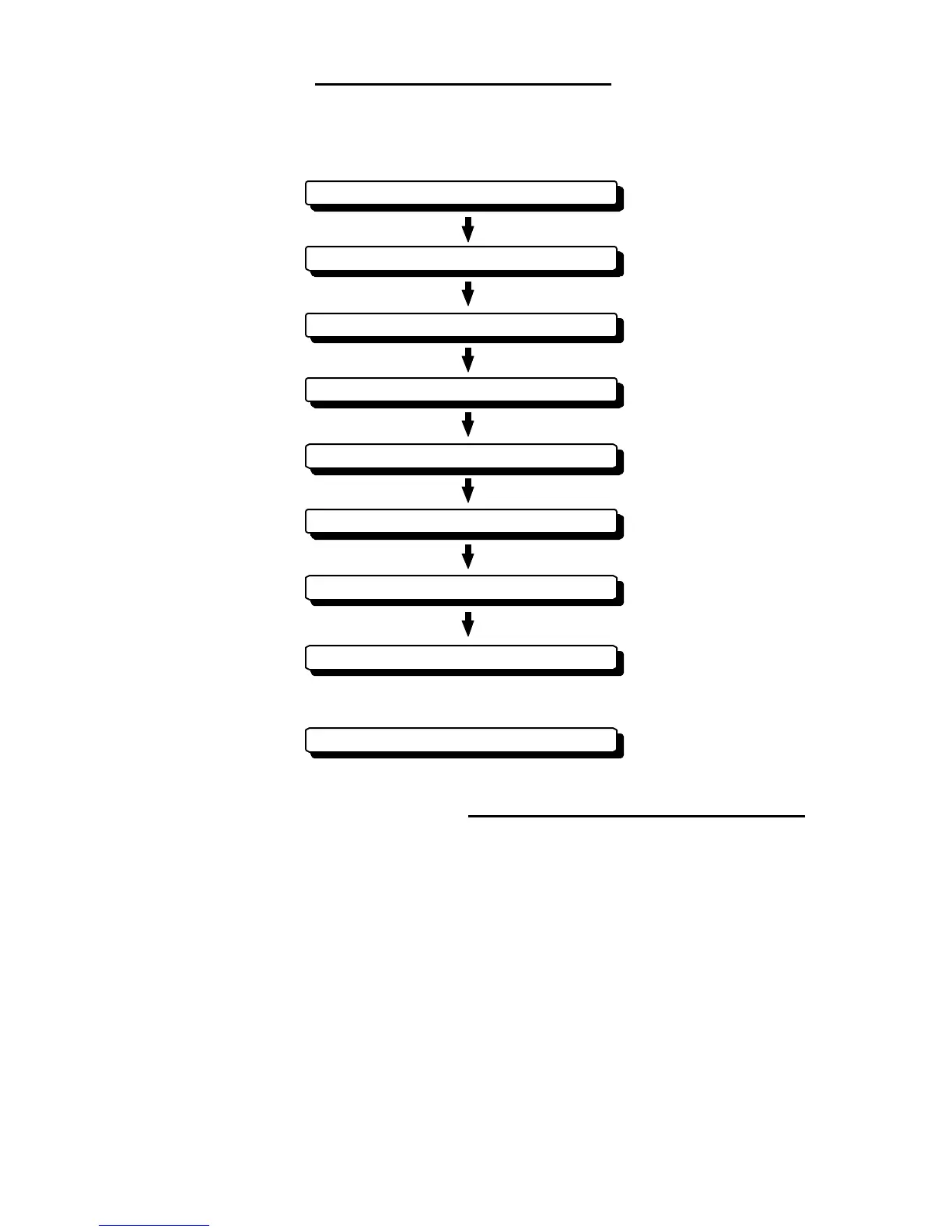
Checking contents of your package
Checking power supply voltage
Determining place of installation
Installing scanner unit
Installing display unit
Connecting cables
Adjustment
Connecting external equipment
When discarding Your radar









 To Next Page