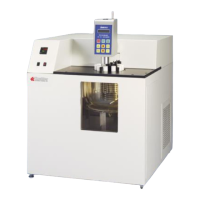
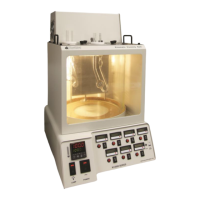
KV3000 Kinematic Viscosity Bath
Operation and Instruction Manual
KV3000-Manual
-15-
Koehler factory. Please do NOT attempt
to re-program the digital temperature
controller as this will void the product
warranty. If assistance is required,
please do not hesitate to contact the
Koehler technical service department.
Setting the Temperature. Set the desired
operating temperature by adjusting the set
point with the up and down keys. The set
point will be displayed in the lower green Set
Point LED display and the actual
temperature will be displayed in the upper
red Process LED display. Please allow the
instrument to fully equilibrate before
proceeding with any testing.
Temperature Calibration. This routine allows
the digital temperature controller to be
calibrated to a certified thermometer. In the
calibration mode, the display will always give
2 decimal places.
a. Use a certified calibrated measuring
device to acquire the temperature.
Calculate the difference between the
measuring device and the Process
value displayed on the controller.
b. Press the program key two times until
PCt is displayed in the lower green LED
display. Press the DOWN key. CAL will
display on the lower green display. If
there is a value observed in the upper
red LED display, add it to the calculated
difference obtained in the previous step.
This is the offset value.
c. Press the Program Key. The lower
green display will flash. Use the up or
down keys to adjust to the new
calibration offset value on the upper red
display calculated in the previous step.
When the value has been entered, the
controller will automatically store the
value. The lower green display will stop
flashing. If further adjustments are
necessary, press the Program Key
again. Resume regular operations by
pressing the Exit / Function key two
times. Verify if the new calibration is
correct by observing the upper red
display and comparing the value with
the calibrated reference device.
Auto Tune. This routine allows the digital
temperature control to learn the heating
parameters needed for any particular set
point temperature. This operation should be
done when installing a new unit, after
replacing or changing the bath medium type,
or utilizing a different temperature set point
20% different from the previously used set
point temperature.
a. Set the operating temperature to the
desired setting.
b. Press the up and down arrow buttons
simultaneously for about 5 seconds.
When Auto Tune is active, the lower
green LED display will blink TUNE. Auto
Tune will automatically toggle off when
the set point temperature is reached.
Auto tune can be terminated by pressing
the up & down buttons simultaneously
again.
4.4 Recommended Accessories
Withdrawal Bulb. Use to pull sample into
viscometer tube.
Part number: K22090
Rubber Stopper. Use to hold sample in
viscometer tube.
Part number: K23311
Operation near or below ambient
temperatures. A water supply or external
chiller may be used to maintain the
temperature of the bath for cooler
temperature. Hose-barb connections for
water or refrigerated coolant are located at
the top of the bath. There are two
connections: inlet and outlet. The hose
connections can be secured with copper
wire to prevent the tubing from disengaging
from the connection.
5 Operation
5.1 Bath
Fill the bath with the appropriate heat transfer
fluid based upon the testing temperature. Fill the
bath with the medium from the top through one
of the seven port openings using a wide neck
funnel with a 500mL griffin beaker adding about
½ L at a time to 2" (5 cm) from the top of the
bath to allow room for fluid expansion. This will
provide the proper depth for immersing the
viscometers and allow for thermal expansion.


 To Next Page