8 9
Owner’s Manual
K6HK144BBA2ACA0 / K6HK144BEA2ACA0
Operaon
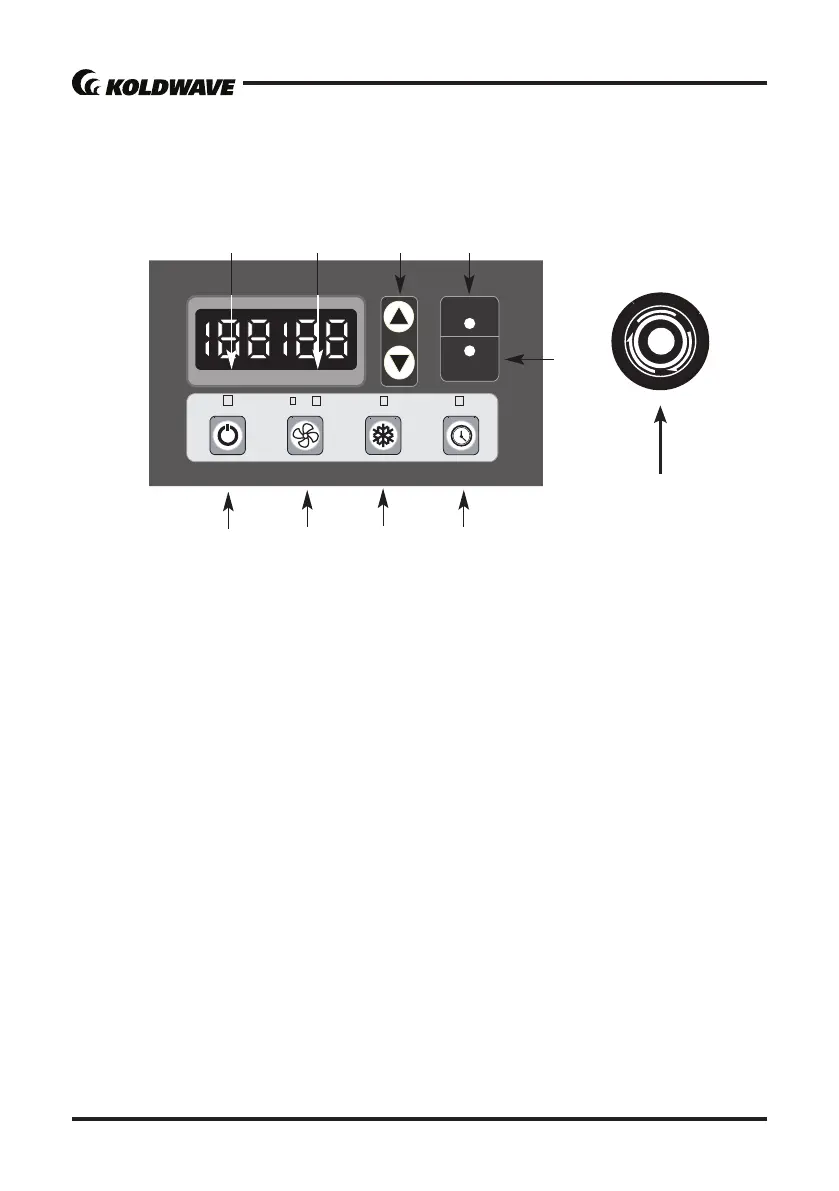
CONTROL PANEL
10
Figure 8
108&3 #-08&3 $00- 5*.&3
4105$00-
"-"3.
$633&/5
5&.1)6.*%
5" 3(&5
5&.1)6.*%
2
7
3
4
6
5
98
1. POWER BUTTON: Acvates unit when POWER BUTTON is pressed. If POWER BUTTON is
pressed during operaon, unit stops.
2. BLOWER BUTTON: Indicates fan speed. (Not available for 3 phase model)
3. COOL BUTTON: Acvates compressor and begins producing cool air in 5 seconds aer
buon is pressed.
4. TIMER BUTTON: Enters to Timer Seng Mode by pressing TIMER BUTTON for 1 seconds.
Two digits on CURRENT TEMP indicate hour(s) and two digits on TARGET TEMP indicate
minutes. Set desired o-me by pressing SET TEMP BUTTONS.
5. ALARM: Alarm indicator lights (blinks) and indicates abnormal system operaon.
If Alarm occurs, compressor stops. System operaon stops when Alarm light is acvated
(blinks) longer than 3 minutes.
6. SPOT/COOL: Lights (blinks) when unit is operated on SPOT/COOL mode.
7. SET TEMP BUTTONS: Change target temperature/data value by +/-1. Press the SET TEMP
BUTTONS to set temperature. Upper buon is to heighten temperature and Lower buon
is to lower temperture.
8. TARGET TEMP: Displays unit set temperature for ROOM/COOL mode only.
Set TARGET TEMP 0 ℃ or 32℉ on SPOT/COOL mode.


 To Next Page