- 7 -
3. Explanation of Screen and Operation
3.1. Explanation of screen
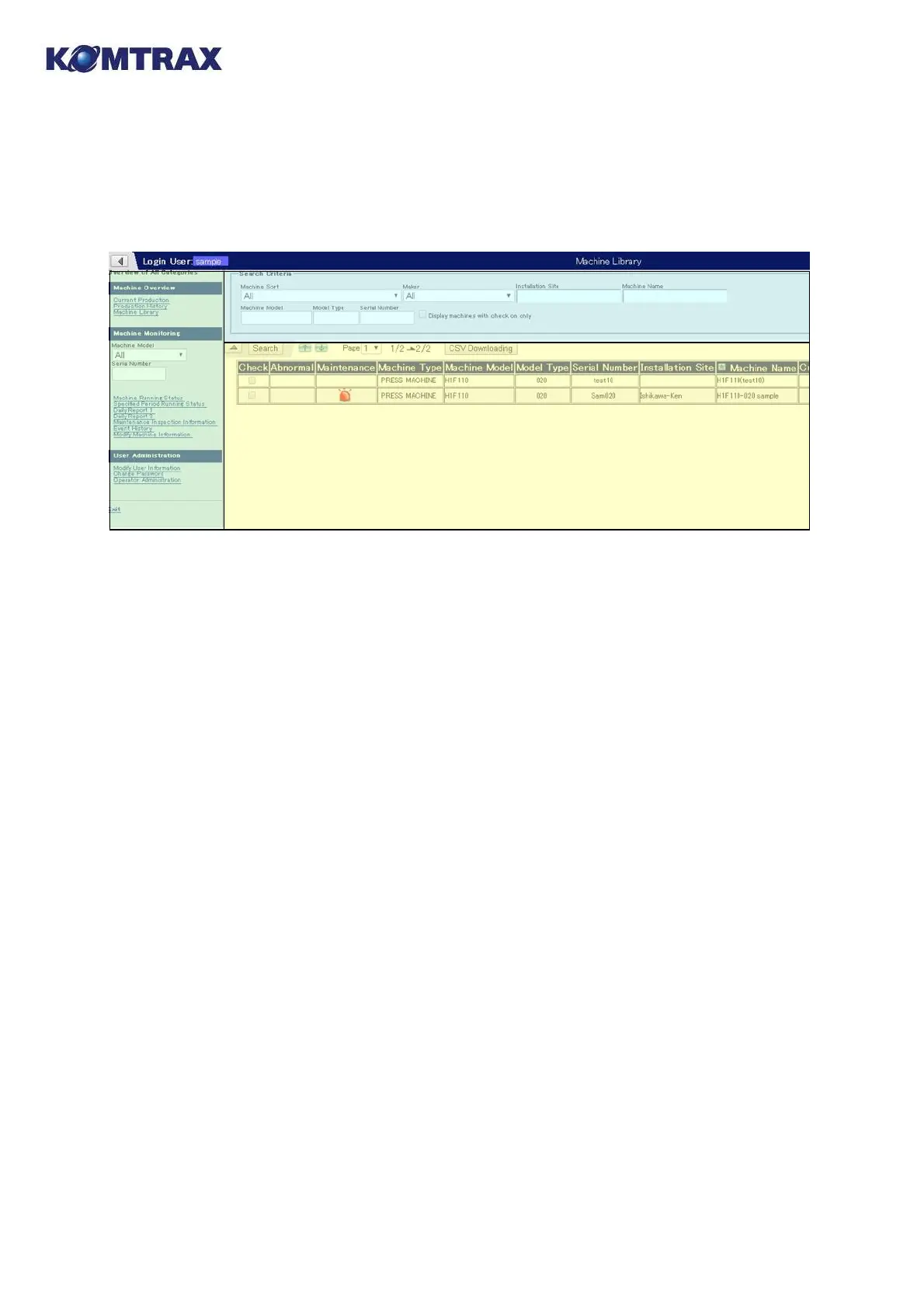
The typical KOMTRAX screen is divided into the following three areas.
① Information Display area (bottom right of the screen)
Information on various machine statuses shall display. Contents are different depending on
each screen. See explanation of each screen for details.
② Search Criteria area (top right of the screen)
When too much information is displayed in the Information Display area to find objective
information, it can be limited by using here. See "Retrieval of Information" for using this area.
(No Search Criteria area is provided on some screens.)
③ Shortcut Menu area (left of the screen)
Links to an objective screen are located.
Three categories of [Machine Overview], [Machine Monitoring] and [User Administration]
are provided in addition to [Exit].
[Machine Overview]: function of displaying information of all belonging machines. Click
"Machine Library" for moving to the machine list screen.
[Machine Monitoring]: function of displaying information of a particular machine. Enter
Machine Model and Serial Number (omissible) and click the link for the screen you
want to see.
[User Administration]: Your password can be changed here.
[Exit]: to terminate KOMTRAX to move to the Logout screen.
③
③
S
S
h
h
o
o
r
r
t
t
c
c
u
u
t
t
M
e
n
u
a
r
e
a
②
②
S
S
e
e
a
a
r
r
c
c
h
h
C
C
r
r
i
i
t
t
e
e
r
r
i
i
a
a
a
a
r
r
e
e
a
a
①
①
I
I
n
n
f
f
o
o
r
r
m
m
a
a
t
t
i
i
o
o
n
n
D
D
i
i
s
s
p
p
l
l
a
a
y
y
a
a
r
r
e
e
a
a



 To Next Page