E
PT043328 Issue 3 October 2021 23
Before the ITM is due for replacement, the ink system will automatically reduce quantity of
ink to a minimum level. It is normal to replace the ink cartridge when replacing the ITM.
(1) Switch off (hold the standby button for 2 seconds) and wait for the printer to
shut down.
(2) Disconnect the power lead and open the door.
(3) Remove the ink Cartridge (if fitted) (see previous pages).
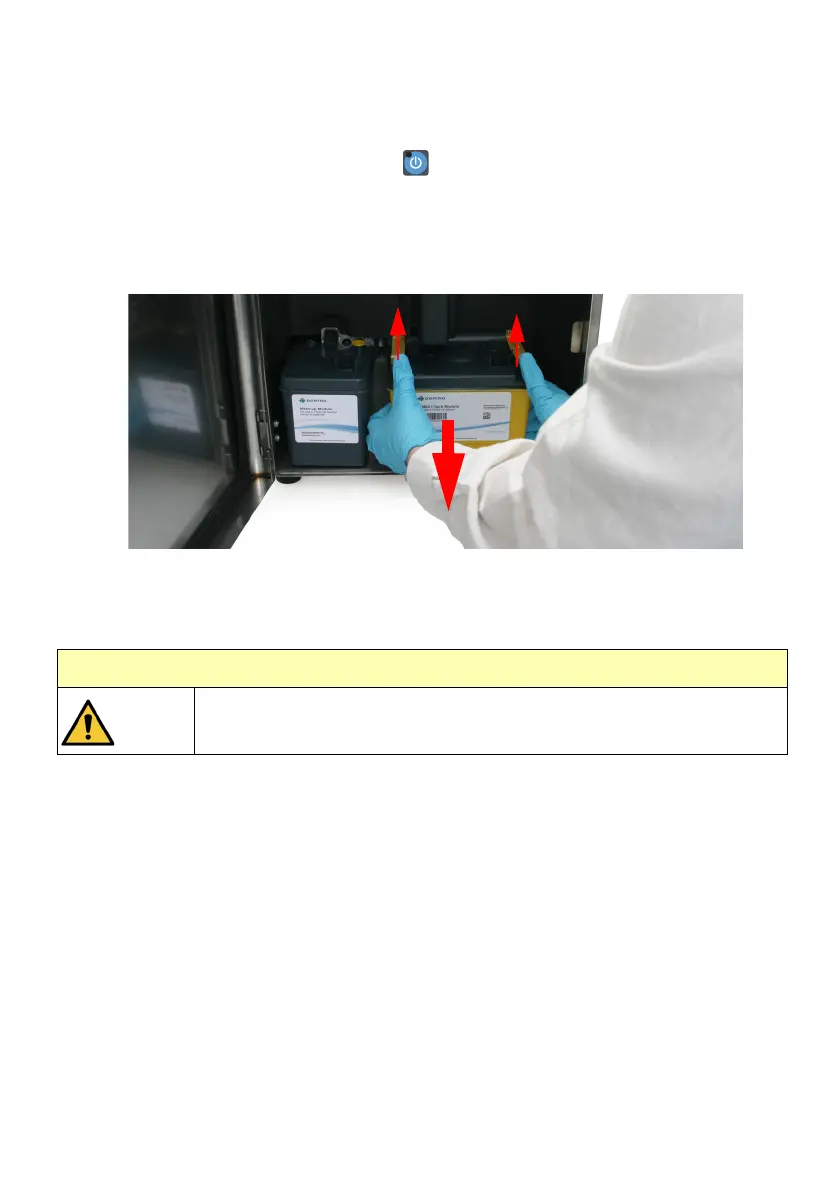
(4) Remove the ITM.
(5) Push retaining clips up then pull the ITM towards you, away from the Ink Block.
Note: If the ITM does not move with moderate pressure, push the ITM away from you
(which will break any seal caused by dry ink) and try again.
CAUTION: Hazardous Chemical. Risk of spillage
The manifold pipes will contain residual ink,
take care to avoid spillage.


 To Next Page