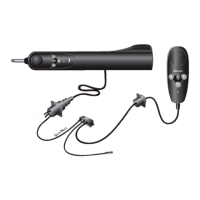
The Simrad AP51 Remote Control is designed to provide comprehensive control over the Simrad AP50 autopilot system. This manual serves as a reference guide for its operation, offering detailed information on its functions, technical specifications, usage, and maintenance.
Function Description
The Simrad AP51 Remote Control is a portable, handheld device that allows users to manage the AP50 autopilot system from various locations on a vessel. It provides a user-friendly interface for steering, course adjustments, and system mode selection. The AP51 is a complex electronic system that interacts with the vessel's speed, hull shape, and size to ensure optimal autopilot performance.
Key functions include:
- Automatic Steering: The AP51 can steer the vessel automatically on a set heading. It allows for course changes and rudder adjustments to maintain the desired heading.
- Follow-Up (FU) Steering: This mode enables manual control of the rudder angle, with the AP51 providing feedback on the current rudder position.
- Non-Follow-Up (NFU) Steering: In this mode, the rudder is moved as long as the button is pressed, and the actual rudder angle is displayed.
- Auto-Work Mode: This mode is designed for specific operational conditions like trawling, towing, or slow speed, where the autopilot adjusts to maintain the vessel's course.
- Thruster Steering: If the vessel is equipped with a thruster, the AP51 can control it in conjunction with the rudder for precise maneuvering.
- Navigating with the AP51: The remote control can use steering information from external navigators (GPS/Chart plotter or ECS) to direct the boat to a specific waypoint or through a series of waypoints. It uses the heading sensor as its heading source for course keeping.
- Dodging: This feature allows for temporary course changes to avoid obstacles or evade other vessels, with options for automatic or manual dodging.
- Turn Mode (U-turn/C-turn): The AP51 supports predefined turn maneuvers, such as U-turns and C-turns, for efficient course changes.
- Multiple Station System: In a multiple station system, the AP51 can be moved between different control units, allowing for flexible operation from various points on the vessel.
- Lock Function: This security feature locks out all control units except for a single, user-selected "active" control unit.
- User Set-up Menu: Provides access to various settings, including backlight, contrast, steering function (thruster+rudder), course adjust, and language selection.
Important Technical Specifications
- Dimensions: See Figure 3-1 for detailed dimensions.
- Weight: 0.57 kg (1.25 lbs.)
- Material: PC-ABS
- Supply: 12-32 VDC –10%/+30% via Robnet
- Power consumption: 3 W
- Environmental Protection: IP56
- Safe distance to compass: 0.35 m (1.0 ft.)
- Color: Black
- Temperature:
- Operating: -25 to +55°C (-13 to +130°F)
- Storage: -30 to +70°C (-22 to +158°F)
- Display:
- Type: Backlit LCD matrix
- Resolution: 80 x 32 pixels
- Illumination: Adjustable in 10 grades
- Mounting: Handheld or placed in a fixed, bracket-mount
- Cable: 7m (23 ft.) Robnet cable with air tube and one male connector
The AP51 Remote Control connects to the AP50 Control Unit via a Robnet cable. The system can be expanded with additional components like heading sensors, rudder feedback units, junction units, and drive units.
Usage Features
The AP51 Remote Control is designed for ease of use with a clear display and intuitive button layout.
- Buttons and Rotary Course Knob:
- STBY/POWER On/Off: Switches the system on/off and selects STANDBY mode.
- AUTO/AUTO-WORK: Selects AUTO mode and AUTO-WORK mode.
- NAV/NAV-WORK: Selects NAV mode and NAV-WORK mode.
- DODGE/U-TURN: Activates Dodging and U-turn functions.
- PORT key (left arrow): Adjusts course to port.
- STARBOARD key (right arrow): Adjusts course to starboard.
- Rotary course knob: Rotates to set commanded rudder angle, course, or adjust settings in the User Set-up Menu.
- Display Readouts: The display shows critical information such as current heading, rudder angle, selected mode (STBY, FU, NFU, AUTO, AUTO-WORK, NAV, NAV-WORK), and system status.
- Alarms: The system provides visual and audible alarms for various conditions, including system failures, compass errors, and vessel off-course situations.
- User Set-up Menu: Accessible by pressing the NAV button, this menu allows customization of settings like backlight, contrast, steering function, course adjust, and language.
- Backlight and Contrast: Adjustable in 10 grades for optimal visibility.
- Steering Function (Thruster+Rudd): Selects between rudder-only steering or a combination of rudder and thruster.
- Course Adjust: Allows setting course changes in 1°, 5°, or 10° increments.
- Language: Supports English, Deutsch, Francais, Espanol, Italiano, Nederlands, Svenska, and Norsk.
- JP21 Jack Point: The AP51 can be connected to the AP50 via a JP21 Jack Point, allowing for simple connection/disconnection at different locations on the vessel.
Maintenance Features
Regular maintenance ensures the longevity and optimal performance of the AP51 Remote Control.
- Cleaning: Under normal use, the AP51 Remote Control requires little maintenance. Use fresh water and a mild soap solution (not a detergent) for cleaning. Avoid using chemical cleaners and hydrocarbons such as diesel or petrol.
- Robnet Connectors: Ensure all open Robnet connectors are fitted with a protection cap. It is advisable to check the Robnet connectors and cover them with Vaseline or WD40 at the start of each season.
- Software Exchange: The AP51 Remote Control contains a Programmable Read-Only Memory (PROM) that can be exchanged for software updates. The manual provides instructions for safely removing and inserting the PROM using an extraction tool.
- Troubleshooting: The manual includes a comprehensive troubleshooting section with display readouts, probable faults, and recommended actions for various issues, such as:
- System failure alarms (rudder feedback failure, flashing rudder angle indicator).
- No rudder response (steering gear not operative, broken connection, missing power).
- Rudder too slow (excessive load, insufficient drive unit capacity).
- Rudder test failed (poor connections, faulty PCBs, rudder moves at full speed).
- Steering compass missing or monitor compass missing.
- Failure active Control Unit.
- J50 current overload or internal voltage issues.
- J50 high temp.
- Memory failure.
- Com. failure with J50.
- Low or high supply voltage.
- Compass difference.
- Speed missing.
- Rudder limit.
- No thruster valve voltage or thruster response.
- Vessel off course.
- End of route.
- NAV data failure.
The Simrad AP51 Remote Control is a robust and versatile device designed to enhance the control and navigation capabilities of vessels equipped with the Simrad AP50 autopilot system. Its comprehensive features and detailed manual ensure reliable and efficient operation.

 Need help?
 General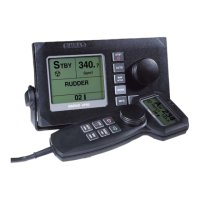

 To Next Page