Simrad AP51 Remote Control
20 20221016C
If “END ROUTE” is used as final WP-name, an “End of route”
warning will be given on the active control unit when arriving at
the final WP.
Note ! If the AP50 system is connected to a navigation receiver that
does not transmit a message with the bearing to the next
waypoint, it will pick a Cross Track Error message and steer on
Cross Track Error only. In that case you have to revert to AUTO
mode at each waypoint and manually change the set course to
equal the bearing to the next waypoint and then select NAV
mode again.
Setting the waypoint arrival circle
For route navigation it is recommended to use automatic
waypoint shift/change at a set waypoint arrival circle.
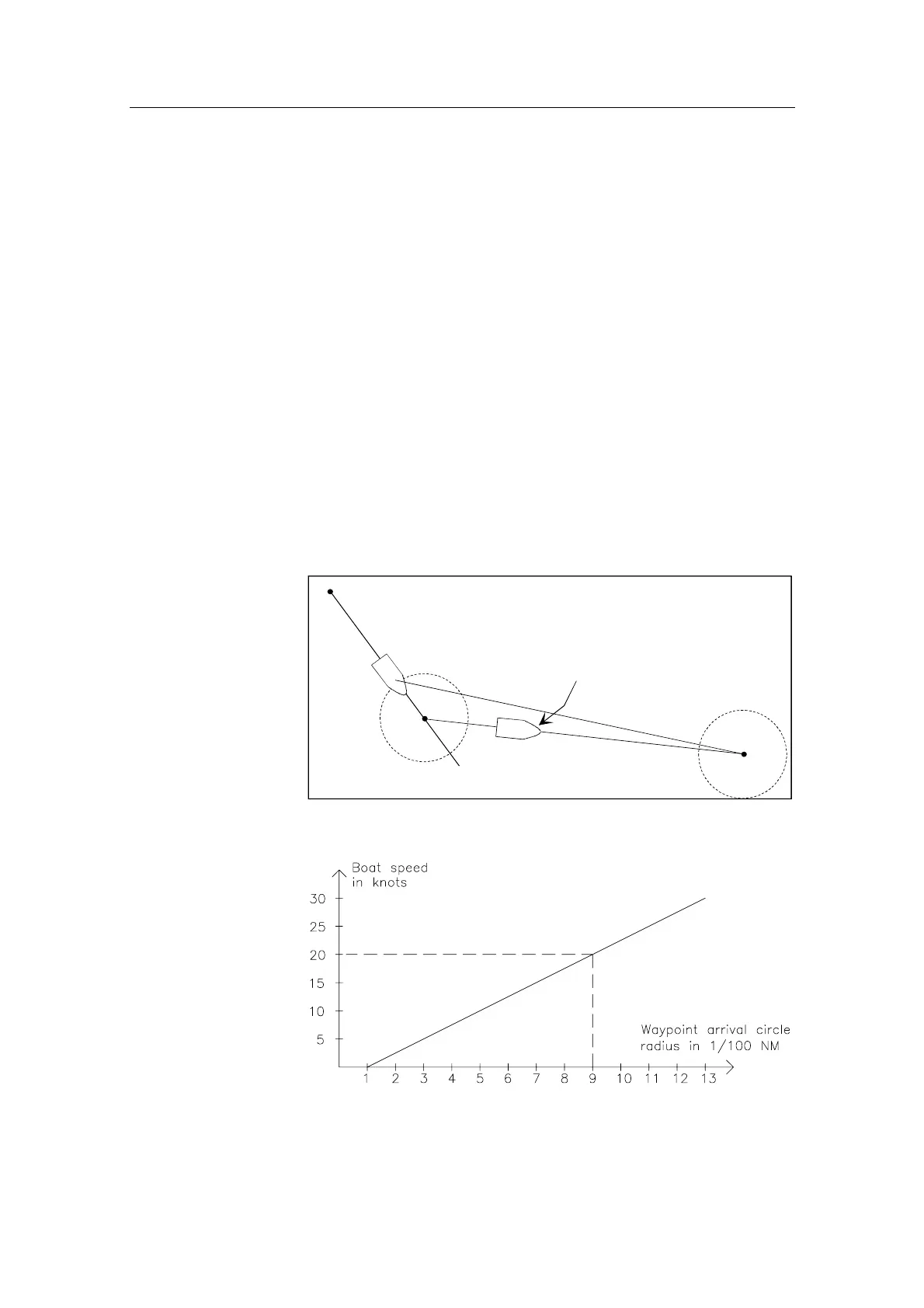
The arrival circle should be adjusted according to boat speed.
The higher speed, the wider circle. The intention is to make the
autopilot start the heading change in due time to make a smooth
turn onto the next leg.
Origin
WP2
The new heading is accepted
automatically after the
NAV/SETUP button is pressed
Waypoint arrival circle
(determined by the navigator)
WP1
B
W
W
B
P
W
The figure below may be used to select the appropriate waypoint
circle on the GPS/chartplotter.
Example: With the speed of 20 knots you should use a waypoint
circle with radius 0.09 NM.


 To Next Page