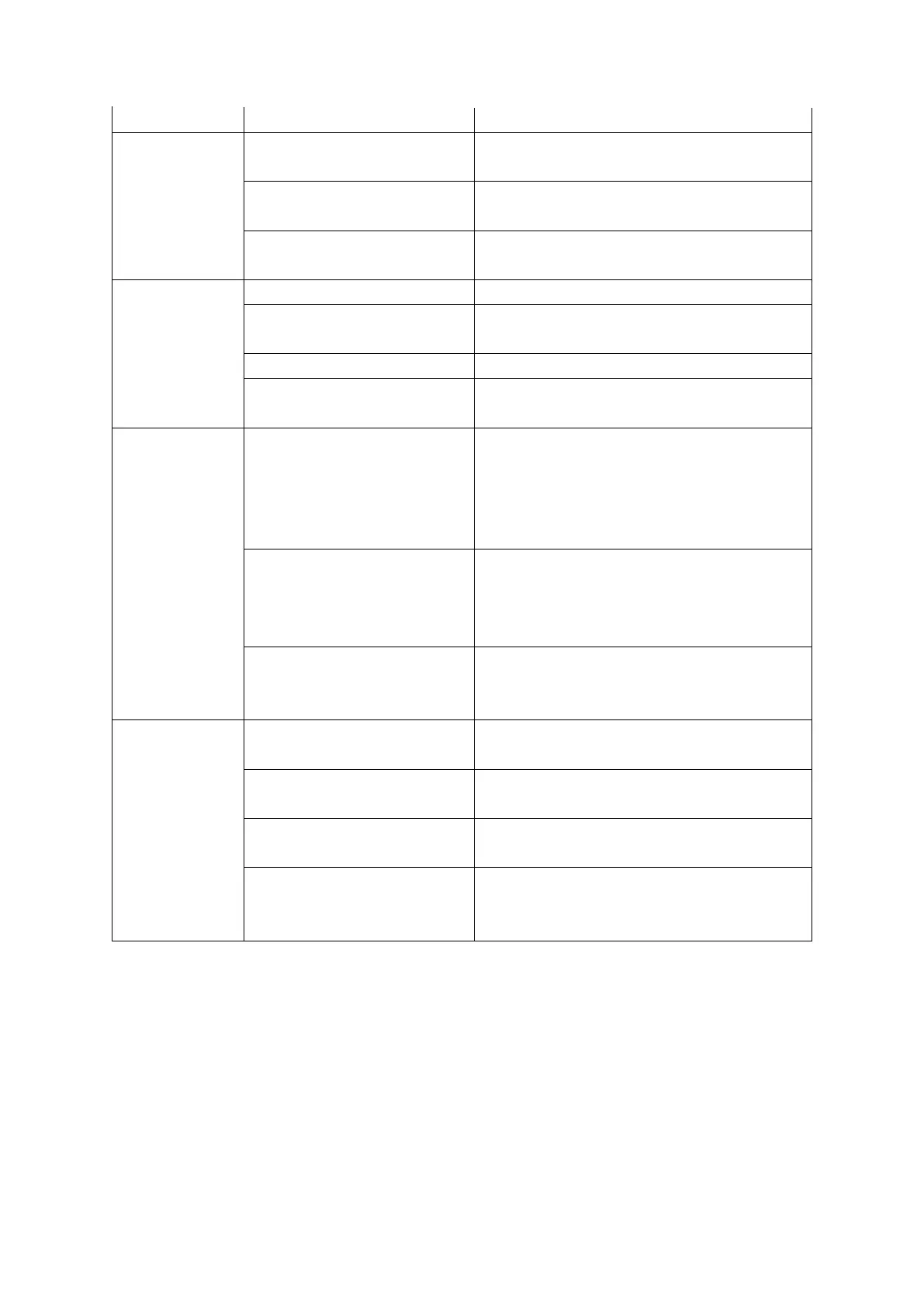
3. Is power supplied 115V ±
10%?
Please check the power and use a dedicated
outlet.
4. Is the front power switch on?
Set the front power switch on the front display to
the on ('ICE') position
1. Is the water valve closed? Open the water supply valve.
2. Is the water supply hose
properly installed?
Check and resolve.
3. Has the water supply stopped?
Wait until water supply is confirmed.
4. Is the water supply valve
operating?
After confirming, contact service center.
1. Machine is dirty (lots of
dust)
(Air-cooled)
After removing the front cover, remove the dust
net to the side and remove the dust using the
vacuum cleaner. If a lot of dust accumulates, the
performance of the machine may deteriorate and
electricity consumption be high.
2. Is the ambient temperature
too high or too low?
The operating temperature of the product is
within 50-100F. Control the ambient
temperature according to the operating
temperature.
3. Is there accumulation of debris
inside the water supply valve?
Disassemble the water supply valve, and then
remove any foreign matter from the sieve.
Be sure to close the faucet at this time.
4. The noise is
too big and
abnormal
1. Is the installation floor
unstable or weak?
Install the unit on a flat, level surface
2. Is the front and rear of the ice
maker touching the wall?
Please keep more than 8" clearance front and
back.
3. Is the water supply
temperature too low?
Use water with a supply water temperature of
50-90F.
4. Does the ice generator
make a loud noise?
Turn the power switch to 'OFF' to completely
dissolve the ice, then switch back to 'ICE'.
Please contact service center
30
2. Is the circuit breaker switch on?
1. Is power supplied?
Please plug in the power cord.
After checking the cause, turn on the breaker
Action
Things to check
Operating status
not work
1. Machine does
10. Before Requesting Service
If the operating condition of the machine is not good, please check the followings.
If the operating condition is still not satisfactory, contact your dealer or service center. At this time, please give details of
the following items on your warranty card. (Details of model name, serial number, name of dealer, date of purchase)
______________________________________________________________________________________________________________________


 To Next Page