Kortho Hot Quickcoder User Manual
7
2 GENERAL INTRODUCTION
The Hot Quickcoder (henceforth HQC) has been developed to apply small texts of one to three lines
(max. line length 25 mm) on a production line. The applications vary from loose products to a
continuous product (e.g. packaging film).
The text can be applied to a stationary or a moving product. The maximum permitted product speed
is 60 m/min. Approx. 250 impressions per minute can be produced.
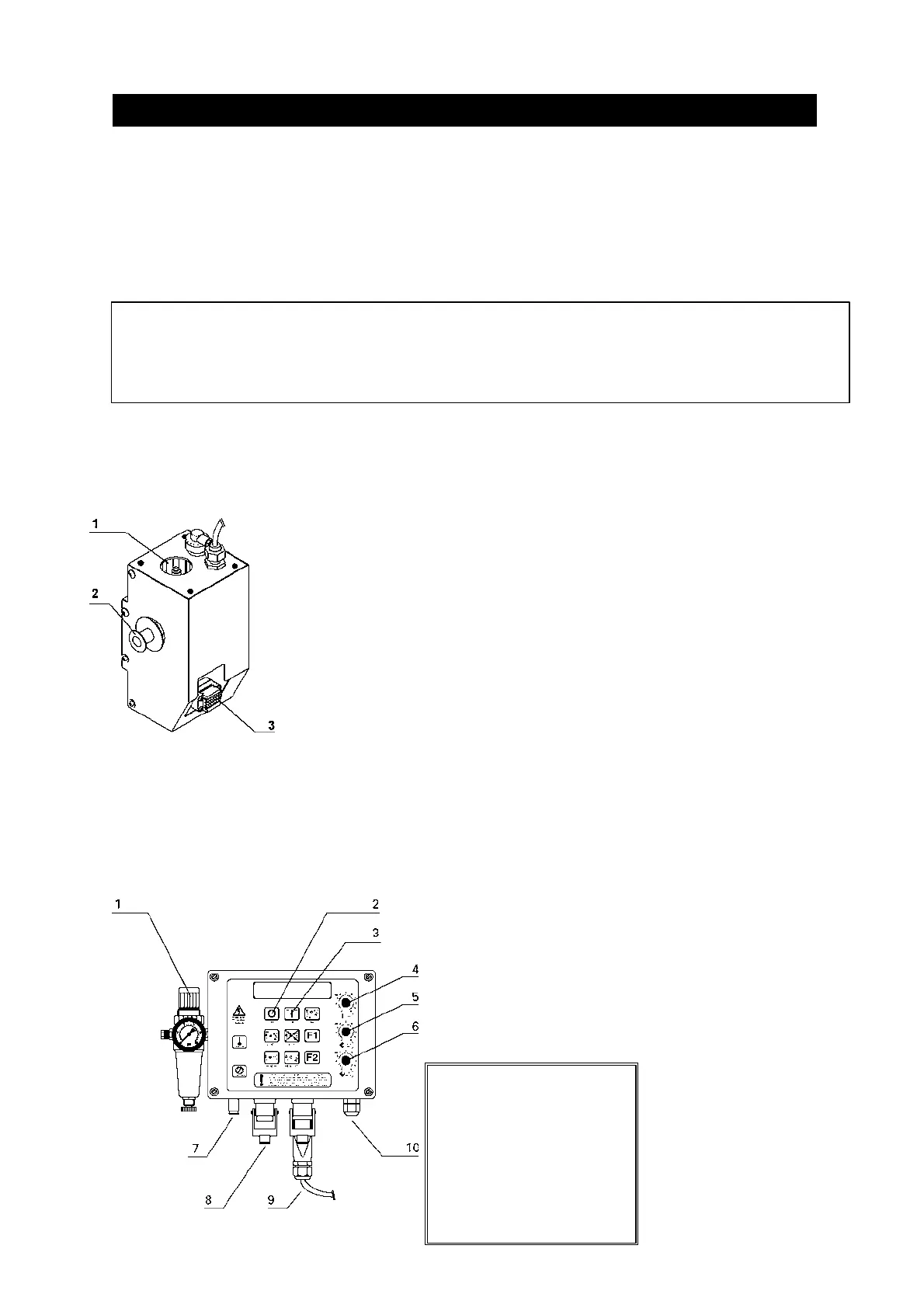
2.1 The Hot Quickcoder
Figure 1: The Hot Quickcoder
The code to be printed is applied to an exchangeable
text head via text characters or blocks. The text head
is inked with a Hotroll which only delivers the inked
(wax-based) at high temperature. The Hotroll is kept
at temperature in the heating ring of the HQC.
2.2 The Control box
A good print quality is achieved with a correct combination of stamping time, stamping pressure,
temperature of the text head and the setting of any counter-pressure plate.
Figure 2: The Control box
The stamping time
and temperature are
set with the buttons
on the Control box.
The stamping
pressure is set as
standard to 4 bar.
The impression can
be optimised using a
counter-pressure
plate, if there is one.
(In case film belts)
! WARNING:
After using the HQC, it cannot simply be deactivated. For the correct procedure read section 8
"Deactivating the Hot Quickcoder".
1 Preheating
2 Hotroll
3 Text head
1 Pressure setting
2 OFF button
3 ON button
4 Temperature setting
5 Pulse/time setting
6 Print/delay setting
7 HQC air connection
8 Mains power connection
9 Hot Quickcoder connection
10 Coupling nut
!!! NOTE !!!
The HQC air connection is
a rapid connection as
indicated in figure 2. Other
figures of the Control box
in this manual still show
the old connection.



 To Next Page