0
1
1/2
MODE
A
TCS
OFF
ECO
13:59
RPM
-----
km/h
0
GEAR
-
999.9
Time Trip
hr
9999.9
Trip 1
km
12.5
V
95
°C
2
3
4
5
6 7 8 9 10 11 12 13
0
1
DoneBack
Model MT-09
Please select your original part number of meter.
1RC-83500-00
1RC-83500-10
1RC-83500-20
1RC-83500-30
1RC-83500-40
1RC-83500-50
2DR-83500-00
2DR-83500-10
BS2-83500-00
BS2-83500-10
BS2-83500-20
BS2-83500-30
DoneBack
Model MT-09
Please select your original part number of meter.
1RC-83500-00
1RC-83500-10
1RC-83500-20
1RC-83500-30
1RC-83500-40
1RC-83500-50
2DR-83500-00
2DR-83500-10
BS2-83500-00
BS2-83500-10
BS2-83500-20
BS2-83500-30
Model
Please select your motorcycle model.
MT-07
MT-09
XSR700
XSR900
NextBack
wh081ba08a(P17-5)
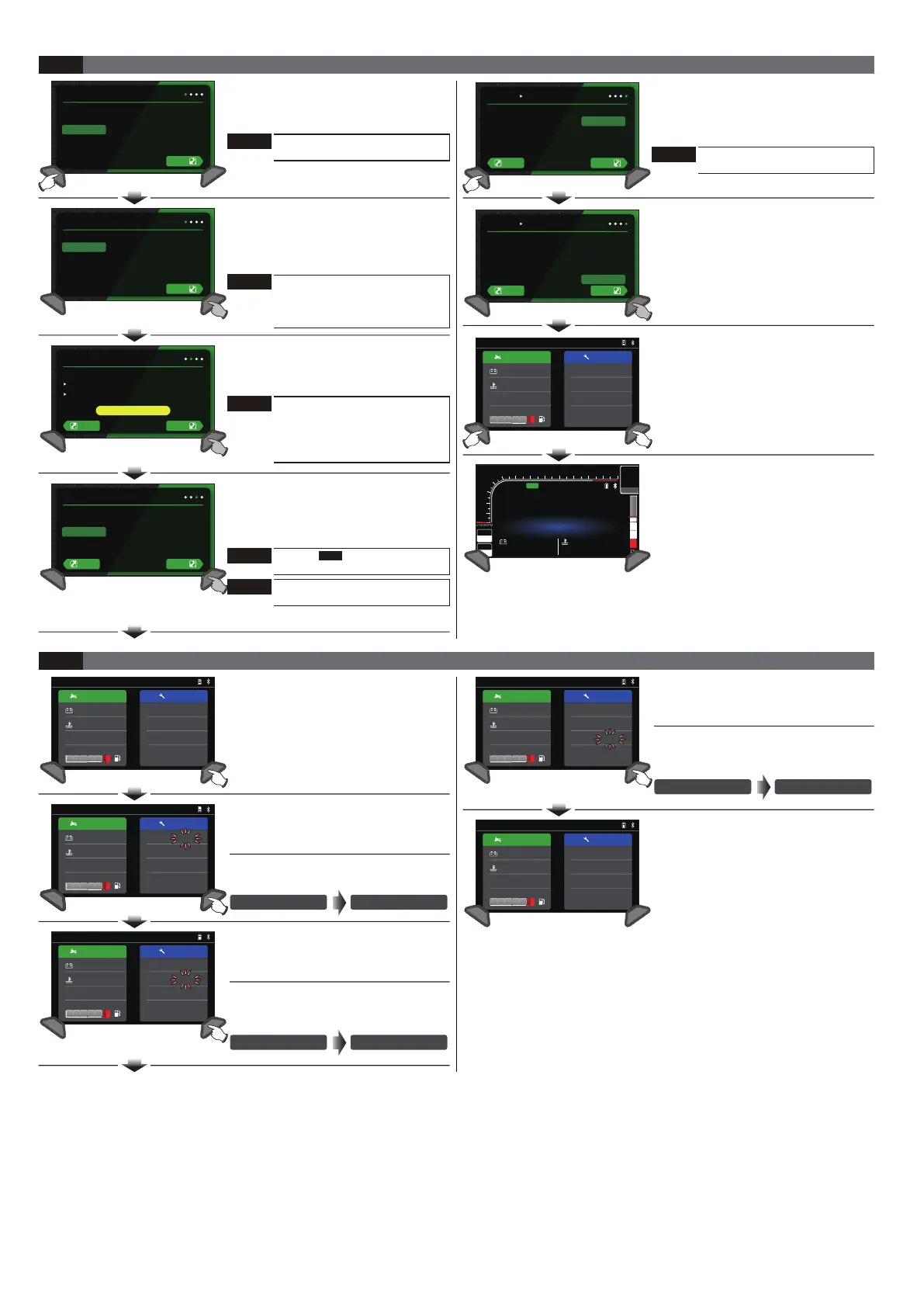
●Press the Adjust button for 3 seconds,
enter the Bluetooth® pairing screen.
●EX : Select iOS for mobile phone
operating system
Hello!
Please select your mobile OS.
iOS
Android
Next
Start screen for Initial Use
4-1
●Start screen for Initial Use, press the
Adjust or Select button to choose
mobile operating system.
Hello!
Please select your mobile OS.
iOS
Android
Next
KOSO_RX4
Pairing Code:
12345
Bluetooth
Please pair with bluetooth through mobile device.
Device Name:
Mobile Device: Unconnected
NextBack
●Press the Adjust button for 3 seconds,
enter the vehicle type screen.
●EX : Bluetooth® pairing screen completed.
●EX : Select MT-09 for the vehicle type.
●Press the Adjust button for 3 seconds,
enter the Corresponding No. screen of
the Vehicle.
●Press the Adjust or Select button to
choose the setting number.
●EX : To set Corresponding
No. of the Vehicle to BS2-83500-30.
●Press the Adjust button for 3 seconds,
enter the Vehicle condition screen.
●EX : Set Corresponding No. of the Vehicle
from BS2-83500-00 to BS2-83500-30 .
Informat ion Service
13:59
01 1/2
12.5
V
65
°C
2538
ODO
km
532
km
Trip O
12
km
Service 1
16000
Service 2
km
°C28
●Vehicle condition screen.
●Press the Adjust + Select buttons,
to enter the main screen.
●The main screen.
NOTE
iOS operating system:
Need to enter the pairing code.
Android operating system:
No pairing code is required.
Enter vehicle type selection directly.
NOTE
iOS operating system:
iOS 5.0 and above
Android operating system:
Android 9 and above
NOTE
Press the left button for
explanation in the graphics.
NOTE
Refer to Corresponding
No. of the Vehicle.
3-1
NOTE
The screen is only for Yamaha
MT-09.
NOTE
The screen is only for the model
of BS-835000-00/10/20/30.
●In the Vehicle condition screen, press
the Adjust button,to enter the Trip O
screen (Flash).
Switching Instruction for Vehicle Condition Screen
4-2
●In the Trip O screen (Flash), press the
Adjust button to enter the Maintenance
mileage 1 screen (Flash).
●Press the Adjust button for 3 seconds
to reset Trip O screen.
-999
km
Trip O
500
km
Trip O
●In the Maintenance mileage 1 screen
(Flash), press the Adjust button to enter
the Maintenance mileage 2 screen (Flash).
●Press the Adjust button for 3 seconds
to reset Maintenance mileage 1 screen
(Flash).
12
kmService 1
500
kmService 1
●The Vehicle condition screen.
●In the Maintenance mileage 2 screen
(Flash), press the Adjust button to enter
the Vehicle condition screen.
●Press the Adjust button for 3 seconds
to reset Maintenance mileage 2 screen
(Flash).
12
kmService 1
500
kmService 1
Informat ion Service
01 1/2
12.5
V
65
°C
2538
ODO
km
-999
km
Trip O
12
km
Service 1
60
Service 2
km
Informat ion Service
01 1/2
12.5
V
65
°C
2538
ODO
km
-999
km
Trip O
12
km
Service 1
60
Service 2
km
Informat ion Service
13:59
01 1/2
12.5
V
65
°C
2538
ODO
km
-999
km
Trip O
12
km
Service 1
60
Service 2
km
°C28
Informat ion Service
01 1/2
12.5
V
65
°C
2538
ODO
km
-999
km
Trip O
12
km
Service 1
60
Service 2
km
Informat ion Service
13:59
01 1/2
12.5
V
65
°C
2538
ODO
km
-999
km
Trip O
12
km
Service 1
60
Service 2
km
°C28


 To Next Page
 Loading...