16
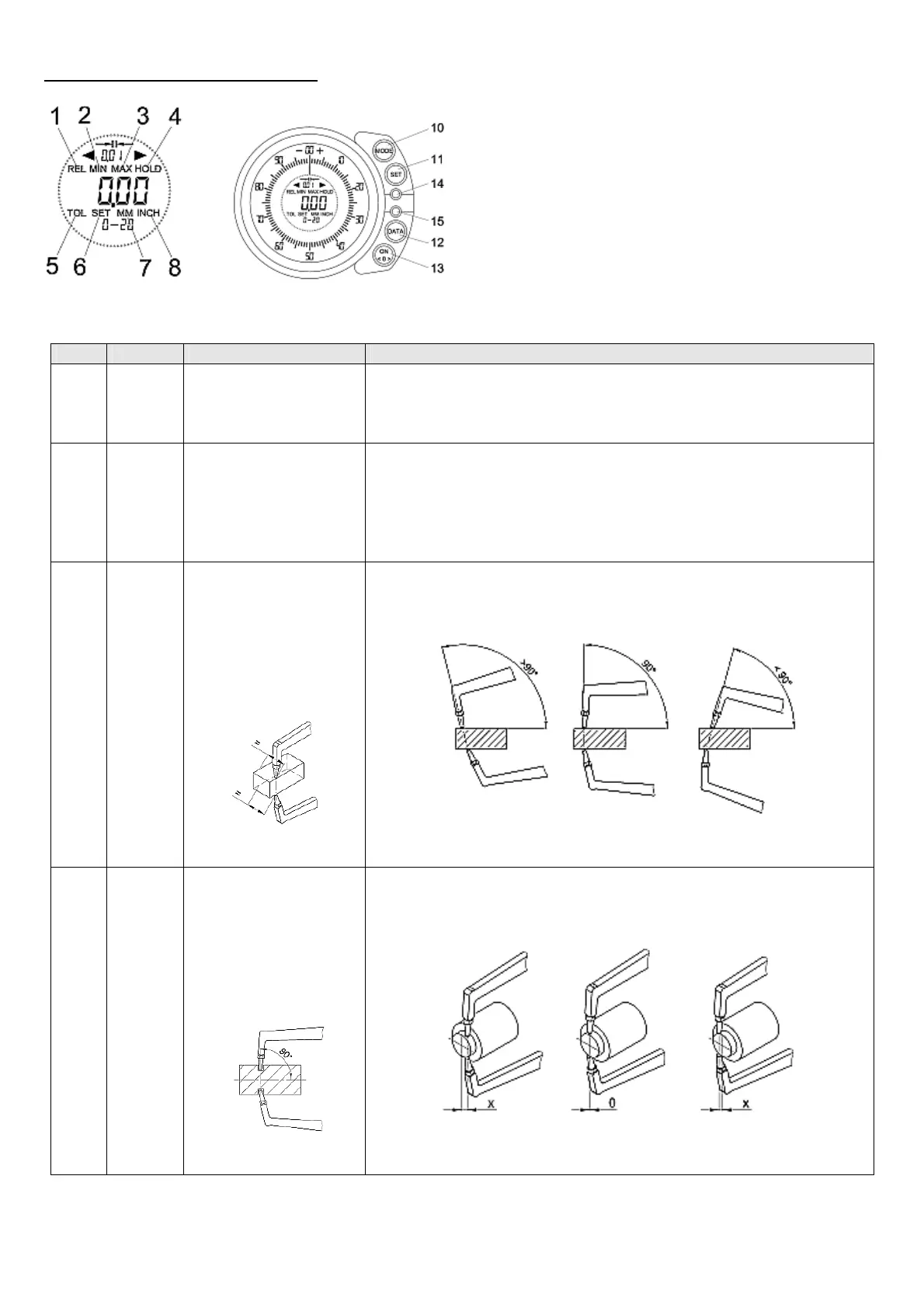
2. Display and operating keys
Display:
No. Display Function Application
Without Continuous tracking of
the measured value and
pointer in relation to the
position of the caliper
Absolut mode: Direct finding and reading of the measured value
1 REL Switching from Abso-
lute mode into Relative
mode,
the Absolute mode will
not be displayed sepa-
rately
Switch can be done in every mode,
but should be done in MIN, MAX or HOLD Mode, as the last measured
value can be set to 0.
2 MIN
Finding and saving of
the minimum measured
value
Requirement:
Measuring axle is verti-
cal to the measuring
surface.
For internal diameter and wide grooves.
Steadily pivot gauge vertically
Measurement:
3 MAX
Finding and saving of
the maximum measured
value
Requirement:
Measuring axle is verti-
cal to the measuring
surface.
For small grooves where a vertical panning is not possible,
Move gauge horizontally back and forth.
Measurement:
Measured value
too high
Measured
value correct
Measured value
too small
Measured value
correct
Measured value
too small
Measured value
too high


 To Next Page