TROUBLESHOOTING
SYMPTOM: After connecting a device to one of the charger cables of KS Clock, the Apple
device indicates “Not Charging” or “Incompatible Device”.
SOLUTION(s): Unplug the Apple device from the KS Clock and then plug it back in.
Occasionally a loose connection in the plug may cause this. Lightly clean the
connector free of any foreign matter.
One device may be connected to each charging cable and to each USB outlet;
the KS Clock can simultaneously charge all the devices.
SYMPTOM: After setting the alarm time, the alarm was not activated.
SOLUTION(s): After setting the alarm time, turn the alarm ON by pressing the Alarm ON/OFF
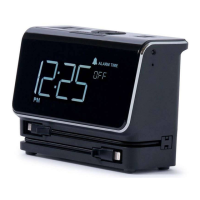
button. When the alarm is activated, the Alarm icon will appear in the clock
display.
SYMPTOM: The Clock display does not show the time but instead displays “C2” or “CL”.
SOLUTION(s): The message “C2” indicates that there is a button that is constantly
depressed. Please pay particular attention to the buttons underneath the unit.
Make sure KS Clock is resting on a flat surface with no surface irregularities or
objects that can press upwards onto the buttons.
The message “CL” indicates a clock functional error. If this message persists,
the unit will need to be returned for service.
SYMPTOM: The alarm was activated, but when the alarm time was reached and the alarm
sounded, nobody was around to turn off the alarm.
SOLUTION(s): The alarm will automatically turn off after 3 minutes of sound and will not sound
again.
SYMPTOM: An alarm time was saved by the user via the Set Alarm button. However
the user decided not to activate the alarm. The next day, the user presses
the Alarm ON/OFF button to activate the alarm but KS Clock indicates “Set
Alarm”.
SOLUTION(s): KS Clock alarm is a one-day alarm. It will erase any user preset alarm time
after one day even if the alarm was never activated.


 To Next Page