15CHECKS BEFORE START
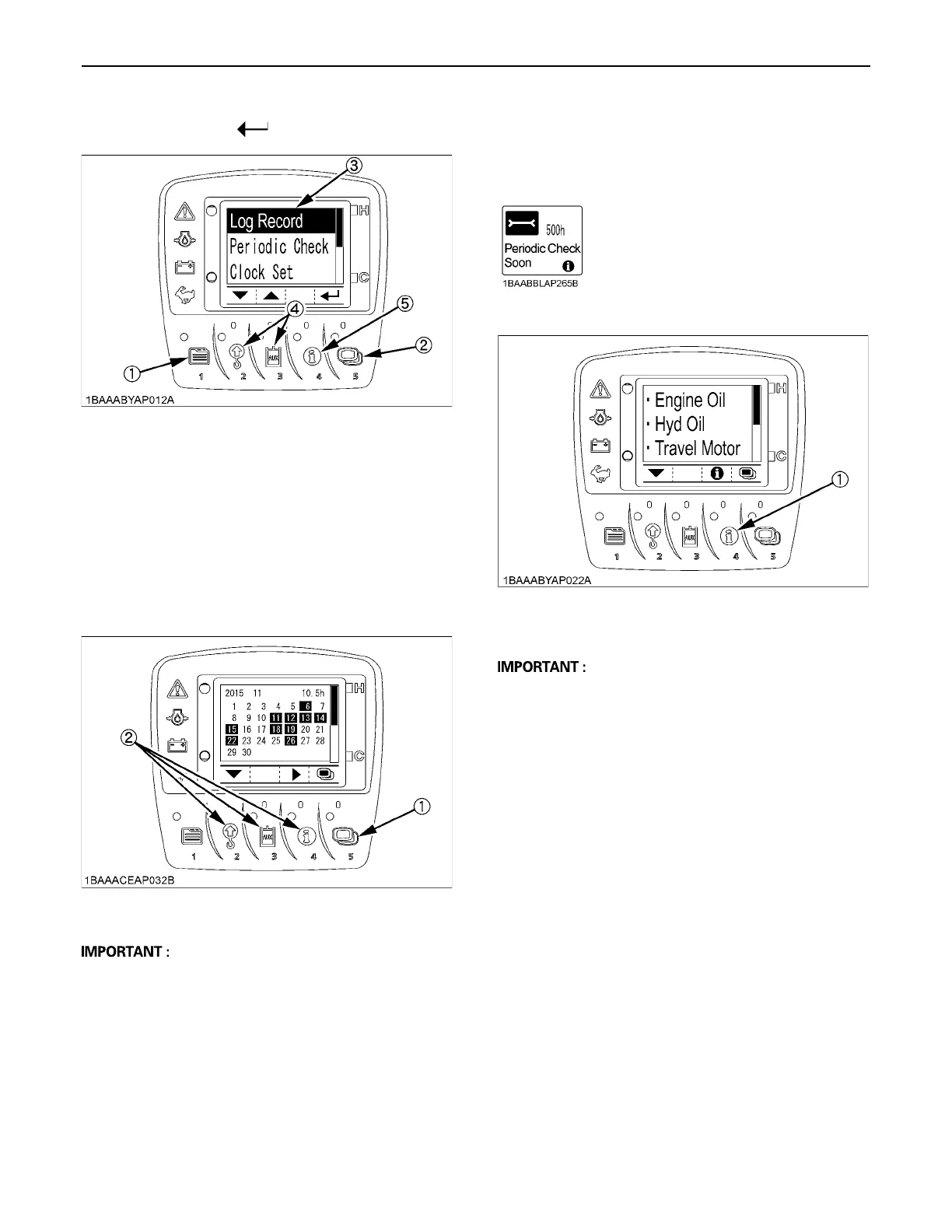
3. Press the switch 2 and 3 to select the log record. Fix
this choice with the switch (Switch 5).
4. Press the switch 5 to make the calendar appear
onscreen.
Press the switch 2, 3 and 4, and the log records
(machine's operating days and operating hours) for
the last month and the month before last (90 days ago)
can be reviewed.
The highlighted days indicate when the machine was
operated.
A Some days may appear marked with [-] when the log
record is unknown because of a new setting of the
clock, a disconnection of the battery or other factors.
BPeriodic Check
The following message appears on the LCD 10 hours
before a periodic check.
Press the switch 4 to see the check results.
Do the following servicing listed below.
A When the servicing has been completed, turn the key
switch ON and OFF 10 times or more and the check
screen automatically disappears.
A When the periodic check interval has passed, the
message "Periodic Check Passed" shows up.
Immediately perform the specified servicing.
A The periodic check screen can also be preset to be
made to disappear manually only. To do this, it is
necessary to select "Periodic Check" on the user
setting menu.
For make this setting, contact your local dealer.
(1) Switch 1
(2) Switch 5
(3) Cursor
(4) Switch 2 and 3
(5) Switch 4
(1) Switch 5
(2) Switch 2, 3 and 4
(1) Switch 4



 To Next Page