11-14
Master Mode
Utils
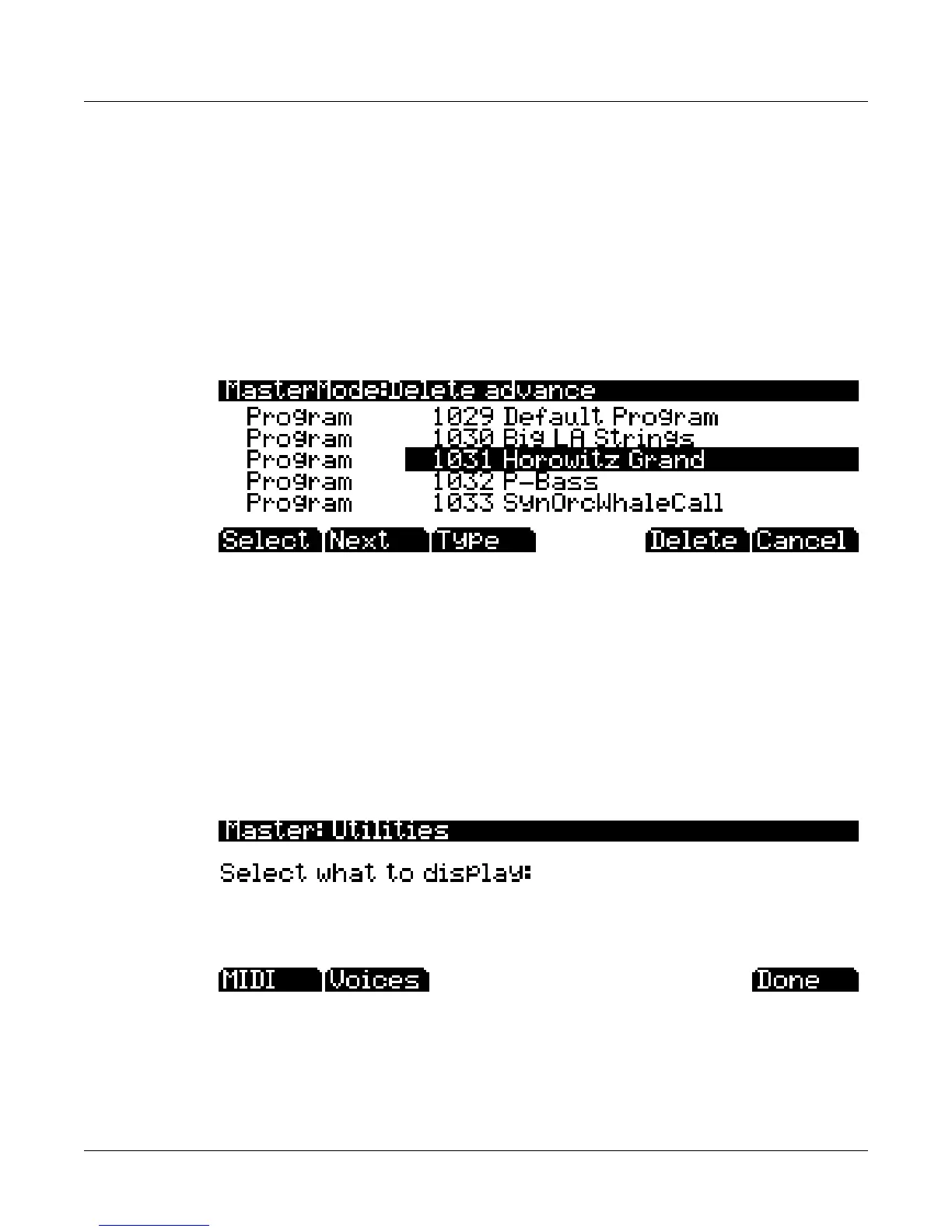
Todeletesingleormultipleobjects,gototheDeleteadvancedpagebypressingtheAdvncesoft
buttononthemainDeletepage(seebelow.)Therightcolumnshowsyoualistofallusercreated
objects.Theleftcolumntellsyouwhattypeeachobjectis,andobjectsaregrouped
bytype.Use
thealphawheelorplus/minusbuttonstoselectoneormoreobjectsfromthelist.UsetheSelect
softbuttontomakeyourselection(s),whichwillbemarkedwithastar.UsetheTypesoftbutton
tojumptothelowestnumberedobjectofthenextgroup
ofobjecttypes.Youcanusethe
alphanumericpadtojumptoanobjectoftheselectedtypebynumber,orenter0tojumptothe
lowestsavedobjectnumberofthecurrentlyselectedtype.Toreviewwhichobjectsyouhave
selected,presstheNextsoftbuttontomoveto
thenextselectedobjectinthelist.Pressthe
Deletesoftbuttontodeleteyourselection,youwillbegiventhechoicetoDeleteorCancel.The
CancelsoftbuttonontheDeleteadvancedpagewillreturnyoutothemainDeletepage.
ForDeleteandDeleteadvance,ifany
oftheselectedobjectshavedependentsthatwerenot
selected,youwillseethequestion:Deletedependentobjects?
IfyouanswerYestothisquestion,alldependentobjectsoftheselectedobjectsaredeleted,
unlesstheyarebeingusedasdependentsofotherobjectsthataretoremaininmemory.
Answering
Nowilldeleteonlythoseobjectsthatwereselectedandnottheirdepende nts.
Utils
PressingtheUtilssoftbuttoncallsuptheUtilitypage,whichgivesyouaccesstotwoanalytic
anddiagnostictool.Additionally,pressingthetworight‐mostsoftbuttonswillcallupthe
Utilitypagefromanymodeoreditor.TheUtilitiespageappearsasshownbelow:
PressingtheMIDIsoftbutton
launchesMIDIScope™,ausefulsubprogramthatletsyou
monitortheMIDImessagesfromthePC3KandthosereceivedviaMIDI.Thisisagoodwayto
makesureyou’rereceivingMIDIfromMIDImasters.It’salsogoodformakingsureyour
controlsareassignedasyouwantthem,checkingyourattack
velocities,checkingyour
controllervalues,etc.



 To Next Page