Safety Precautions
28
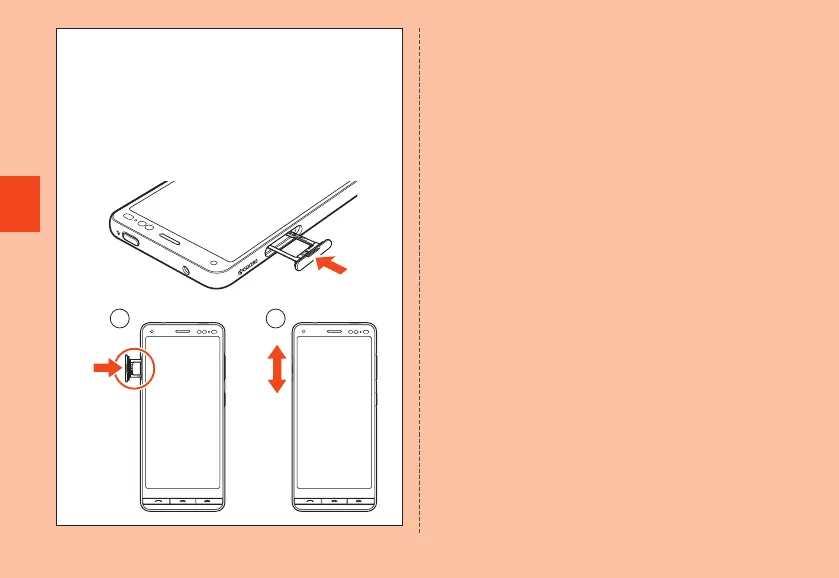
How to close the au IC card/microSD memory card tray
Insert the au IC card/microSD memory card tray in the
product, and push in all the way without bending.
After inserting the tray, ① press all of the tray with the flat part
of your finger. ② Rub your finger over the tray in the direction
of arrow to ensure that the tray is not partially open.
Rub your finger over the tray in the direction of arrow to ensure
that the tray is not partially open.
1
2
● If any liquid other than plain water gets on the product
• If anything other than water (seawater, washing detergent,
alcohol, etc.) gets on the product, immediately rinse with
water.
• Wash with slightly weak running water (less than 6 liters/
minute) with tap water (5℃ to 35℃ ) at a position about 10 cm
away from the faucet or shower.
• If the product gets soiled, wash by hand without using a brush,
etc., holding the product so that the au IC card/microSD
memory card tray does not open.
● After the product gets wet
•
After becoming wet, drain water and wipe the product with a dry,
clean cloth.
• In cold regions, any water on the product may freeze. Using
the product with frozen water may cause malfunction. Do not
leave water drop on the product.
● Rubber seal
• The rubber seal around the au IC card/microSD memory
card tray is important in maintaining water resistance. Do not
scratch or remove it.
• Be careful not to pinch the rubber seal when closing the au IC
card/microSD memory card tray. Trying to close the tray with a
seal pinched can scratch the seal and affect water resistance.
Any minute particles becoming lodged between contact
surfaces (a single hair, etc.), no matter how small, can cause
seepage.
CB70_EN.indb 28 2020/02/07 13:41:13













 To Next Page