42
Getting Ready
■ When au IC Card is Not Inserted
When au IC Card is not inserted, the following operations
are not available.
• Making*/Receiving a call
• Sending/Receiving +Message
• Initial settings and sending/receiving of au-mail
• PIN code setting
• Checking your phone number and e-mail address of the
product
Besides the items above, functions that require your phone
number may also be unavailable.
* Emergency calls such as 110 (Police), 119 (Fire/Ambulance),118 (Maritime
rescue) are also unavailable. However, only emergency calls may be
available in overseas. (Emergency call numbers differ depending on the
countries/regions.)
■ PIN Code Limit Settings
To protect your personal information, you can limit
unauthorized use of the au IC card by a third party by
changing PIN code or locking SIM card (▶P. 35 "PIN
Code").
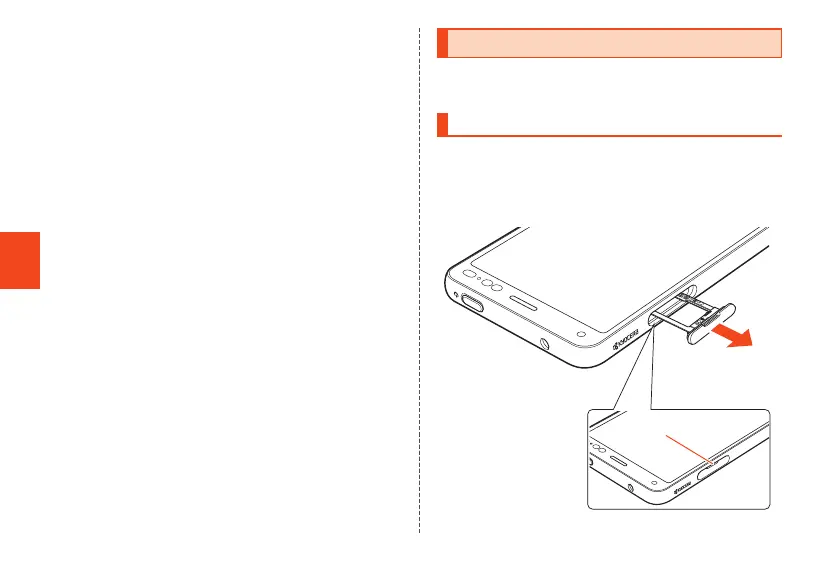
Attaching/Removing au IC Card
• Attach/Remove the au IC card after turning off the
product.
Attaching au IC Card
1
With your ngertip on the groove in the
au IC card/microSD memory card tray,
pull it out without bending
Groove
CB70_EN.indb 42 2020/02/07 13:41:14













 To Next Page