10 82-G1652-1EN, Rev. 002
Pairing with a computer for
Internet calls
Disconnect from the Music profile if connected and
turn off the headset.
(You cannot make a new connection if the headset
is connected to another profile.)
1. To put the headset in pairing mode, with the
headset turned off, long-press until the
LED flashes red/blue.
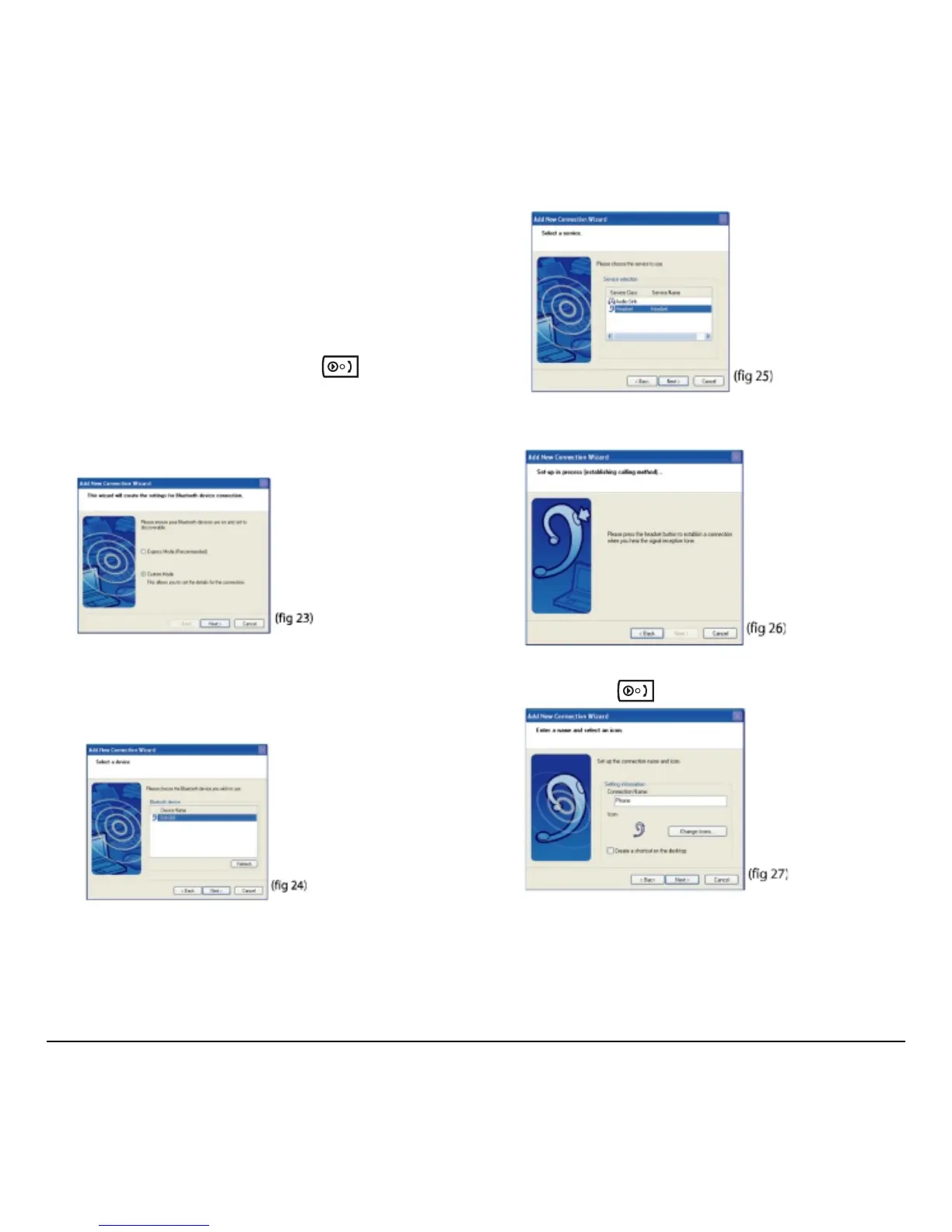
2. Right-click the Bluetooth Manager icon in the
system tray and select
Add New Connection
(fig 23).
3. Select the Custom Mode radio button and click
Next.
The wizard searches for the device and the
following screen appears (fig 24).
4. Select GSH300 and click Next (fig 25).
5. Under Service Class, select Headset and click
Next (fig 26).
6. When you hear a signal tone on the headset,
short-press
(fig 27).
7. Type a connection name such as “Phone”
and click
Next. A registration confirmation
screen appears.



 To Next Page