Digital OverVoltage Relay (GDR-C01) User's Manual V1.00
Kyongbo Electronics Co., Ltd.
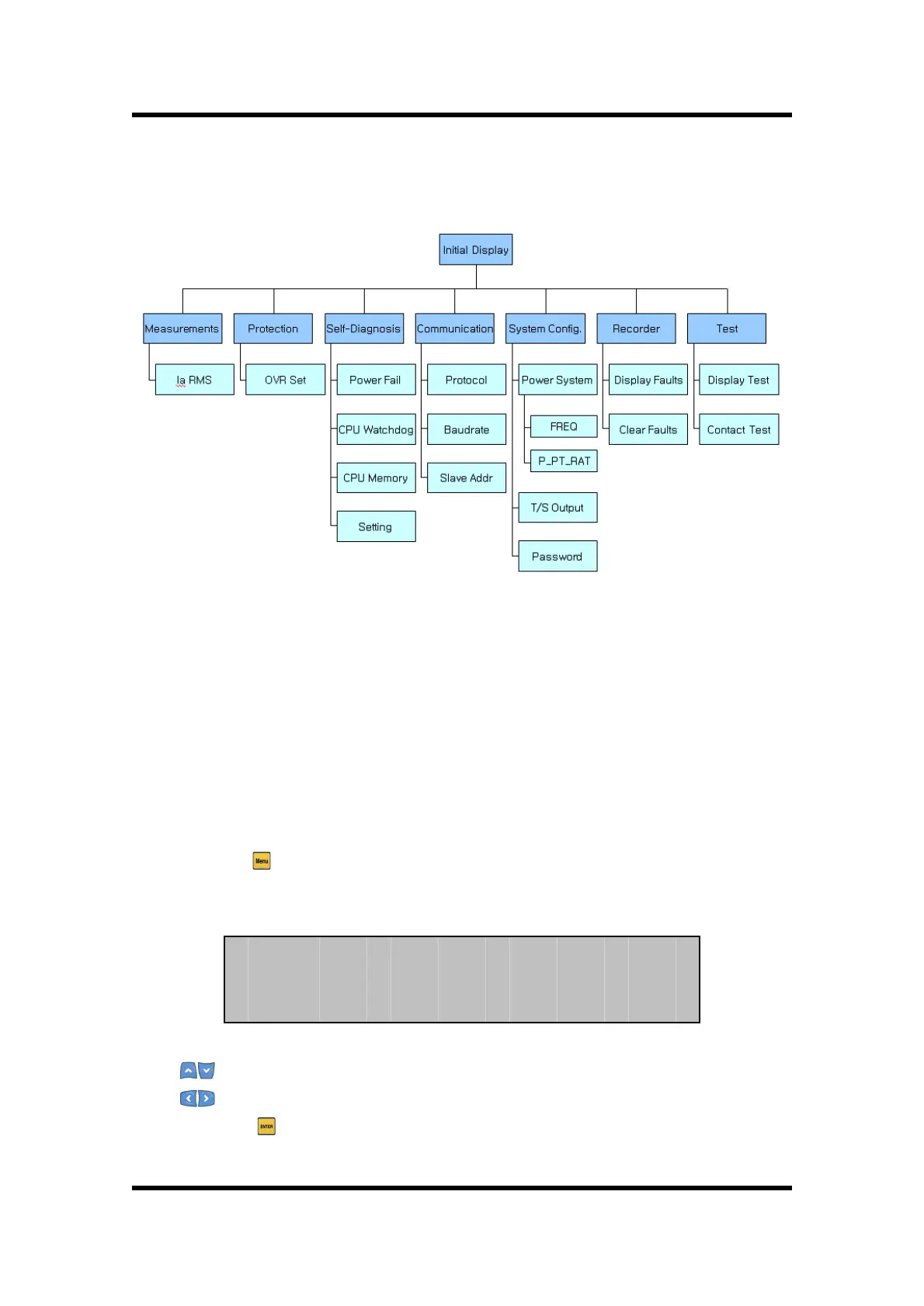
Operations and descriptions of each menu are stated in detail in 6.2 Setting Modes.
6.2 Setting Modes
For this Relay to operate properly, it needs to be set appropriately to the system
environment in which it is used. The Settings and Display elements are composed of
7 categories of Measurement, Protection, Self-Diagnosis, RS-485 Comm., System Config,
Recorder, and Test.
Press Menu ( ) Key from the default LCD screen, then the screen asking for Password
appears.
(1) Key : Changes the number
(2) Key : Changes the location of the digit
(3) ENTER ( ) Key : Confirm the password after the input of password.
Password is composed of 4 digits from 0 ~ 9, and the default password of the relay


 To Next Page