Digital OverVoltage Relay (GDR-C01) User's Manual V1.00
Kyongbo Electronics Co., Ltd.
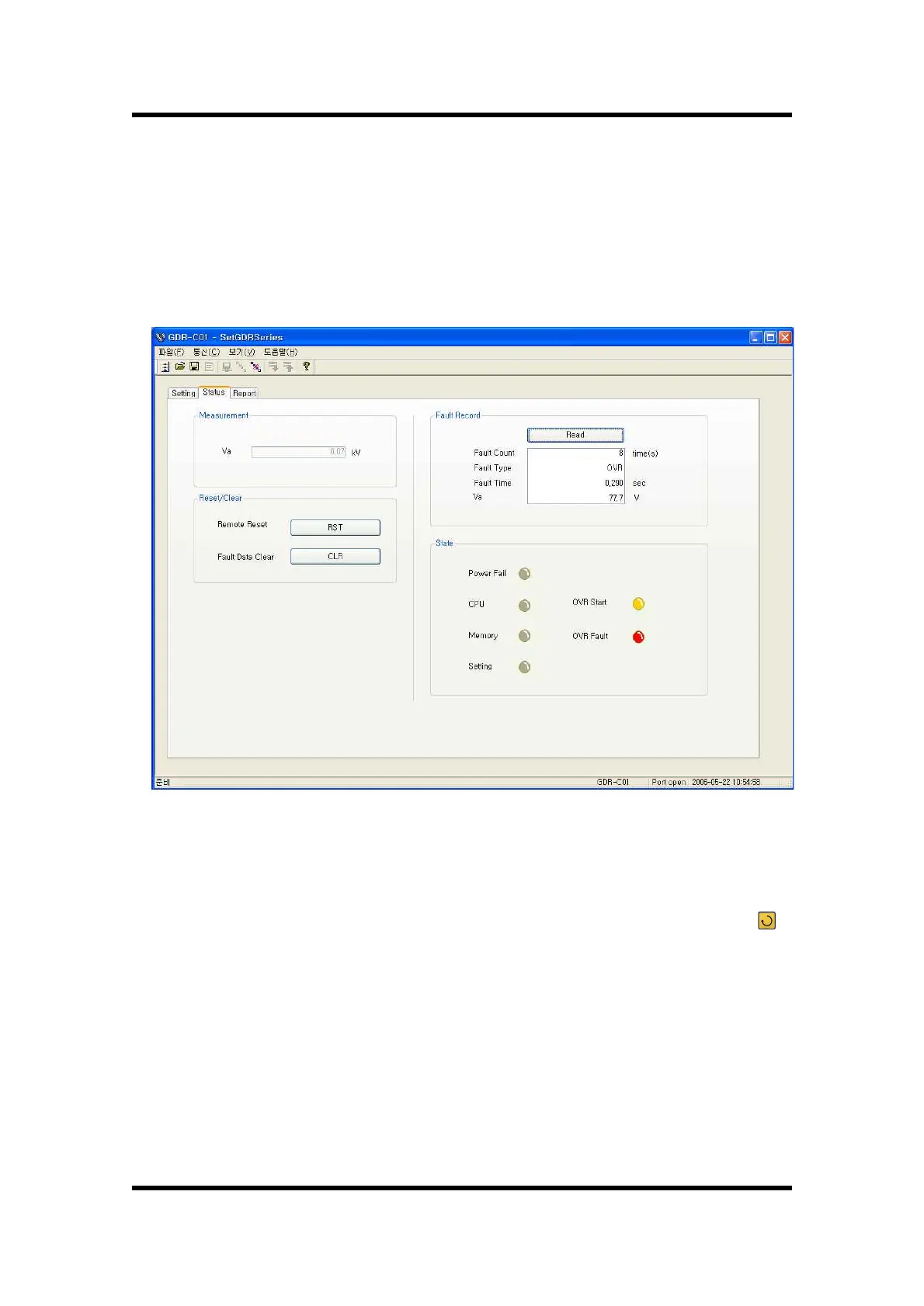
7.4.2 Status
Status Screen is composed to view the categories that are displayed in the relay
such as Voltage Measurement, Fault Record, State, etc. in one screen.
The description of this category is the same as the relay menu, so please refer to
"6. Display and Setting Mode".
【Figure 7.5】 GDR-C01 Status
Ÿ SetGDRSeries Measurement unit is kV.
Ÿ Click Read button, then it shows the last fault content stored in the relay.
Ÿ Click RST button, then the protection relay element among the Reset ( )
Key functions of the relay operates, and when Operating Indicator is on, the
operation of Indicator Reset can be done remotely at PC.
Ÿ Click CLR button, then the same function of Recorder ▶ 2.Clear Fault category
of the relay can be done remotely at PC.


 To Next Page