12
2-2-9 Connecting RS-485 Output (Optional Function)
When using RS-485 interface equipped WGI-400-03 and WGI-400-13.
Various functions can be set as well as measured values can be read from external devices.
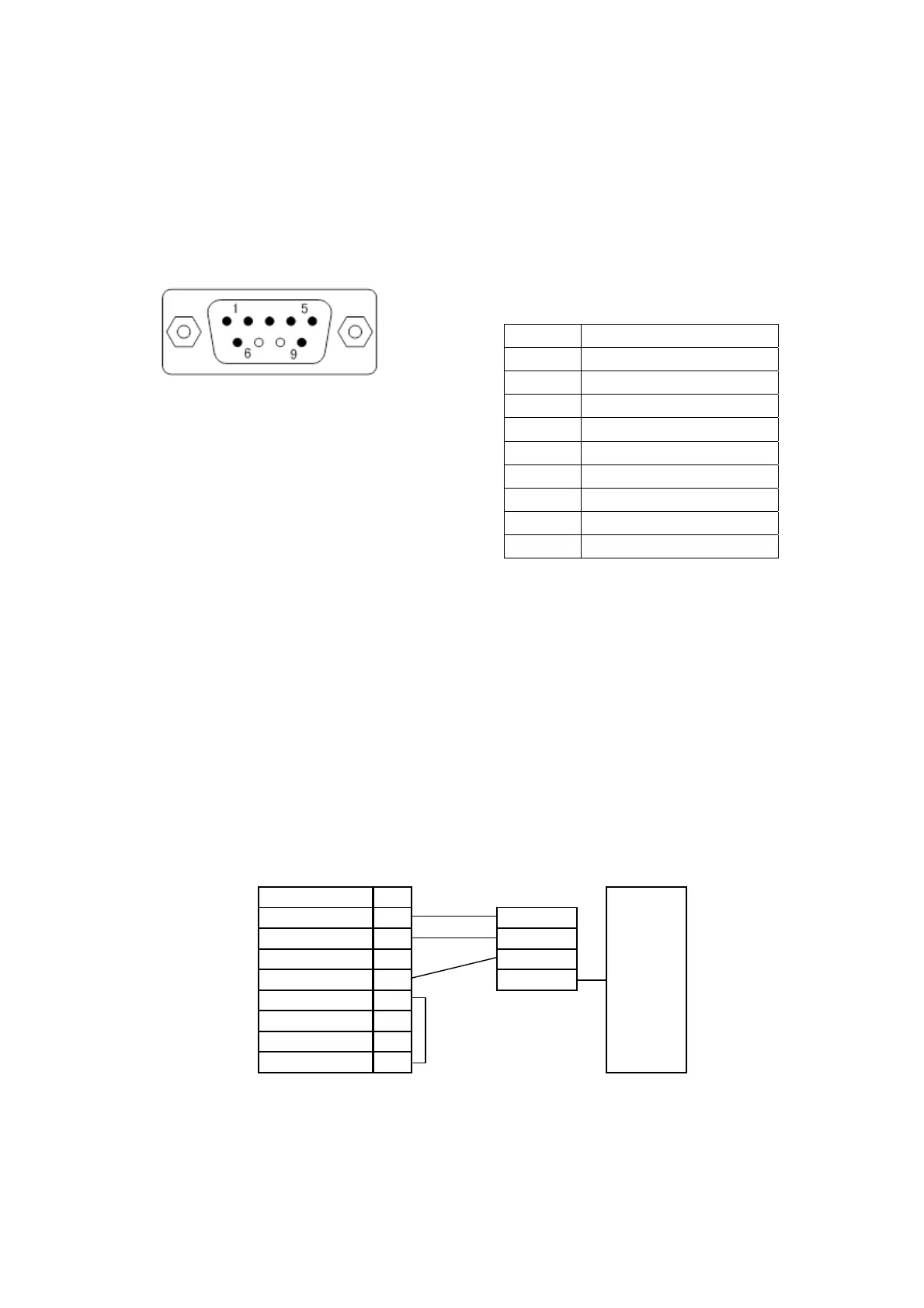
1) Connector Pins and Signal Names
Pin No. Signal Name
1 +(Non-reversing output)
2 +(Non-reversing output)
3 - (Reversing output)
4 - (Reversing output)
5 SG
6 Terminator
7 N.C.
8 N.C.
9 Terminator
2) Signal Specifications
Transmission speed: 9600 bps Receive delimiter: CR
Data bit: 7 bits Transmit delimiter: CR + LF
Parity bit: Odd number parity
Stop bit: 1 bit
Output code: ASCII
The above settings are default values.
3) Connecting to External Devices
(1) Connection
• For connecting external devices to the PC, use RS-485 ↔ RS-232C converter (Following is a
recommended converter).
• Short-circuit connector pins Nos. 6 and 9. Then, terminating resistance applied state is obtained.
• Set the converter switch to DTE.
• Pin Nos. 1 and 2 as well as 3 and 4 are the same functions. Correctly connect the wires.
PC side
+(Nonreverse output)
1 Converter
+(Nonreverse output)
2SD/RD+
-(Nonreverse output)
3 SD/RD-
-(Nonreverse output)
4GND
SG 5 RS-232C
Terminator 6
N.C. 7
Short
N.C. 8
Terminator 9
WGI side
Recommended converter: SI-30 (RS-485 ↔ RS-232C converter) LINEEYE CORP. made
Note: Do not forget to turn OFF both WGI-400A and external devices before connecting to the PC.
Or, the WGI-400A may not operate correctly or cause damage.
Pin type (male)
Front view of the RS-485 connector
(D-sub connector) on the rear panel.



 To Next Page