La Crosse Technology, Ltd. Page 8
• Consider items in the signal path between the transmitter and the Wireless
Thermometer.
• Sometime a simple relocation of the transmitter or the Wireless Thermometer will
correct the interference issue.
• Windows can reflect the radio signal.
• Metal will absorb the RF (radio frequency) signal.
• Stucco is backed by a metal mesh that holds it to the wall.
• Transmitting antennas (ham radio, emergency dispatch center, airports, military bases,
etc.)
• Electrical wires (utilities, cable, etc.)
• Vegetation is full of moisture and reduces signal.
• Dirt: Trying to receive a signal through a hill is difficult.
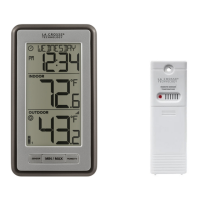
Wireless Thermometer
How tall are the time numbers?
The time numbers are 0.5 inches tall.
Power requirements
• 2-AA alkaline batteries power the Wireless Thermometer.
12-Hour or 24-Hour time format
• Display the time in 12-hour or 24-hour format.
• Default is 12-hour time.
• Use the Program Menu to switch time formats.
Dashes, HH.H, LL.L or stuck Indoor Temperature
• This is generally a power related issue.
• Batteries may be overpowered or underpowered. Remove batteries from Wireless
Thermometer.
• Press any button 20 times. Leave the Wireless Thermometer unpowered for 1-2 hours.
• Install fresh alkaline batteries with correct polarity.
• If the indoor temperature is still dashes or OFL, the Wireless Thermometer may need
replacement.
Inaccurate Indoor Temperature reading
• Side-by-side test: Bring the outdoor transmitter in the house and place it next to the
Wireless Thermometer for 2 hours.
• Compare indoor and outdoor temperature. The temperature should be within 4
degrees to be within tolerance.




 To Next Page