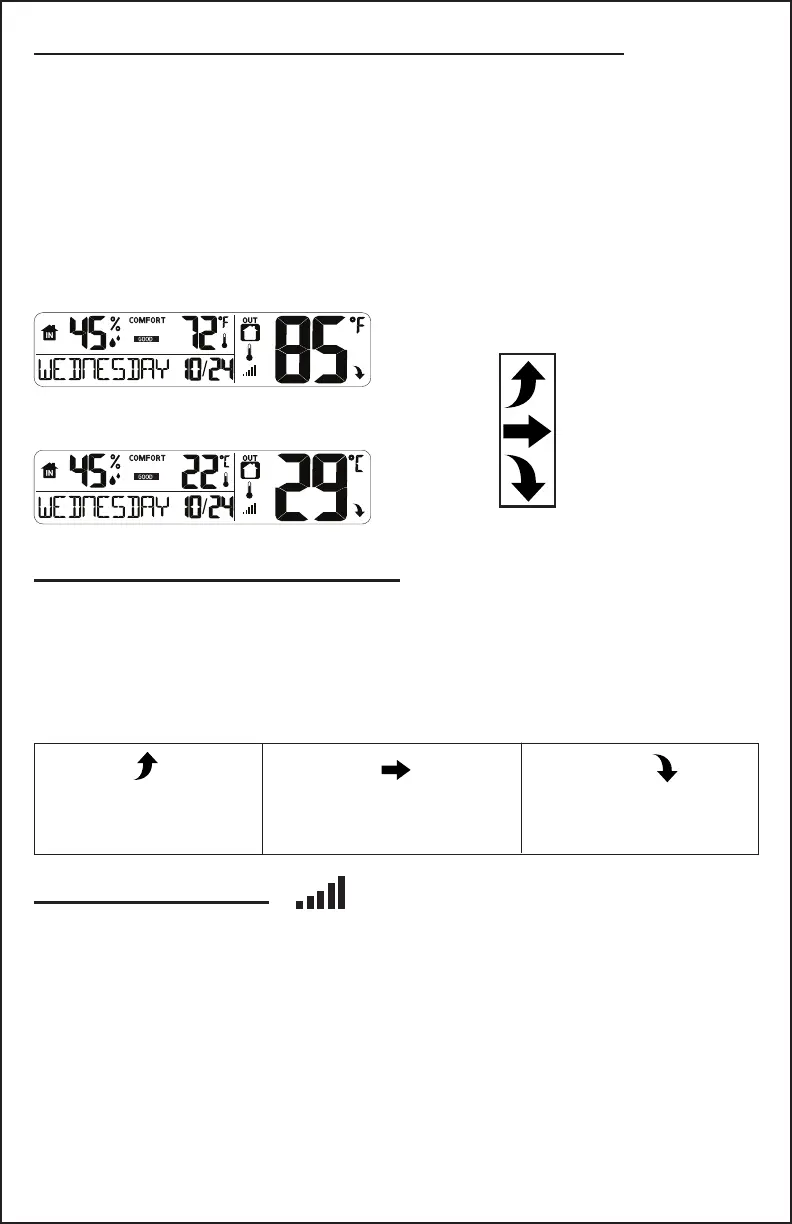
Temperature Trend Arrows
The outdoor temperature (2°F / 1°C) trend indicators update every 30
minutes or less. This provides a 3 hour comparison which changes on
every ½ hour:
Example: At 3:00 - compare to 12:00 data;
at 3:30 -compare to 12:30 ….. etc.
Temperature rose over
the past 3 hours
Temperature is
unchanged over the
past 3 hours
Temperature fell over
the past 3 hours
Indoor/Outdoor Temperature and Humidity
• Indoor and outdoor temperature and humidity are displayed in the
lower section of the clock.
• Select Fahrenheit or Celsius in the Settings menu.
• Temperature trend arrows track temperature over the past 3 hours.
• The outdoor sensor reception signal indicates the connection strength
between sensor and clock.
Sensor Reception
• Hold the - button 3 seconds to search for the sensor.
• The strength signal icon will ash until the sensor signal is received
or for 3 minutes if no signal available.
• The signal will show solid when connected to the sensor.
Temperature/Humidity
Temperature
Trend
Arrows
Page 7 www.lacrossetechnology.com/support BBB86095



 To Next Page