BTA 060, Rev 1K1 Page 4/18
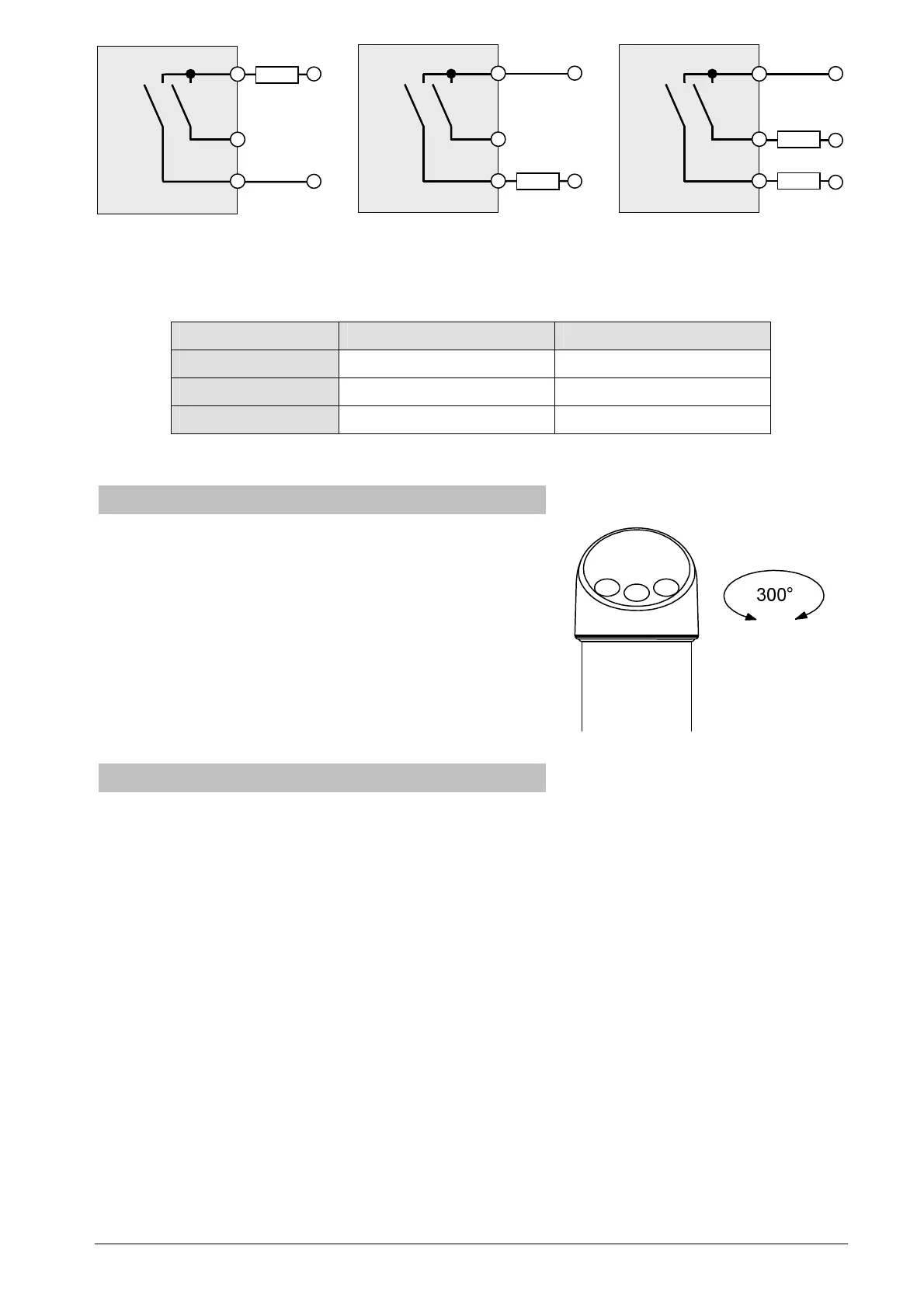
Figure 4: Connecting options with shared high-side
Use an appropriate free-wheeling diode, if you want to switch inductive loads.
The default values fort he switching units are as follows, if not specified otherwise:
switching unit 1 switching unit 2
output function hysteresis, normally open hysteresis, normally open
switch point 40% of measuring range 80% of measuring range
reset point 20% of measuring range 60% of measuring range
Table 1: Default settings for switching outputs
3.2 Adjusting the display unit
You can turn the display unit approx. 300° to optim ize
the readability. To do so hold the stainless steel
housing with one hand and turn the display unit with
the other hand into the wanted position.
The turning angle is limited by an internal limit stop. Do
not try to force the display unit beyond that point. It
might get destroyed.
3.3 Devices with flush mounted diaphragm
For type series CS2110 with flush mounted diaphragm observe the following hints:
Do not remove the protective cap or protective wrapping from the diaphragm before
immediate installation to prevent soiling or damage.
Do not touch the diaphragm as this might cause deformation or damage. Any deformation
may negatively influence the zero point or other characteristics of the device.
If required you can find further information about diaphragm seals in the separate
operating instructions BTA-062.


 To Next Page