BTA 060, Rev 1K1 Page 14/18
6.4.3 Decimal-point setting (decP)
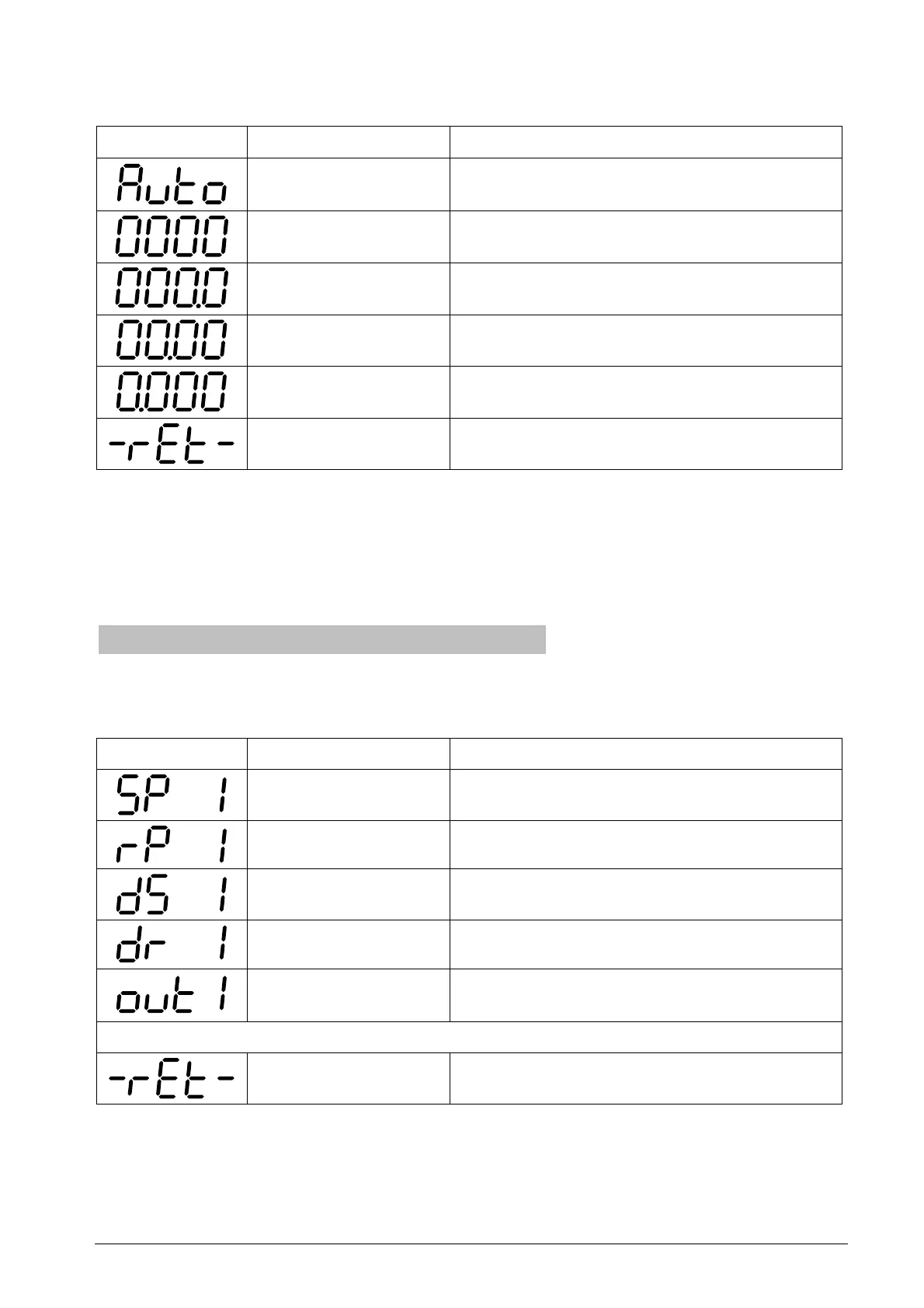
You can set a fixed decimal point or allow the system to compute the best position for the
decimal point.
Display Designation Description
Automatic The decimal point is set so that the decimal
places are fully used
No decimal place
One decimal place
Two decimal places
Three decimal places
Return
Return to "dEcP "
Table 10: Parameter list for setting the decimal point
Please note that when the decimal point is fixed the measured value may not be displayed
if there are insufficient digits left of the decimal point. In this case the maximum number
that can be shown on the display will appear flashing, e.g. "99.99", when two decimal
places are set for a measured value of 110 mbar.
6.5 Switch-point menu
The switch-point menu contains the functions for setting the first and second switch-point.
The menu items vary, depending on whether you select a hysteresis or frame function.
Independently from the output function you can define switching delays.
Display Designation Description
Switch-point Switch-point in the selected measuring unit
Reset-point Reset-point in the selected unit
Delay switch Output delay at the switch point
Delay reset Output delay at the reset point
Output function Configuring the output (normally open /
normally closed, hysteresis / frame)
Menu items for second switch point
Return
Return to "SP"
Table 11: Menu items for a switching output with hysteresis function


 To Next Page