LaCie 12big Rack Network Module Removal & Replacement
User Manual page 40
5.3.3.2. Installing a Drive Carrier
IMPORTANT INFO: A Drive Carrier module cannot be installed
if its anti-tamper lock is activated outside the enclosure. Please refer
to section 5.3.3.1. Removing a Drive Carrier for the de-activation
procedure.
Parts Check List
✦ Drive Carrier module
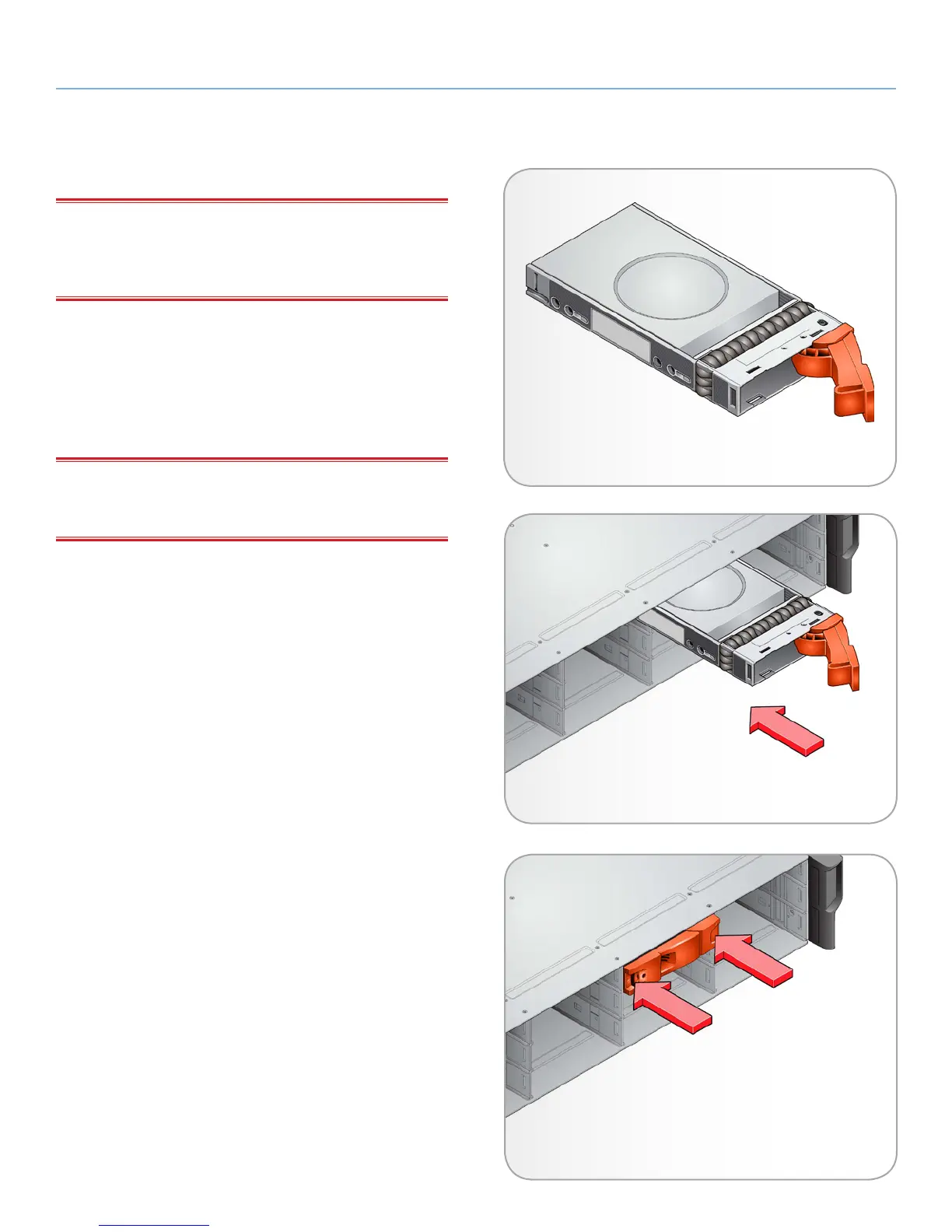
1. Release the drive carrier handle, by depressing the latch in the
handle (see Fig. 30).
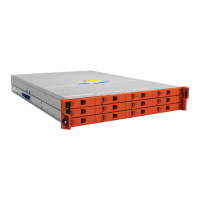
2. Insert the drive carrier into the enclosure (Fig. 31).
IMPORTANT INFO: Ensure that the carrier is orientated so that
the drive is uppermost and the handle opens from the left, as shown
in Fig. 32.
3. Slide the drive carrier, gently, all the way into the enclosure.
4. Cam the drive carrier home - the camming foot on the base
of the carrier will engage into a slot in the enclosure. Continue
to push firmly until the handle fully engages. A click should be
heard as the latch engages and holds the handle closed.
continued on the next page >>
Fig. 30 - Installing a Drive Carrier Module (1)
Fig. 31 - Installing a Drive Carrier Module (2)
Fig. 32 - Engaging a Drive Carrier Module in an
Enclosure)


 To Next Page