I/O Expansion modules
I/O Expansion modules
The RTU can be equipped with I/O expansion modules (10 modules max.) to expand its input-output capabilities.
The types of available I/O modules are:
• 16DI
• 8DO
• 8AI-mA
• 8AI-T°
• 8AO
Powering the I/O modules
The I/O modules have a separate 24 Vdc power supply, independent of the compact case; this power supply is not backed up by the
battery.
A single I/O module must be powered by a minimum 500 mA source; this power source automatically propagates to other installed
modules.
The green LED indicates that the supply voltage is present; the module type and its physical location are automatically detected by
the software.
Switch the case and the I/O modules off before removing or adding I/O modules.
Mounting
Each module snaps in easily on the right side of the case and must be mounted on the DIN rail (I/O modules cannot be remotely
deported from the main case).
The DIN rail must be connected to Ground; the Ground terminal connection is ca
rried out by mounting the
casing. If the fasteners on the DIN rail become unfastened, the user must make sure to
replace them to
prevent the module from tipping over.
Handling
1°/ Use the screwdriver to turn the bolt that attaches the module to the DIN rail,
2°/ Press the button on the front side to disengage the expansion module from the main panel or from another module.
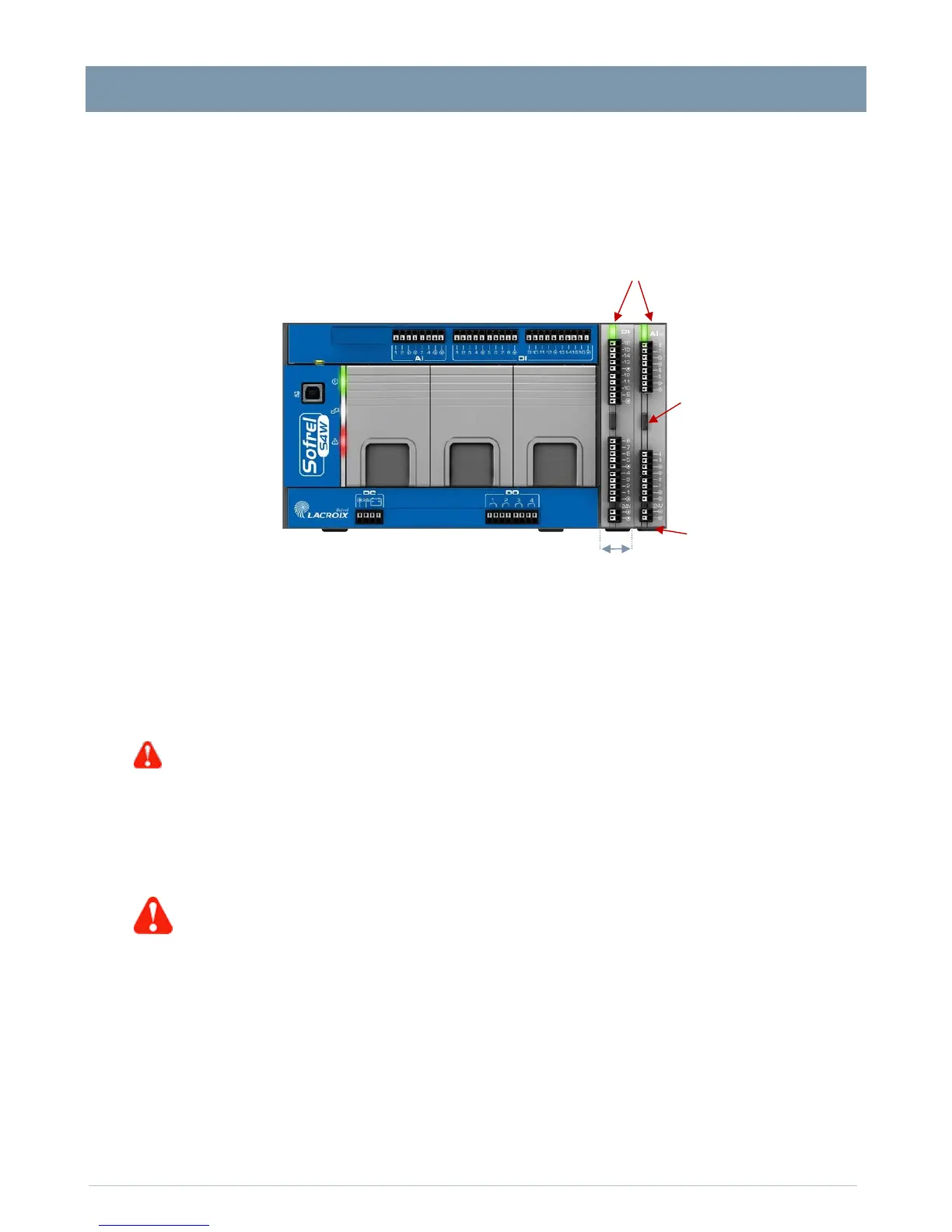
Example case with 2 I/O modules
L
=20.5 mm wide
Disconnect button
Mounting bolt on the DIN rail.


 To Next Page