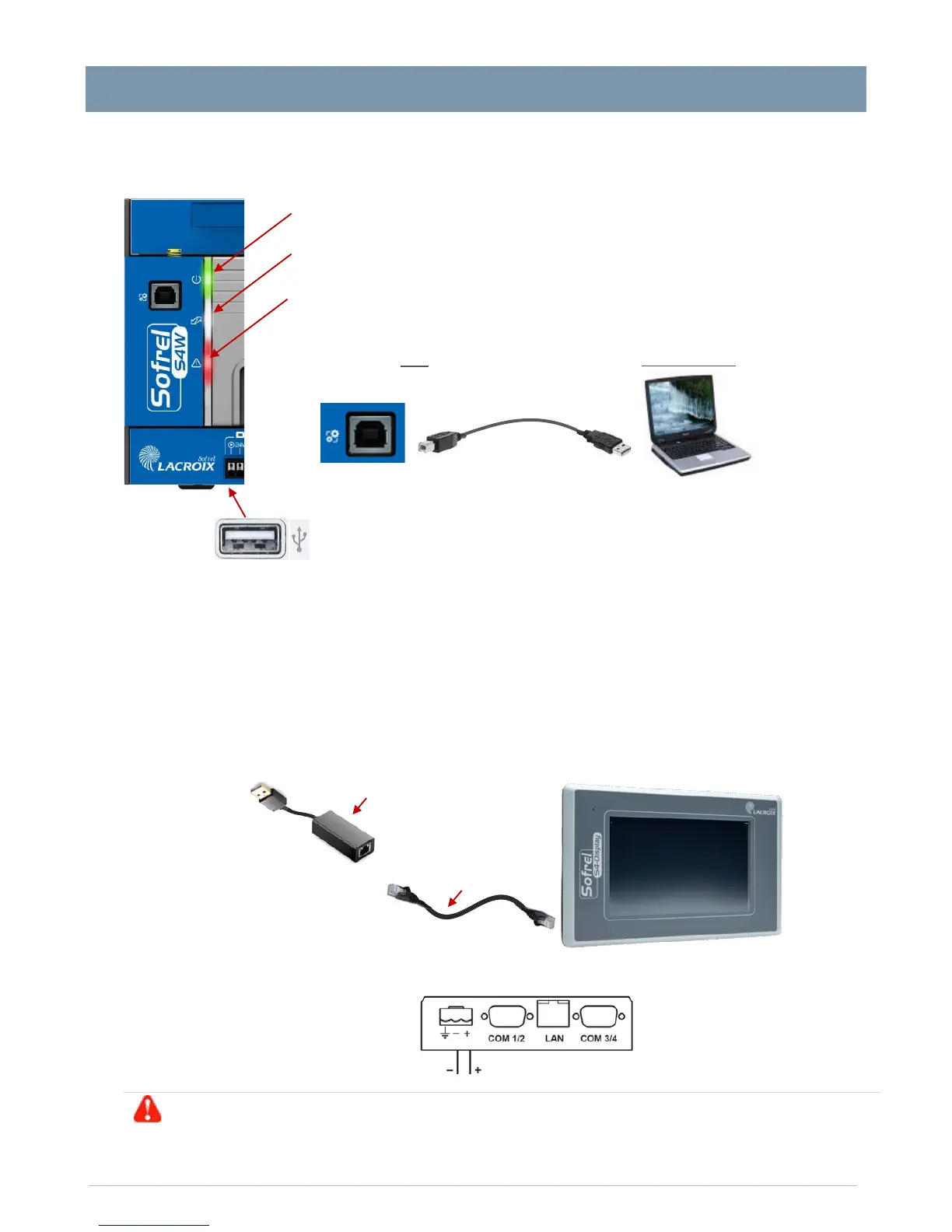
Case – Indicator lights and USB ports
Case – Indicator lights and USB ports
3 indicator lights display the operating status of the RTU:
GREEN
• Case power supply (light on if OK)
WHITE
• Communication with the Centralised System (light on if connection OK)
• General system operation (light off if OK)
-face, the USB port, type B (printer), connects to the configuration PC.
UNDER THE CASE, the second USB port connects to the S4 Display.
S4-Display connection
The S4 Display must be flush mounted and facing forward in the control panel.
Dimensions:
• Front part = 170.4 × 106.8 × 7.5 mm
• Depth of the rear part = 41.7 mm
• Dimensions of the flush-mounting area = 160.7 x 93 mm
•
Maximum thickness of the receiving panel = 5.5 mm
Connection of 24V and LAN TERMINAL STRIPS
Prepare a free space of 100 mm around the display (above, below, behind), 50 mm on the sides.


 To Next Page