
 Need help?
Do you have a question about the LAFVIN Obstacle Avoidance Smart Car Kit and is the answer not in the manual?
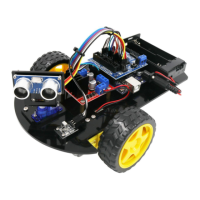
An overview of the tutorial's content, designed for beginners to assemble and use the smart robot car kit with Arduino.
Step-by-step guide for downloading and installing the Arduino Integrated Development Environment software on Windows.
Instructions for downloading and installing the Arduino IDE on macOS, including Java runtime library setup.
Guidance for installing the Arduino IDE on Linux systems, recommending the Ubuntu software center.
Explains what libraries are and how to install them using the Arduino IDE's Library Manager or by importing a ZIP file.
Guide on opening and configuring the Serial Monitor in the Arduino IDE for communication and debugging.
Instructions on how to upload a sketch to make the Arduino's built-in LED blink and how to save a copy.
Explanation of the basic structure of an Arduino sketch, including setup() and loop() functions and comments.
How to modify the 'delay' command in the Blink sketch to change the LED's blinking frequency.
Detailed steps and diagrams for mechanically assembling the smart car chassis with motors and other components.
Guide on installing the UNO R3 board and expansion board onto the car chassis using provided hardware.
Instructions for attaching the wheels, servo motor, and ultrasonic sensor to the car assembly.
Details on connecting a servo motor to the Arduino UNO R3 and the code required for its operation.
Guidance on loading and running the servo motor control program, including library requirements.
Overview of the HC-SR04 ultrasonic sensor, its function for distance measurement, and working principle.
Visual guide showing how to connect the HC-SR04 sensor to the Arduino UNO R3 board.
How to use the Serial Monitor to view distance measurements obtained from the ultrasonic sensor.
Introduction to the IR receiver module for wireless control projects and its connections (Signal, Voltage, Ground).
Diagram illustrating the correct wiring of the IR receiver module to the Arduino UNO R3.
Information on how to decode and display signals from an IR remote control using the Arduino.
Introduction to the L298N integrated circuit, its capabilities for driving DC motors and its pinout diagram.
Wiring diagram showing the connections between the L298N motor driver module, Arduino, and DC motors.
Explanation of the code used to control motor direction and speed with the L298N driver.
Introduction to building an IR-controlled car using Arduino, an IR module, and motors.
Schematic showing the connections for the IR remote control car project, including IR receiver, Arduino, and motor driver.
Instructions for uploading and running the code for the IR remote control car project.
Explanation of how the car detects obstacles using an ultrasonic sensor and controls its movement.
Wiring diagram for the obstacle avoidance car, showing connections for ultrasonic sensor, motors, and Arduino.
Instructions for uploading and running the code for the obstacle avoidance car functionality.

 To Next Page
 General