2.3. The Rear Panel
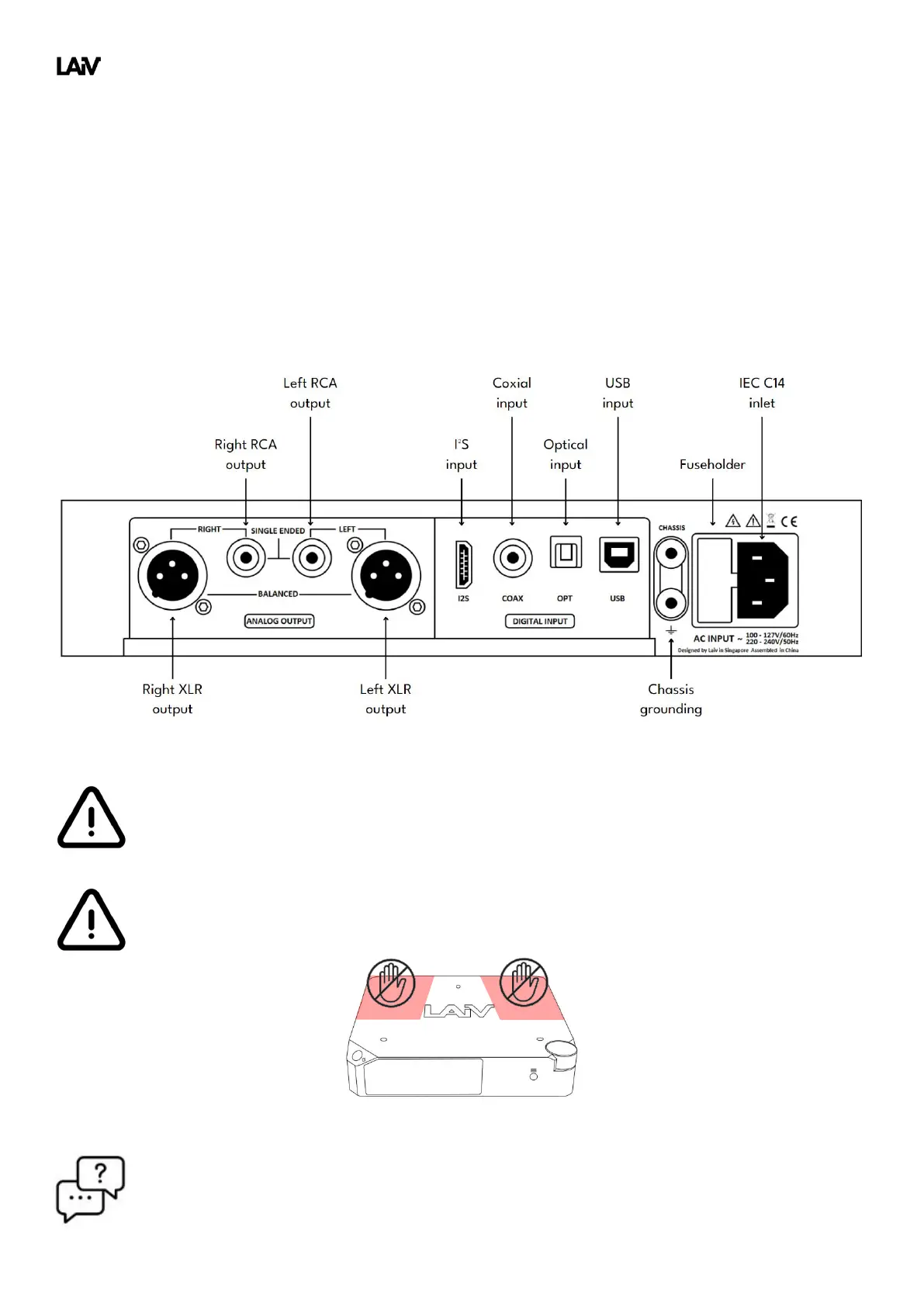
The rear panel of the DAC features three distinct sections. Positioned on the far right is the IEC inlet, providing
power to the device, accompanied by a grounding connection for the chassis ensuring optimal performance.
Moving towards the center, you will find the array of digital inputs, including USB, OPT (optical), COAX (coaxial),
and I
2
S, offering versatile connectivity options to suit various audio sources. Finally, on the left side, are the
analog outputs, comprising both single-ended and balanced outputs, allowing you to seamlessly connect the
DAC to your amplifiers or other audio equipment for exceptional sound reproduction.
Please do not connect both RCA outputs and XLR outputs to the amplifiers simultaneously, as this
may create an imbalance in signals between the two outputs.
A three spikes design is used, so avoid pressing the two top areas shown below to prevent unstable
placement that may caused damage.
Q: Can I connect multiple inputs simultaneously?
A: Yes, you can connect up to four inputs, with one input allowed for each digital input type.



 To Next Page