M A I N T E N A N C E PAGE 20
Last printed 1/31/2012 4:04:00 PM
Version Rev. 2003D-0
Adjusting the Aim of a Photo-Eye
1. Remove side panel of cabinet.
2. Press (RST/ENT) button on the tumbler timer. This will supply power to the photo-
eyes, which will be indicated by a red light on at the back of the timer. (If they do
not come on, the photo-eye might be out of alignment.)
3. For adjusting the mounting hole on the cabinet, an adjusting tool was shipped with
the machine.
A. Remove the photo-eye from the cabinet.
B. Remove one of the nuts that is threaded onto the adjusting tool and insert the
threaded end into the hole in the cabinet from the outside and thread the nut
back on the tool.
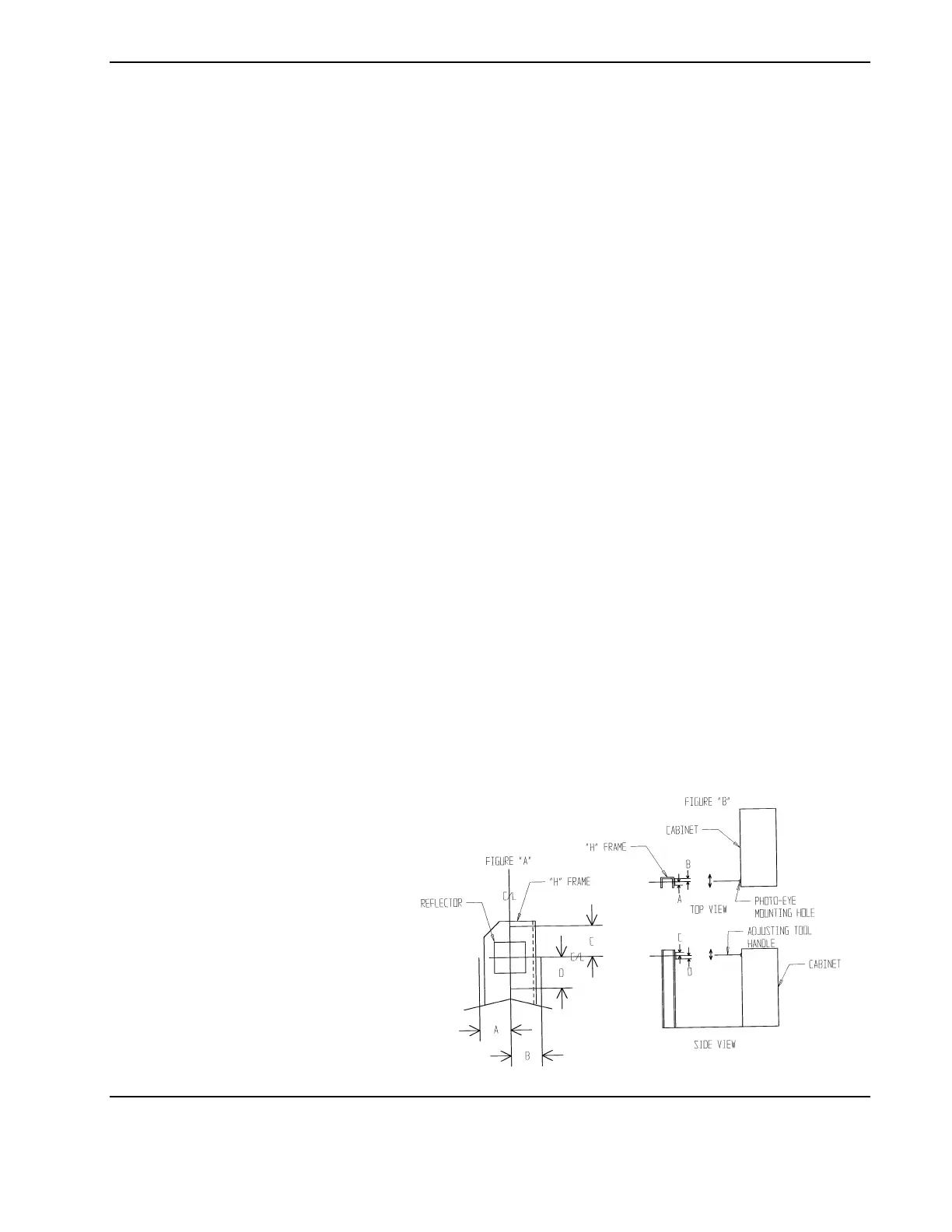
C. Pull the handle of the adjusting tool into the direction of the smaller
measurements that you recorded in Step #4 (see Figure "B"). You should be
able to bend the mounting hole in the cabinet to align the photo-eye.
4. Install the photo-eye back into the cabinet.
5. Repeat instructions for Checking the Aim of the Photo-Eye. Readjust again, if
necessary.
6. Once this is complete, remove the tape from the reflector and put the side panel
back on the cabinet.
7. Alignment is now complete.



 To Next Page