User Guide User Guide
Page 4 PP307 Page 4 PP307
2.2 SN-W/E Interface Unit
Specifications:
Mounting: DIN Rail
Power Requirements: 24V d.c. nominal
Ambient Operating range: 0 to 70°C/32 to 158°F
Sealing: To IP20/NEMA1
EMC: EN 61326:1999
Wiring Details: (Customer and Thermometer connections)
a. The connector pin column can be used if the prewired cable supplied by Land is not used.
b. Common is used for the laser and command if an external switch is used.
c. Comms input/output change over between the SN-WE and thermometer
SN-W/E Thermometer
Customer Thermometer
Connections Connections
Pin No. Description Pin No. Pin No. Description Cable No.
1 24V 1 A Power in+ 1
2 0V 2 B Power in- 2
3 mA out+ from IRT 3 C mA out+ 3
4 mA out- from IRT 4 N mA out- 4
5 Emissivity in+ to IRT 5 F Emissivity in+ 5
6 Emissivity in- to IRT 6 E Emissivity in- 6
7 Laser switch 7 D Laser in 7
8 Common 8 L Common 8
9 Command switch 9 M Command in 9
10 Relay 1a 10 O Relay 1a o/p 10
11 Relay 1b 11 P Relay 1b o/p 11
12 Relay 2a 12 R Relay 2a o/p 12
13 Relay 2b 13 S Relay 2b o/p 13
14 Comms from IRT+ (A) 14 K IRT comms out+ (Y) 14
15 Comms from IRT- (B) 15 I IRT comms out- (Z) 15
16 Comms to IRT- (Z) 16 H IRT comms in- (B) 16
17 Comms to IRT+ (Y) 17 G IRT comms in+ (A) 17
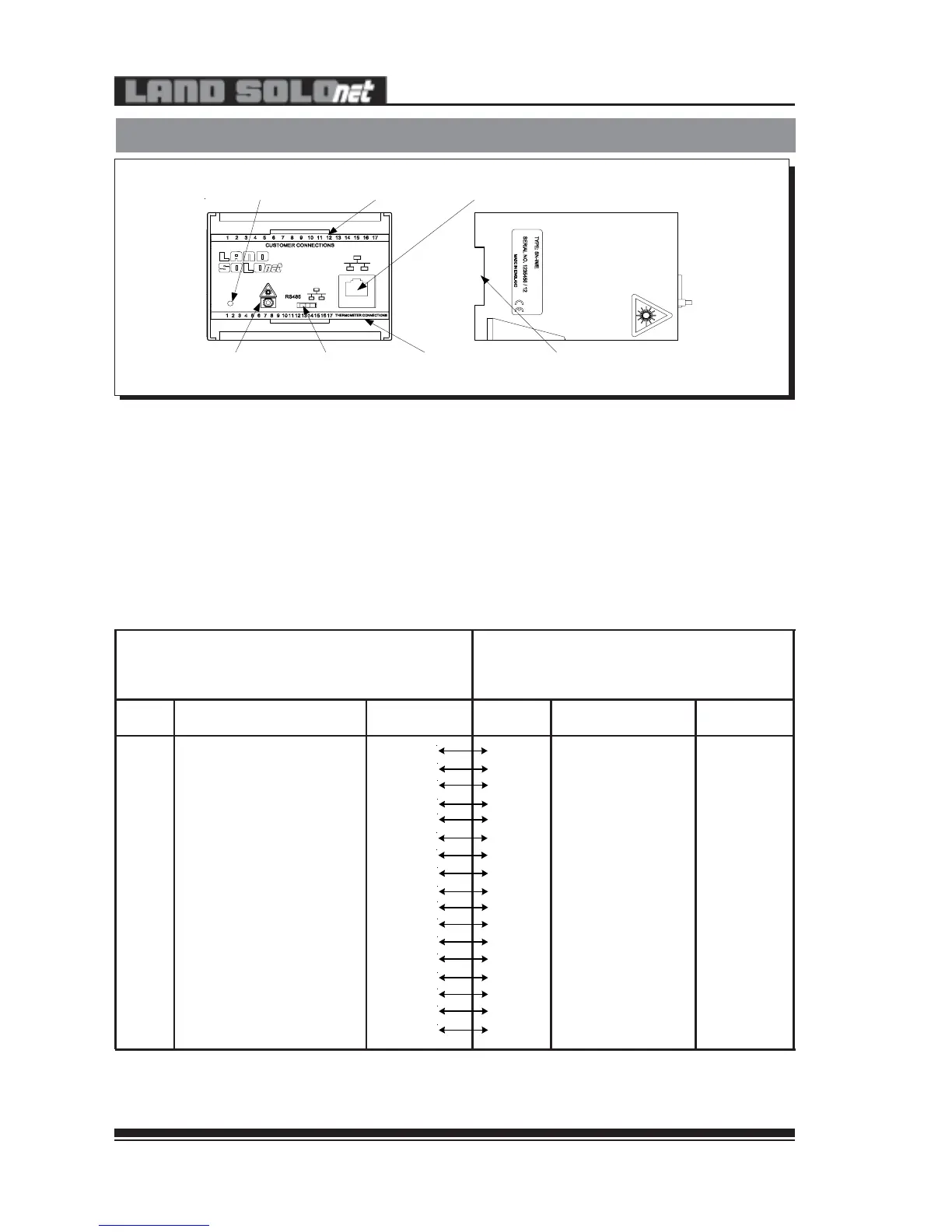
Fig. 34 - Land SN-W/E Interface Unit
307034
DIN-rail mount
RS485 - Webserver/
Ethernet switch
Customer
connections
Laser activation
button
Power LED
RJ45 port for Webserver/
Ethernet connection
Thermometer
connections
SN-WE
2.2 SN-W/E Interface Unit
Specifications:
Mounting: DIN Rail
Power Requirements: 24V d.c. nominal
Ambient Operating range: 0 to 70°C/32 to 158°F
Sealing: To IP20/NEMA1
EMC: EN 61326:1999
Wiring Details: (Customer and Thermometer connections)
a. The connector pin column can be used if the prewired cable supplied by Land is not used.
b. Common is used for the laser and command if an external switch is used.
c. Comms input/output change over between the SN-WE and thermometer
SN-W/E Thermometer
Customer Thermometer
Connections Connections
Pin No. Description Pin No. Pin No. Description Cable No.
1 24V 1 A Power in+ 1
2 0V 2 B Power in- 2
3 mA out+ from IRT 3 C mA out+ 3
4 mA out- from IRT 4 N mA out- 4
5 Emissivity in+ to IRT 5 F Emissivity in+ 5
6 Emissivity in- to IRT 6 E Emissivity in- 6
7 Laser switch 7 D Laser in 7
8 Common 8 L Common 8
9 Command switch 9 M Command in 9
10 Relay 1a 10 O Relay 1a o/p 10
11 Relay 1b 11 P Relay 1b o/p 11
12 Relay 2a 12 R Relay 2a o/p 12
13 Relay 2b 13 S Relay 2b o/p 13
14 Comms from IRT+ (A) 14 K IRT comms out+ (Y) 14
15 Comms from IRT- (B) 15 I IRT comms out- (Z) 15
16 Comms to IRT- (Z) 16 H IRT comms in- (B) 16
17 Comms to IRT+ (Y) 17 G IRT comms in+ (A) 17
Fig. 34 - Land SN-W/E Interface Unit
307034
DIN-rail mount
RS485 - Webserver/
Ethernet switch
Customer
connections
Laser activation
button
Power LED
RJ45 port for Webserver/
Ethernet connection
Thermometer
connections
SN-WE


 To Next Page